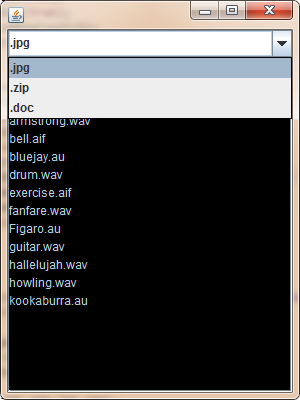
構建一個圖形界面應用,功能包括:
public class FileUtils extends JFrame {
    // 1. 目錄遍歷核心邏輯
    public static String listDirectory(File dir) throws IllegalAccessException {
        if (!dir.exists()) throw new IllegalAccessException("目錄不存在: " + dir);
        if (!dir.isDirectory()) throw new IllegalAccessException("非目錄: " + dir);

        String[] names = dir.list(); // 僅獲取當前層級,非遞歸
        StringBuilder sb = new StringBuilder();
        for (String name : names) sb.append(name).append("\n");
        return sb.toString();
    }

    // 2. GUI 構建與事件綁定
    public static void main(String[] args) {
        JFrame frame = new JFrame("文件瀏覽器");
        JPanel panel = new JPanel(new BorderLayout());

        // 過濾器下拉框(當前版本未實際關聯過濾邏輯,僅作演示)
        String[] filters = {".jpg", ".zip", ".doc"};
        JComboBox comboBox = new JComboBox<>(filters);
        comboBox.setEditable(true);

        // 結果展示區
        JTextArea textArea = new JTextArea();
        textArea.setBackground(Color.BLACK);
        textArea.setForeground(Color.GREEN);
        textArea.setEditable(false);
        JScrollPane scrollPane = new JScrollPane(textArea);

        panel.add(comboBox, BorderLayout.NORTH);
        panel.add(scrollPane, BorderLayout.CENTER);
        frame.add(panel);

        // 異步加載數據,避免阻塞 EDT
        SwingUtilities.invokeLater(() -> {
            try {
                File targetDir = new File("C:\\Users\\Administrator\\Desktop\\Java作業5\\soundPlayer\\audio");
                String result = listDirectory(targetDir);
                textArea.setText(result);
            } catch (IllegalAccessException e) {
                textArea.setText("錯誤: " + e.getMessage());
                e.printStackTrace();
            }
        });

        frame.setDefaultCloseOperation(JFrame.EXIT_ON_CLOSE);
        frame.setSize(600, 400);
        frame.setLocationRelativeTo(null);
        frame.setVisible(true);
    }
} 所有 GUI 操作必須在 Event Dispatch Thread (EDT) 執行。使用 SwingUtilities.invokeLater() 確保數據加載與界面渲染不阻塞主線程。
自定義 IllegalAccessException 區分「路徑不存在」與「非目錄」兩種業務異常,在界面直接反饋給用戶,而非僅控制台打印堆棧。
當前下拉框僅為佔位。進階實現可引入 FileFilter 接口,根據選中擴展名動態過濾 dir.listFiles(filter) 結果。
Files.walkFileTree 或遞歸方法)。JTree 替代 JTextArea 呈現樹狀目錄結構。