AWT(Abstract Window Toolkit)是 Java 早期提供的 GUI 開發工具包,雖然 Swing/JavaFX 更現代,但理解 AWT 架構有助於掌握 Java GUI 核心概念。本文系統講解 AWT 類別體系、Frame/Panel 容器使用、視窗建立與佈局管理實戰。
JFC (Java Foundation Classes) 包含三大支柱:
| 組件 | 描述 | 關係 |
|---|---|---|
| AWT | 抽象視窗工具包,原生對等體,輕量級前身 | JFC 基礎 |
| Swing | 建立在 AWT 之上,純 Java 實現,功能豐富、可換膚 | 主流選擇 |
| Java 2D | 高品質 2D 圖形、文字、圖像渲染 API | 繪圖增強 |
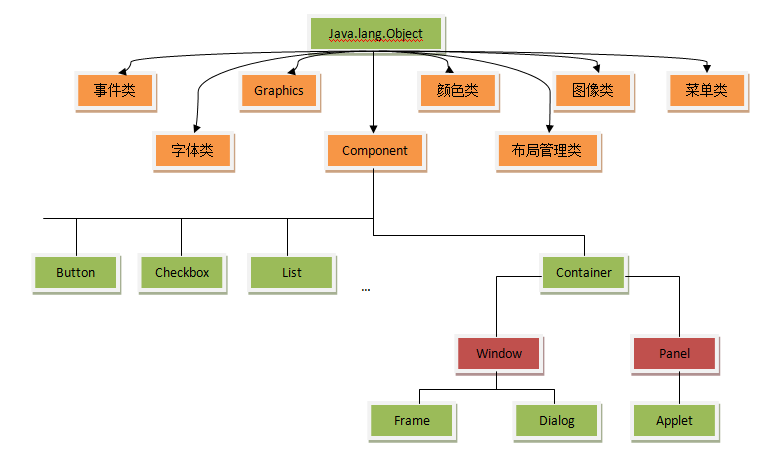
Frame()、Frame(String title)BorderLayoutsetVisible(true)add(Component) 添加子組件import java.awt.*;
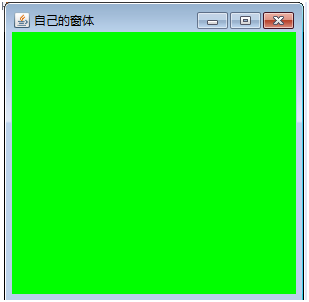
class MyFrame extends Frame {
public MyFrame(String title) {
super(title);
}
public void init() {
this.setSize(300, 300); // 設定寬高
this.setBackground(Color.GREEN); // 背景色
this.setVisible(true); // 顯示視窗
}
}
public class TestFrame {
public static void main(String[] args) {
MyFrame frame = new MyFrame("我的第一個 AWT 視窗");
frame.init();
}
}
FlowLayoutimport java.awt.*;
class MyFrameWithPanel extends Frame {
public MyFrameWithPanel(String title) {
super(title);
}
public void init() {
this.setSize(300, 300);
this.setBackground(Color.GREEN);
this.setLayout(null); // 取消預設 BorderLayout,使用絕對定位
// 建立面板
Panel panel = new Panel();
panel.setLayout(null); // 面板也使用絕對定位
panel.setBackground(Color.BLUE);
panel.setBounds(0, 0, 200, 200); // 相對父容器 Frame 位置
// 建立按鈕
Button btn = new Button("Click Me");
btn.setBounds(0, 0, 100, 100); // 相對 Panel 位置
btn.setBackground(Color.RED);
// 組裝層級:Frame → Panel → Button
panel.add(btn);
this.add(panel);
this.setVisible(true);
}
}
public class TestPanel {
public static void main(String[] args) {
new MyFrameWithPanel("Panel 嵌套範例").init();
}
}
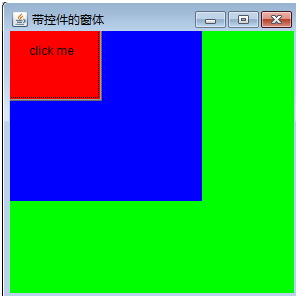
| 管理器 | 特點 | 適用場景 |
|---|---|---|
| FlowLayout | 左到右、上到下流式排列,Panel 預設 | 簡單按鈕組、工具列 |
| BorderLayout | 東南西北中五區域,Frame 預設 | 主視窗整體佈局 |
| GridLayout | 規則網格,行列固定 | 計算機鍵盤、表格 |
| GridBagLayout | 彈性網格,組件可跨行列、權重分配 | 複雜表單、響應式佈局 |
| CardLayout | 卡片堆疊,一次顯示一張 | 嚮導頁、標籤頁切換 |
| null (絕對定位) | 手動 setBounds(x,y,w,h),不自動調整 | 原型快速開發、固定尺寸視窗 |
source.addActionListener(listener)import java.awt.*;
import java.awt.event.*;
class EventFrame extends Frame implements ActionListener {
Button btn;
Label label;
int count = 0;
public EventFrame() {
super("事件處理範例");
setLayout(new FlowLayout());
setSize(300, 200);
btn = new Button("計數器: 0");
label = new Label("點擊按鈕增加計數");
btn.addActionListener(this); // 註冊監聽器
add(label);
add(btn);
setVisible(true);
}
@Override
public void actionPerformed(ActionEvent e) {
count++;
btn.setLabel("計數器: " + count);
}
public static void main(String[] args) {
new EventFrame();
}
}
class DrawCanvas extends Canvas {
    @Override
    public void paint(Graphics g) {
        // 繪製圖形
        g.setColor(Color.RED);
        g.drawRect(10, 10, 100, 50);      // 矩形邊框
        g.fillOval(120, 10, 50, 50);      // 填充圓形
        g.drawLine(10, 80, 200, 80);      // 直線

        // 繪製文字
        g.setFont(new Font("微軟正黑體", Font.BOLD, 16));
        g.drawString("AWT 繪圖測試", 10, 150);
    }
}

// 在 Frame 中使用
Frame f = new Frame("繪圖");
f.add(new DrawCanvas());
f.setSize(300, 200);
f.setVisible(true);
import java.awt.event.WindowAdapter;
import java.awt.event.WindowEvent;

frame.addWindowListener(new WindowAdapter() {
    @Override
    public void windowClosing(WindowEvent e) {
        System.exit(0); // 或執行清理邏輯
    }
});
| 特性 | AWT | Swing |
|---|---|---|
| 實現方式 | 原生對等體 | 純 Java 輕量級 |
| 外觀一致性 | 平台相關 | 跨平台一致(可換膚) |
| 組件豐富度 | 基礎 | 極豐富 (JTable, JTree, JTabbedPane...) |
| 類別命名 | Button, Frame | JButton, JFrame |
| 雙重緩衝 | 手動 | 內建支援 |