《Think in Java》曾指出:「對程序語言的設計者來說,創建一個好的輸入/輸出 (I/O) 系統是一項艱難的任務」。Java IO 體系作為 Java 核心類庫的基石,雖然 NIO.2 和 Reactive Streams 已經推出,但傳統 IO (java.io) 仍是日常開發、面試考察、框架源碼閱讀的必修課。本文將從核心類、架構圖譜、流模型、分類體系、關鍵 API 等維度,系統梳理 Java IO 知識體系。
在整個 java.io 包中,最核心的「五個類 + 一個接口」構成了 IO 體系的骨架:
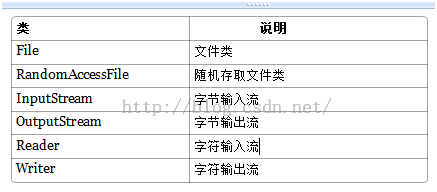
| 層次 | 核心類 | 職責 |
|---|---|---|
| 流式部分 | InputStream/OutputStream/Reader/Writer 及其子類 | IO 操作主體,數據傳輸管道 |
| 非流式部分 | File、RandomAccessFile、FileDescriptor | 輔助流操作:文件元數據、隨機訪問、文件描述符 |
| 其他類 | SerializablePermission、FileSystem、Win32FileSystem 等 | 安全權限、底層文件系統適配 |
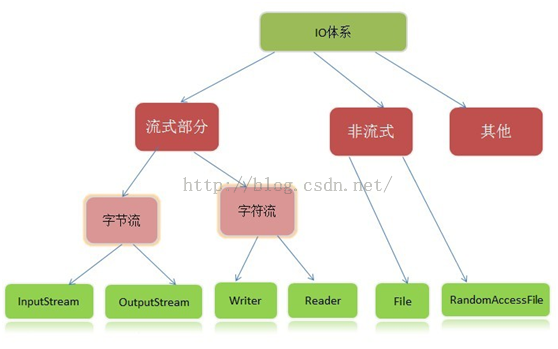
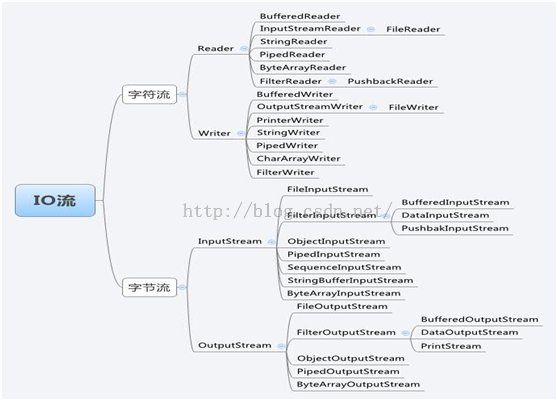
流:代表任何有能力產出數據的數據源對象,或有能力接受數據的接收端對象。
本質:數據傳輸通道,將數據源與目的地連接。
形象比喻:像水管連接兩個容器,流是有順序、有起點終點的字節/字符集合。
Java IO 採用 Decorator (裝飾者) 模式,按功能劃分 Stream,可動態組合裝配:
// 需要緩衝的文件輸入流
InputStream is = new BufferedInputStream(new FileInputStream("test.txt"));

// 需要緩衝、支持對象序列化的輸出流
ObjectOutputStream oos = new ObjectOutputStream(
    new BufferedOutputStream(new FileOutputStream("data.obj")));
核心優勢:單一職責、靈活組合、避免繼承爆炸。每個裝飾類只負責一項功能(緩衝、轉換、數據類型讀寫),運行時動態疊加。
| 分類維度 | 類別 | 典型類 | 適用場景 |
|---|---|---|---|
| 按數據單位 | 字節流 (8-bit) | InputStream/OutputStream 子類 | 圖片、視頻、音頻、二進制文件、網絡傳輸 |
| 字符流 (16-bit Unicode) | Reader/Writer 子類 | 文本文件、配置文件、字符串處理 | |
| 按流向 | 輸入流 | InputStream、Reader | 讀取數據:文件→內存、網絡→內存 |
| 輸出流 | OutputStream、Writer | 寫出數據:內存→文件、內存→網絡 | |
| 按角色 | 節點流 | FileInputStream、FileReader | 直接操作目標設備(文件、內存、網絡) |
| 處理流/包裝流 | BufferedInputStream、InputStreamReader | 包裝節點流,提供增強功能(緩衝、轉碼、對象序列化) |
public abstract class InputStream implements Closeable {
    public abstract int read() throws IOException;           // 讀取單字節,返回 0-252 或 -1(EOF)
    public int read(byte[] b) throws IOException;            // 批量讀入數組,返回實際讀取字節數
    public int read(byte[] b, int off, int len) throws IOException; // 指定偏移長度讀取
    public long skip(long n) throws IOException;             // 跳過 n 字節
    public int available() throws IOException;               // 可不阻塞讀取的字節數
    public void close() throws IOException;                  // 關閉流,釋放資源
    public synchronized void mark(int readlimit);            // 標記當前位置
    public synchronized void reset() throws IOException;     // 回到標記位置
    public boolean markSupported();                          // 是否支持 mark/reset
}
public abstract class OutputStream implements Closeable, Flushable {
    public abstract void write(int b) throws IOException;    // 寫單字節 (低 8 位)
    public void write(byte[] b) throws IOException;          // 批量寫入
    public void write(byte[] b, int off, int len) throws IOException;
    public void flush() throws IOException;                  // 刷新緩衝區
    public void close() throws IOException;
}
public abstract class Reader implements Readable, Closeable {
    public abstract int read(CharBuffer target) throws IOException;
    public int read(char[] cbuf) throws IOException;
    public abstract int read(char[] cbuf, int off, int len) throws IOException;
    public long skip(long n) throws IOException;
    public boolean ready() throws IOException;               // 是否可讀
    public void mark(int readAheadLimit) throws IOException;
    public void reset() throws IOException;
    public boolean markSupported();
}
public abstract class Writer implements Appendable, Closeable, Flushable {
    public void write(int c) throws IOException;
    public void write(char[] cbuf) throws IOException;
    public abstract void write(char[] cbuf, int off, int len) throws IOException;
    public void write(String str) throws IOException;
    public void write(String str, int off, int len) throws IOException;
    public abstract void flush() throws IOException;
    public abstract void close() throws IOException;
}
// 字節流 → 字符流 (解碼)
InputStreamReader isr = new InputStreamReader(new FileInputStream("utf8.txt"), "UTF-8");
BufferedReader br = new BufferedReader(isr);

// 字符流 → 字節流 (編碼)
OutputStreamWriter osw = new OutputStreamWriter(new FileOutputStream("out.txt"), "UTF-8");
BufferedWriter bw = new BufferedWriter(osw);

// JDK 11+ 簡化寫法
Files.newBufferedReader(Path, StandardCharsets.UTF_8);
Files.newBufferedWriter(Path, StandardCharsets.UTF_8);
關鍵點:指定編碼!默認編碼受平台影響(Windows GBK、Linux UTF-8),跨平台必須顯式指定 StandardCharsets.UTF_8。
| 維度 | 字節流 | 字符流 |
|---|---|---|
| 處理單位 | 字節 (byte/8-bit) | 字符 (char/16-bit Unicode) |
| 編碼處理 | 不處理編碼,原始二進制 | 內部按 Unicode 處理,需編碼/解碼 |
| 適用數據 | 所有文件(圖片、視頻、文本) | 純文本文件 |
| 效率 | 直接操作,無轉換開銷 | 涉及編碼轉換,稍慢 |
| 典型場景 | 文件複製、網絡傳輸、序列化 | 配置文件讀寫、文本處理、日誌輸出 |
File file = new File("data", "test.txt");
// 創建/刪除/重命名
file.createNewFile(); file.delete(); file.renameTo(newFile);
// 判斷
file.exists(); file.isFile(); file.isDirectory(); file.canRead(); file.canWrite();
// 獲取信息
file.getName(); file.getPath(); file.getAbsolutePath(); file.length(); file.lastModified();
// 目錄操作
file.mkdir(); file.mkdirs(); file.list(); file.listFiles(); file.listRoots();
// "rw" 讀寫模式,支持任意位置跳轉
RandomAccessFile raf = new RandomAccessFile("data.dat", "rw");
raf.seek(100);           // 移動指針到第 100 字節
raf.writeInt(12345);     // 寫入基本類型
raf.writeUTF("Hello");   // 寫入字符串
int val = raf.readInt(); // 讀取基本類型
raf.close();
特點:實現 DataInput/DataOutput 接口,可直接讀寫基本類型;內部維護文件指針,支持斷點續傳、多線程下載、大文件隨機修改。
// 文本文件讀取
try (BufferedReader br = Files.newBufferedReader(path, StandardCharsets.UTF_8)) {
    String line;
    while ((line = br.readLine()) != null) {
        process(line);
    }
}

// 文本文件寫入
try (BufferedWriter bw = Files.newBufferedWriter(path, StandardCharsets.UTF_8)) {
    bw.write(content);
    bw.newLine();
}

// 二進制文件複製
try (InputStream in = new BufferedInputStream(Files.newInputStream(src));
     OutputStream out = new BufferedOutputStream(Files.newOutputStream(dest))) {
    byte[] buffer = new byte[8192];
    int len;
    while ((len = in.read(buffer)) != -1) {
        out.write(buffer, 0, len);
    }
}
StandardCharsets.UTF_8BufferedInputStream/BufferedReader,減少系統調用Serializable 類必須顯式聲明 serialVersionUIDJava IO 體系雖然歷經多個版本演進,但其核心設計哲學——流抽象、裝飾者模式、字節字符分離、編碼轉換橋樑——始終貫穿始終。掌握「五大類一接口」、理解節點流與處理流的組合關係、熟練使用 try-with-resources 與編碼顯式指定,是處理文件、網絡、序列化等 IO 密集型任務的基本功。在微服務、雲原生時代,雖然 NIO/Reactive Streams 成為高性能場景首選,但傳統 IO 依然是基礎設施、中間件、工具類開發的基石,值得每位 Java 開發者深度內化。