Thymeleaf 是 Spring Boot 官方推薦的服務端模板引擎,支持原型開發、自然模板、表達式語法豐富。本文通過完整示例講解 Controller 交互、模板語法、靜態資源引用、AJAX 異步調用、Bootstrap 整合與 DevTools 熱部署配置。
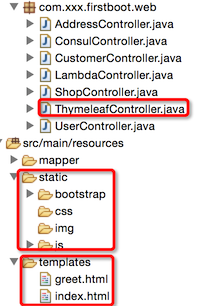
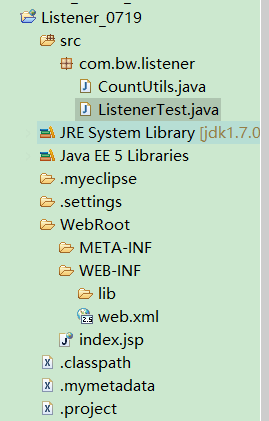
src/main/resources/
├── templates/          # Thymeleaf 模板目錄(默認)
│   └── index.html
└── static/             # 靜態資源目錄(默認)
    ├── bootstrap/css/
    ├── bootstrap/js/
└── js/jquery.min.js@Controller
@RequestMapping("/thymeleaf")
public class ThymeleafController {
@GetMapping("/greeting")
public String greeting(@RequestParam(name = "name", required = false, defaultValue = "world") String name, Model model) {
model.addAttribute("xname", name); // 向模板傳遞數據
return "index"; // 解析為 templates/index.html
}
@GetMapping("/ajax")
@ResponseBody // 直接返回字符串,不經模板解析
public String ajax(@RequestParam("username") String username) {
return "Hello, " + username + "! (AJAX Response)";
}
}<!DOCTYPE HTML>
<html xmlns:th="https://www.thymeleaf.org">
<head>
<title>Thymeleaf Demo</title>
<meta http-equiv="Content-Type" content="text/html; charset=UTF-8" />
<!-- 靜態資源引用:@{/...} 相對 static 根目錄 -->
<link th:href="@{/bootstrap/css/bootstrap.min.css}" rel="stylesheet"/>
<link th:href="@{/bootstrap/css/bootstrap-theme.min.css}" rel="stylesheet"/>
</head>
<body>
<div class="panel panel-primary">
<div class="panel-heading">歡迎頁面</div>
<div class="panel-body" th:text="${xname}"></div> <!-- 模板表達式輸出 -->
</div>
<div class="panel panel-warning">
<div class="panel-heading">AJAX 結果</div>
<div id="usernamediv" class="panel-body"></div>
</div>
<!-- 引入 JS 庫 -->
<script type="text/javascript" th:src="@{/js/jquery-1.11.1.js}"></script>
<script type="text/javascript" th:src="@{/bootstrap/js/bootstrap.min.js}"></script>
<!-- 內聯 JavaScript:th:inline="javascript" 支持 [[${var}]] 語法 -->
<script th:inline="javascript">
$(function() {
$.ajax({
url: "/thymeleaf/ajax",
data: { username: "SpringBoot" },
type: "get",
dataType: "text", // 關鍵:匹配 @ResponseBody 返回類型
success: function(text) {
alert(text);
$("#usernamediv").text(text);
}
});
});
</script>
</body>
</html>| 語法 | 用途 | 示例 |
|---|---|---|
th:text |
設置標籤文本內容(轉義) | <span th:text="${user.name}"></span> |
th:utext |
設置文本(不轉義 HTML) | <div th:utext="${htmlContent}"></div> |
th:href / th:src |
動態生成資源路徑 | <link th:href="@{/css/style.css}"> |
@{/path} |
鏈接表達式,自動補全上下文路徑 | @{/user/{id}(id=${user.id})} |
th:each |
迴圈渲染 | <tr th:each="u : ${users}"> |
th:if / th:unless |
條件渲染 | <div th:if="${user.vip}"> |
th:inline="javascript/css/text" |
內聯模式,支持 [[${var}]] / [(#{msg})] |
<script th:inline="javascript"> var name = [[${user.name}]]; </script> |
${...} |
變量表達式(OGNL) | ${user.name}, ${list[0]}, ${map.key} |
#{...} |
國際化消息 | #{welcome.message} |
classpath:/static/、classpath:/public/、classpath:/resources/、classpath:/META-INF/resources/@{/bootstrap/...} 自動映射到 static/bootstrap/...# application.properties
spring.thymeleaf.cache=false # 關閉模板緩存,DevTools 自動設置
# 修改模板/靜態資源保存後,瀏覽器自動刷新(LiveReload)引入 spring-boot-devtools 並配置 fork=true(見前文)。
dataType 必須匹配返回類型:text 對應 @ResponseBody String,json 對應 @ResponseBody Object(自動序列化)type(GET/POST)需與 @GetMapping/@PostMapping 一致,否則 405[[${var}]] 直接輸出模板變量到 JavaScript<form th:action="@{/user/save}" th:object="${user}" method="post">
<input type="text" th:field="*{name}" />
<input type="email" th:field="*{email}" />
<button type="submit">保存</button>
</form>templates/、static/ 目錄零配置生效@{/...} 統一資源路徑生成,th:inline 打通模板與 JS/CSScache=false 實現「所見即所得」開發體驗spring.thymeleaf.cache=true 提升渲染性能掌握 Spring Boot + Thymeleaf,能快速構建服務端渲染的傳統 Web 應用、管理後台、郵件模板、報表導出等場景。