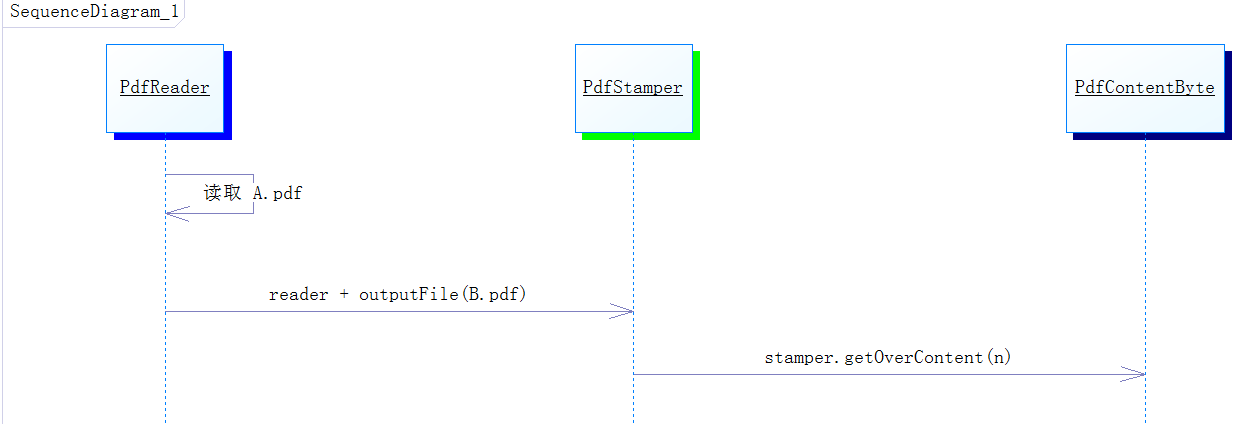
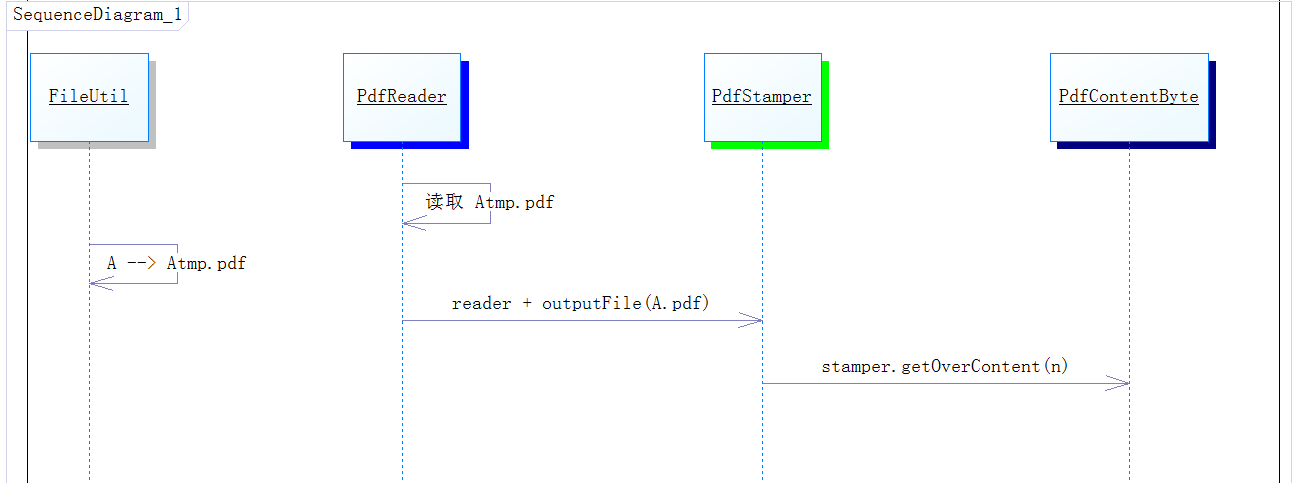
業務常見需求:在已生成的 PDF(如合同、報表)上動態添加水印、簽章、批註。iText 的 `PdfStamper` 是核心工具,但直接「讀原檔、寫原檔」會因文件已被 `PdfReader` 鎖定而失敗。
// 1. 管道複製原檔為副本
FileUtil.fileChannelCopy(new File("E:\\A.pdf"), new File("E:\\A_tmp.pdf"));

// 2. 讀取副本,寫入原檔
PdfReader reader = new PdfReader("E:\\A_tmp.pdf");
PdfStamper stamper = new PdfStamper(reader, new FileOutputStream("E:\\A.pdf"));
PdfContentByte over = stamper.getOverContent(1); // 獲取第 1 頁的繪圖畫布(上層)

// 3. 添加文字
BaseFont font = BaseFont.createFont("STSong-Light", "UniGB-UCS2-H", BaseFont.NOT_EMBEDDED);
over.beginText();
over.setFontAndSize(font, 10);
over.setTextMatrix(200, 200);
over.showTextAligned(Element.ALIGN_CENTER, "需要添加的文字", 580, 530, 0);
over.endText();

// 4. 添加圖片
PdfDictionary pageDict = reader.getPageN(1);
PdfArray mediaBox = (PdfArray) pageDict.get(PdfName.MEDIABOX);
Image img = Image.getInstance("D:\\1.jpg");
img.setAbsolutePosition(100, 100);
over.addImage(img);

// 5. 繪製紅色圓圈
over.setRGBColorStroke(0xFF, 0x00, 0x00);
over.setLineWidth(5f);
over.ellipse(250, 450, 350, 550);
over.stroke();

// 6. 關閉資源(必須調用,否則 PDF 損壞)
stamper.close();
reader.close();
// 7. 刪除臨時副本
Files.deleteIfExists(Paths.get("E:\\A_tmp.pdf"));
public static void fileChannelCopy(File src, File dest) {
    try (FileInputStream in = new FileInputStream(src);
         FileOutputStream out = new FileOutputStream(dest);
         FileChannel inCh = in.getChannel();
         FileChannel outCh = out.getChannel()) {
        inCh.transferTo(0, inCh.size(), outCh);
    } catch (IOException e) {
        throw new RuntimeException("PDF 複製失敗", e);
    }
}