SpringMVC 是 Spring 框架核心模組,基於前端控制器模式 (DispatcherServlet),實現請求分發、模型綁定、視圖解析、異常處理等 Web 層核心功能。本文通過純 XML 配置方式,從零構建一個 HelloWorld 應用,夯實核心組件認知。
springmvc-xml-helloworld
├── src
│   ├── main
│   │   ├── java
│   │   │   └── com.example.controller
│   │   │       └── HelloWorldController.java
│   │   ├── resources
│   │   │   └── springmvc-servlet.xml
│   │   └── webapp
│   │       ├── WEB-INF
│   │       │   ├── views
│   │       │   │   └── helloworld.jsp
│   │       │   └── web.xml
│   │       └── index.jsp
│   └── test
└── pom.xml
<dependencies>
    <!-- SpringMVC 核心 -->
    <dependency>
        <groupId>org.springframework</groupId>
        <artifactId>spring-webmvc</artifactId>
        <version>5.3.30</version>
    </dependency>
    <!-- Servlet API (provided 由容器提供) -->
    <dependency>
        <groupId>javax.servlet</groupId>
        <artifactId>javax.servlet-api</artifactId>
        <version>4.0.1</version>
        <scope>provided</scope>
    </dependency>
    <!-- JSP 支持 -->
    <dependency>
        <groupId>javax.servlet.jsp</groupId>
        <artifactId>javax.servlet.jsp-api</artifactId>
        <version>2.3.3</version>
        <scope>provided</scope>
    </dependency>
    <dependency>
        <groupId>javax.servlet</groupId>
        <artifactId>jstl</artifactId>
        <version>1.2</version>
    </dependency>
</dependencies>
<?xml version="1.0" encoding="UTF-8"?>
<web-app xmlns="https://xmlns.jcp.org/xml/ns/javaee"
         xmlns:xsi="https://www.w3.org/2001/XMLSchema-instance"
         xsi:schemaLocation="https://xmlns.jcp.org/xml/ns/javaee
         https://xmlns.jcp.org/xml/ns/javaee/web-app_4_0.xsd"
         version="4.0">

    <!-- 1. 定義 DispatcherServlet -->
    <servlet>
        <servlet-name>springmvc</servlet-name>
        <servlet-class>org.springframework.web.servlet.DispatcherServlet</servlet-class>
        <init-param>
            <param-name>contextConfigLocation</param-name>
            <param-value>classpath:springmvc-servlet.xml</param-value>
        </init-param>
        <load-on-startup>1</load-on-startup>
    </servlet>

    <!-- 2. 映射所有請求到 DispatcherServlet -->
    <servlet-mapping>
        <servlet-name>springmvc</servlet-name>
        <url-pattern>/</url-pattern> <!-- 關鍵:/ 而非 /*,保留 JSP 容器默認 Servlet 處理靜態資源 -->
    </servlet-mapping>

    <!-- 歡迎頁面 -->
    <welcome-file-list>
        <welcome-file>index.jsp</welcome-file>
    </welcome-file-list>
</web-app>
<?xml version="1.0" encoding="UTF-8"?>
<beans xmlns="https://www.springframework.org/schema/beans"
       xmlns:xsi="https://www.w3.org/2001/XMLSchema-instance"
       xmlns:context="https://www.springframework.org/schema/context"
       xmlns:mvc="https://www.springframework.org/schema/mvc"
       xsi:schemaLocation="
           https://www.springframework.org/schema/beans https://www.springframework.org/schema/beans/spring-beans.xsd
           https://www.springframework.org/schema/context https://www.springframework.org/schema/context/spring-context.xsd
           https://www.springframework.org/schema/mvc https://www.springframework.org/schema/mvc/spring-mvc.xsd">

    <!-- 1. 掃描 Controller 包 (註解驅動前置) -->
    <context:component-scan base-package="com.example.controller"/>

    <!-- 2. 註解驅動:自動註冊 HandlerMapping、HandlerAdapter、參數解析器、返回值處理器等 -->
    <mvc:annotation-driven/>

    <!-- 3. 視圖解析器:邏輯視圖名 → 物理 JSP 路徑 -->
    <bean class="org.springframework.web.servlet.view.InternalResourceViewResolver">
        <property name="prefix" value="/WEB-INF/views/"/>
        <property name="suffix" value=".jsp"/>
    </bean>

    <!-- 4. 靜態資源處理 (可選,避免 DispatcherServlet 攔截靜態資源) -->
    <mvc:resources mapping="/static/**" location="/static/"/>
    <mvc:default-servlet-handler/>

</beans>
package com.example.controller;

import javax.servlet.http.HttpServletRequest;
import javax.servlet.http.HttpServletResponse;
import org.springframework.web.servlet.ModelAndView;
import org.springframework.web.servlet.mvc.Controller;

public class HelloWorldController implements Controller {
    @Override
    public ModelAndView handleRequest(HttpServletRequest request, HttpServletResponse response) throws Exception {
        System.out.println(">>> HelloWorldController.handleRequest() 執行");
        // 返回邏輯視圖名 "helloworld"
        // 視圖解析器解析為:/WEB-INF/views/helloworld.jsp
        return new ModelAndView("helloworld");
    }
}
<%@ page contentType="text/html;charset=UTF-8" language="java" %>
<html>
<head><title>SpringMVC XML HelloWorld</title></head>
<body>
    <h2>SpringMVC XML 配置演示</h2>
    <a href="${pageContext.request.contextPath}/mvc">點擊訪問 HelloWorld</a>
</body>
</html>
<%@ page contentType="text/html;charset=UTF-8" language="java" %>
<html>
<head><title>Hello World</title></head>
<body>
    <h1 style="color: #2c3e50;">Hello World from SpringMVC XML Config!</h1>
    <p>當前時間:${new java.util.Date()} </p>
</body>
</html>
https://localhost:8080/springmvc-xml-helloworld/>> HelloWorldController.handleRequest() 執行Hello World from SpringMVC XML Config!
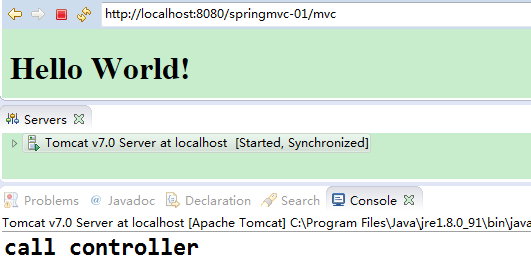
/mvc 到達 DispatcherServletHandlerMapping (由 mvc:annotation-driven 註冊的 RequestMappingHandlerMapping) 根據 @RequestMapping 或 Bean 名稱匹配 Controller (此處 Bean 名稱 /mvc 匹配)HandlerAdapter (由 mvc:annotation-driven 註冊的 RequestMappingHandlerAdapter) 調用 Controller.handleRequest()ModelAndView("helloworld")ViewResolver (InternalResourceViewResolver) 解析:prefix + viewName + suffix = /WEB-INF/views/helloworld.jspDispatcherServlet 轉發到 JSP,渲染響應| 坑點 | 現象 | 解決 |
|---|---|---|
url-pattern 寫成 /* | 靜態資源 404、JSP 循環轉發、錯誤頁面失效 | 必須用 /,保留容器默認 Servlet |
| 視圖解析器 prefix/suffix 錯誤 | 404 或找不到 JSP | 檢查路徑拼接:/WEB-INF/views/ + helloworld + .jsp |
缺少 mvc:annotation-driven | 註解不生效、參數綁定失敗、返回值處理異常 | 必須添加,或手動註冊 10+ 個 Bean |
JSP 放在 WEB-INF 外 | 可直接訪問繞過 Controller | 視圖 JSP 必須在 WEB-INF 下 |
| 中文亂碼 | 頁面/參數亂碼 | 配置 CharacterEncodingFilter、Tomcat URIEncoding=UTF-8、JSP pageEncoding |
下篇將講解基於註解的 SpringMVC 配置:@Controller、@RequestMapping、@ResponseBody、@RestController、參數綁定、返回值類型、異常處理、攔截器、文件上傳等企業級開發核心技能。