MyBatis Generator (MBG) 默認生成代碼風格往往不符合團隊規範:方法命名、參數類型、XML 結構、註解格式等。與其用插件機制勉強適配(功能受限、文檔稀缺),不如直接修改 MBG 核心源碼重新打包,獲得完全可控的生成能力。本文完整演示:源碼獲取 → Eclipse 導入 → 修改 Mapper 接口生成 → 修改 XML 生成 → Maven 打包 → 驗證成果。
Maven 中央倉庫下載 mybatis-generator-core-1.3.2-sources.jar 或從 GitHub 下載完整項目源碼:
MBG 1.3.2 源碼
File → Import → Maven → Existing Maven Projectspom.xml),Finish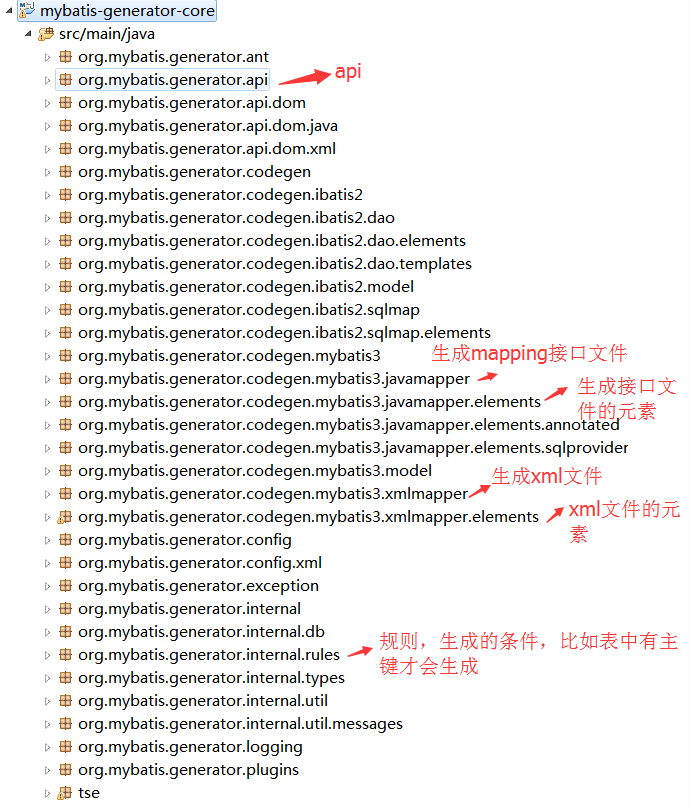
我們期望生成:
void update(Map<String, Object> dataMap); (而非默認實體對象參數)<set> + <if> 非空判斷 + <where> 主鍵條件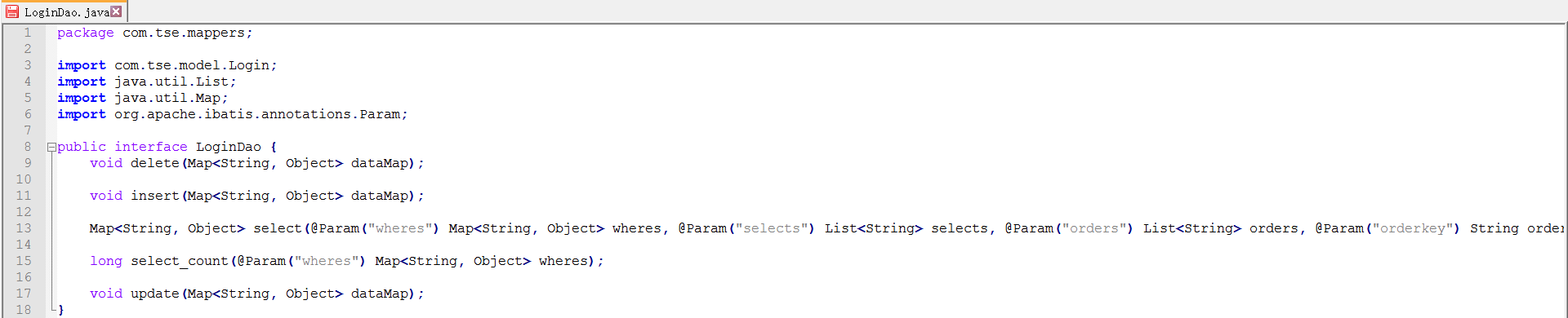
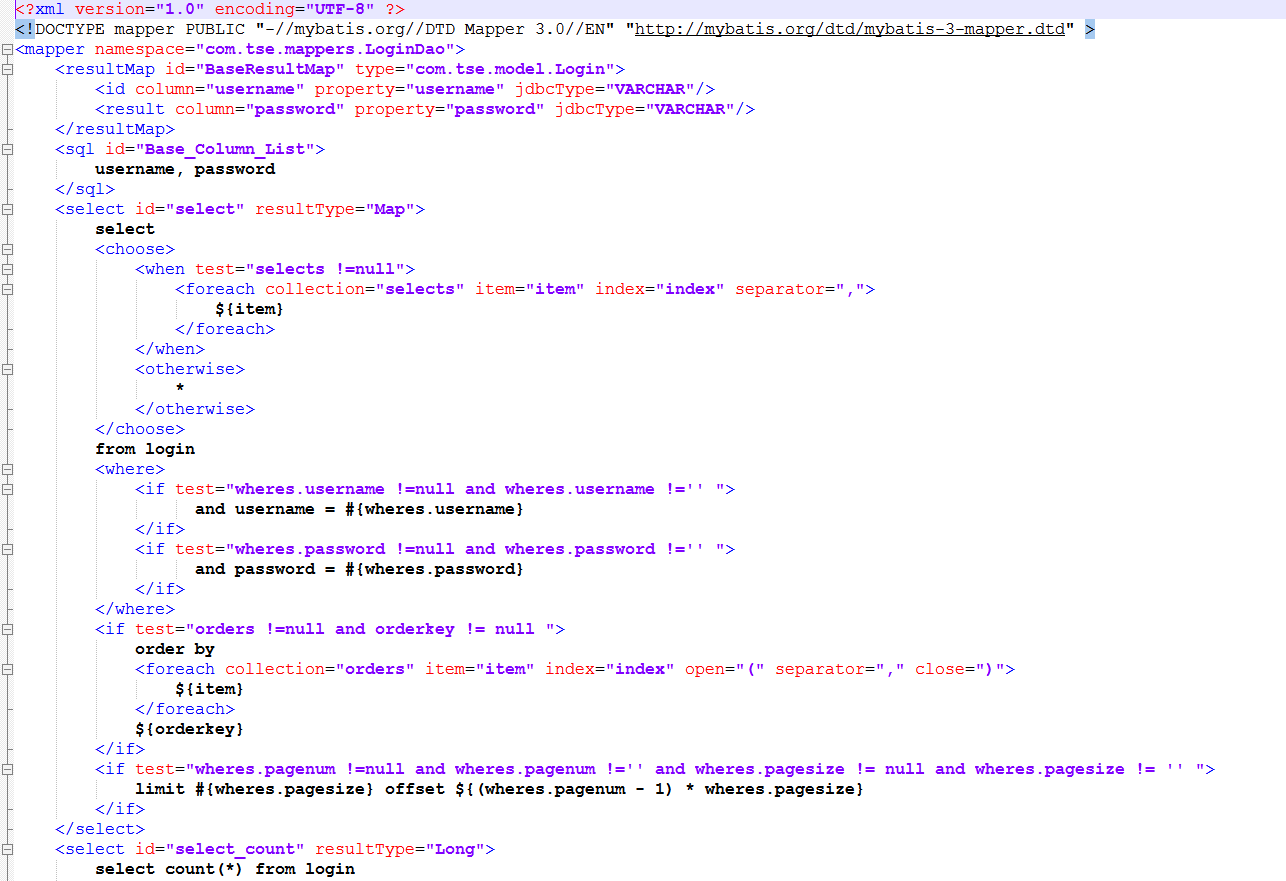
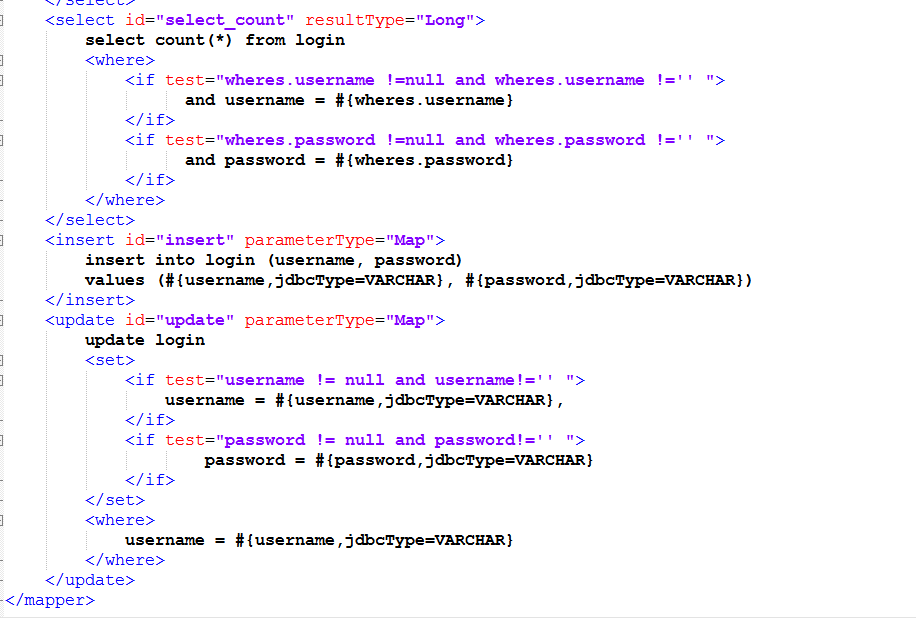
UpdateByPrimaryKeyWithoutBLOBsMethodGenerator路徑:org.mybatis.generator.codegen.mybatis3.javamapper.elements
public class UpdateByPrimaryKeyWithoutBLOBsMethodGenerator extends AbstractJavaMapperMethodGenerator {
    @Override
    public void addInterfaceElements(Interface interfaze) {
        Set<FullyQualifiedJavaType> importedTypes = new TreeSet<>();
        // 1. 返回類型 void
        FullyQualifiedJavaType voidType = FullyQualifiedJavaType.getVoidInstance(); // 或 new FullyQualifiedJavaType("void")

        // 2. 參數類型 Map
        FullyQualifiedJavaType mapType = FullyQualifiedJavaType.getMyMapInstance(); // 需在 FullyQualifiedJavaType 添加靜態方法
        // 簡化寫法:new FullyQualifiedJavaType("java.util.Map")
        // 但需處理泛型,建議擴展 FullyQualifiedJavaType 支持參數化類型

        Method method = new Method();
        method.setVisibility(JavaVisibility.PUBLIC);
        method.setReturnType(voidType);
        method.setName(introspectedTable.getUpdateByPrimaryKeyStatementId()); // "updateByPrimaryKey"

        // 關鍵:設置參數為 Map
        Parameter parameter = new Parameter(mapType, "dataMap");
        method.addParameter(parameter);

        context.getCommentGenerator().addGeneralMethodComment(method, introspectedTable);
        addMapperAnnotations(interfaze, method);

        if (context.getPlugins().clientUpdateByPrimaryKeyWithoutBLOBsMethodGenerated(method, interfaze, introspectedTable)) {
            interfaze.addImportedTypes(importedTypes);
            interfaze.addMethod(method);
        }
    }
}
關鍵擴展:在 FullyQualifiedJavaType 中添加 getMyMapInstance() 返回 Map<String, Object> 類型,或直接構造泛型類型 (需修改該類支持參數化)。
UpdateByPrimaryKeyWithoutBLOBsElementGenerator路徑:org.mybatis.generator.codegen.mybatis3.xmlmapper.elements
public class UpdateByPrimaryKeyWithoutBLOBsElementGenerator extends AbstractXmlElementGenerator {
    @Override
    public void addElements(XmlElement parentElement) {
        XmlElement answer = new XmlElement("update");
        answer.addAttribute(new Attribute("id", introspectedTable.getUpdateByPrimaryKeyStatementId()));
        answer.addAttribute(new Attribute("parameterType", "Map")); // 關鍵:參數類型 Map

        context.getCommentGenerator().addComment(answer);

        //  內容構建
        StringBuilder sb = new StringBuilder();
        sb.append("update ").append(introspectedTable.getFullyQualifiedTableNameAtRuntime());
        answer.addElement(new TextElement(sb.toString()));

        //  動態設置非空字段
        XmlElement setElement = new XmlElement("set");
        List<IntrospectedColumn> columns = introspectedTable.getAllColumns();
        Iterator<IntrospectedColumn> iter = columns.iterator();

        while (iter.hasNext()) {
            IntrospectedColumn col = iter.next();
            String colName = MyBatis3FormattingUtilities.getEscapedColumnName(col);

            XmlElement ifElement = new XmlElement("if");
            ifElement.addAttribute(new Attribute("test", colName + " != null and " + colName + " != ''"));

            sb.setLength(0);
            sb.append(colName).append(" = ").append(MyBatis3FormattingUtilities.getParameterClause(col));
            if (iter.hasNext()) sb.append(',');

            ifElement.addElement(new TextElement(sb.toString()));
            setElement.addElement(ifElement);
        }
        answer.addElement(setElement);

        //  主鍵條件
        XmlElement whereElement = new XmlElement("where");
        for (IntrospectedColumn pkCol : introspectedTable.getPrimaryKeyColumns()) {
            sb.setLength(0);
            sb.append(MyBatis3FormattingUtilities.getEscapedColumnName(pkCol))
              .append(" = ")
              .append(MyBatis3FormattingUtilities.getParameterClause(pkCol));
            whereElement.addElement(new TextElement(sb.toString()));
        }
        answer.addElement(whereElement);

        if (context.getPlugins().sqlMapUpdateByPrimaryKeyWithoutBLOBsElementGenerated(answer, introspectedTable)) {
            parentElement.addElement(answer);
        }
    }
}
<generatorConfiguration>
    <classPathEntry location="mysql-connector-java-5.1.13-bin.jar" />
    <context id="infoGuardian" targetRuntime="MyBatis3">
        <commentGenerator>
            <property name="suppressAllComments" value="true"/>
            <property name="suppressDate" value="true"/>
        </commentGenerator>
        <jdbcConnection driverClass="com.mysql.jdbc.Driver"
            connectionURL="jdbc:mysql://localhost:3306/login?characterEncoding=UTF-8"
            userId="root" password="root"/>
        <javaTypeResolver>
            <property name="forceBigDecimals" value="false"/>
        </javaTypeResolver>
        <javaModelGenerator targetPackage="pojo" targetProject="mybatis3">
            <property name="enableSubPackages" value="true"/>
            <property name="trimStrings" value="true"/>
        </javaModelGenerator>
        <sqlMapGenerator targetPackage="mapper" targetProject="mybatis3">
            <property name="enableSubPackages" value="true"/>
        </sqlMapGenerator>
        <javaClientGenerator type="XMLMAPPER" targetPackage="mapper" targetProject="mybatis3">
            <property name="enableSubPackages" value="true"/>
        </javaClientGenerator>
        <table tableName="login" domainObjectName="Login"
            enableCountByExample="false" enableDeleteByExample="false"
            enableSelectByExample="false" enableUpdateByExample="false"/>
    </context>
</generatorConfiguration>
public class StartUp {
    public static void main(String[] args) throws Exception {
        List<String> warnings = new ArrayList<>();
        File configFile = new File(StartUp.class.getResource("/generatorConfig.xml").toURI());
        ConfigurationParser cp = new ConfigurationParser(warnings);
        Configuration config = cp.parseConfiguration(configFile);
        DefaultShellCallback callback = new DefaultShellCallback(true);
        MyBatisGenerator generator = new MyBatisGenerator(config, callback, warnings);
        generator.generate(null);
        System.out.println(warnings);
    }
}
<plugin>
    <groupId>org.apache.maven.plugins</groupId>
    <artifactId>maven-jar-plugin</artifactId>
    <version>2.4</version>
    <configuration>
        <archive>
            <manifest>
                <addClasspath>true</addClasspath>
                <mainClass>org.mybatis.generator.api.ShellRunner</mainClass>
            </manifest>
        </archive>
        <includes><include>**/org/**</include></includes> <!-- 只打包 org 包 -->
    </configuration>
</plugin>
<plugin>
    <groupId>org.apache.maven.plugins</groupId>
    <artifactId>maven-assembly-plugin</artifactId>
    <configuration>
        <appendAssemblyId>false</appendAssemblyId>
        <descriptors><descriptor>src/main/assembly/src.xml</descriptor></descriptors>
    </configuration>
    <executions>
        <execution>
            <id>make-assembly</id>
            <phase>package</phase>
            <goals><goal>single</goal></goals>
        </execution>
    </executions>
</plugin>
<assembly>
    <id>bundle</id>
    <formats><format>zip</format></formats>
    <fileSets>
        <fileSet>
            <directory>src/main/resources</directory>
            <outputDirectory>/</outputDirectory>
            <includes><include>generatorConfig.xml</include></includes>
            <excludes><exclude>log4j.properties</exclude></excludes>
        </fileSet>
        <fileSet>
            <directory>src/main/scripts</directory>
            <outputDirectory>/</outputDirectory>
            <includes><include>run.bat</include></includes>
        </fileSet>
        <fileSet>
            <directory>${project.build.directory}</directory>
            <outputDirectory>/</outputDirectory>
            <includes><include>${project.artifactId}-${project.version}.jar</include></includes>
        </fileSet>
    </fileSets>
</assembly>
java -jar mybatis-generator-core-1.3.2.jar -configfile generatorConfig.xml -overwrite
pause
mvn clean package -DskipTests
產出:target/mybatis-generator-core-1.3.2.jar + generatorConfig.xml + run.bat 打包 zip,解壓即用。
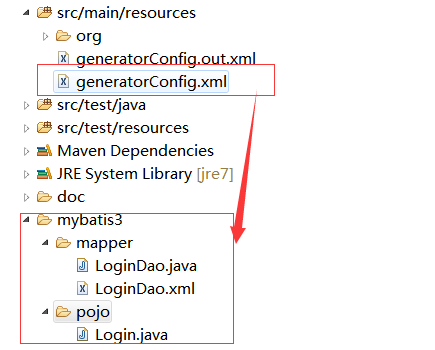
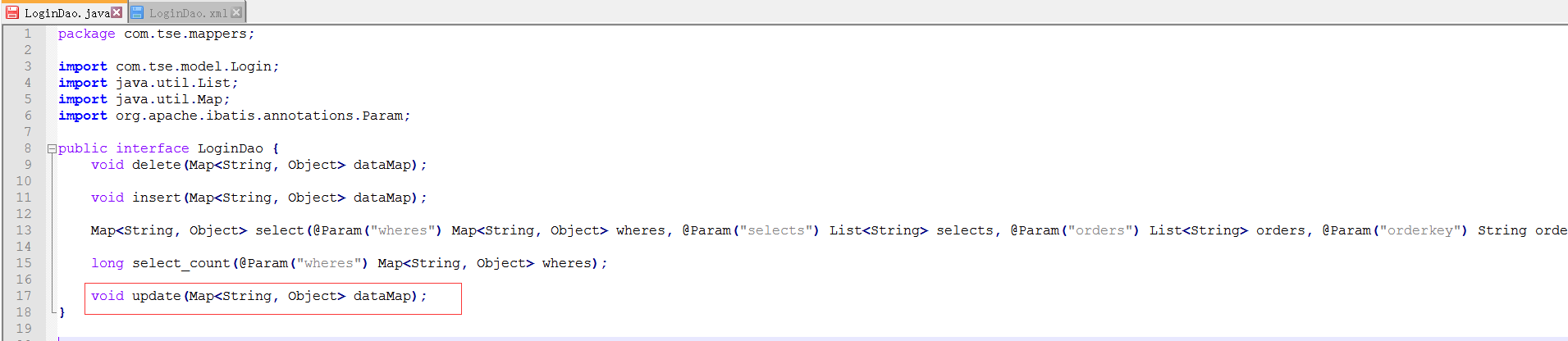
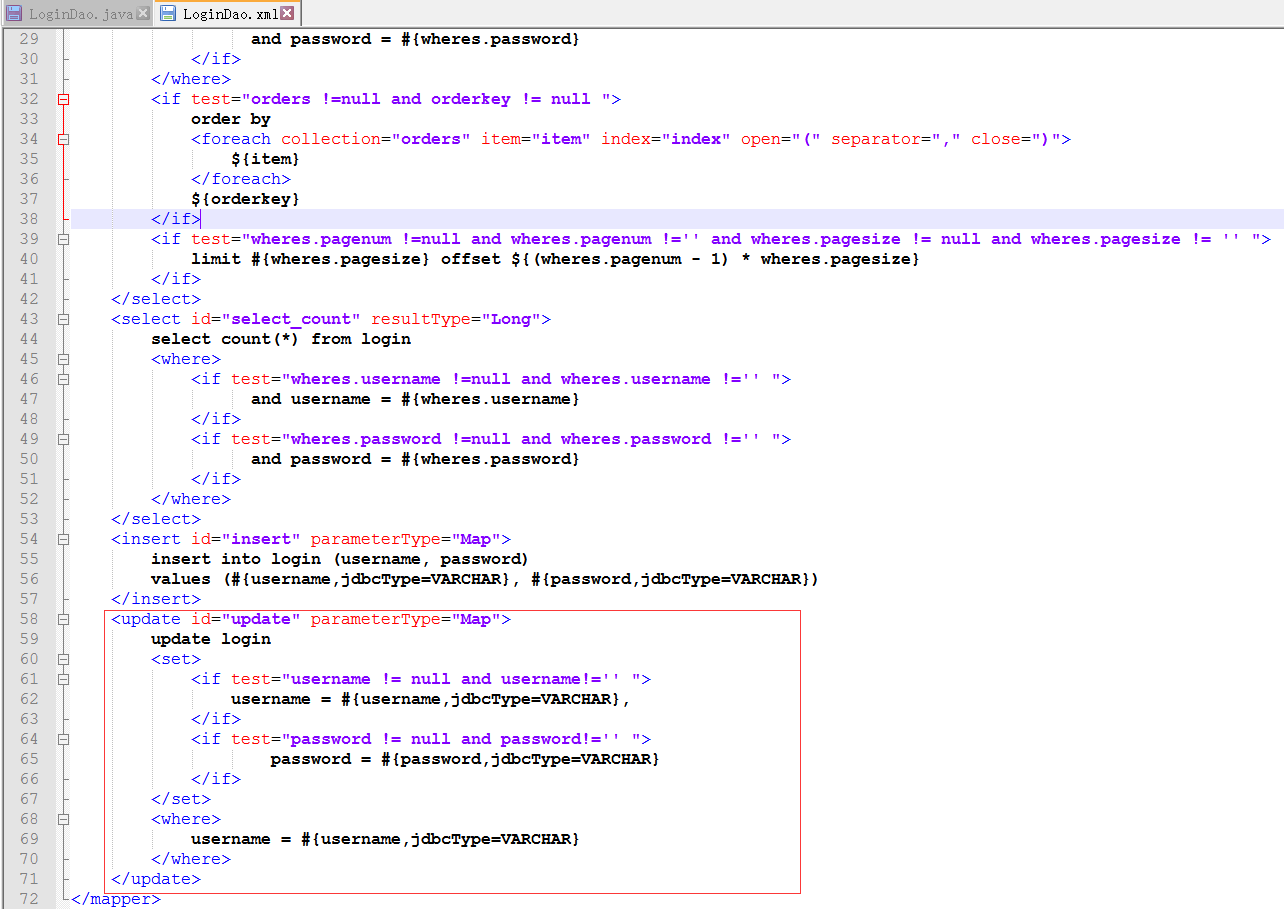
生成的 Mapper 接口包含 void update(Map<String, Object> dataMap);,XML 包含動態 <set>/<if>/<where>,完全符合預期。
參考:MBG 添加自定義方法完整教程
核心步驟:
1. 創建新的 XxxMethodGenerator 實現 JavaMapperMethodGenerator
2. 創建新的 XxxElementGenerator 實現 XmlElementGenerator
3. 在 context 配置中註冊 (或硬編碼在 JavaMapperGenerator/XmlMapperGenerator 中調用)
4. 重新打包
通過直接修改 MBG 源碼,我們獲得了完全可控的代碼生成能力:方法簽名、參數類型、XML 結構、註解風格均符合團隊規範。雖然維護成本略高 (升級 MBG 版本需重新移植修改),但對於長期穩定的項目,一次投入、長期收益,極大提升開發效率與代碼質量一致性。建議將修改後的 JAR 發布至團隊私有 Maven 倉庫,統一依賴版本。