驗證碼是 Web 表單防刷、防機器人的第一道防線。本文提供基於 ExtJS 6+ 前端組件與 Java (Struts2 + Spring) 後端的完整實現方案,包含點擊刷新、登錄失敗刷新、干擾線/噪點/扭曲等安全增強特性,附帶核心代碼與效果截圖。
var imgCheckValid = Ext.create('Ext.Component', {
    width: 70,
    height: 45,
    margin: '5',
    id: 'imgCheckValid',
    autoEl: {
        tag: 'img',
        src: 'Code/genCodeImg.do?' // 初始請求
    },
    listeners: {
        render: function(cmp) {
            cmp.getEl().on('click', function(e) {
                // 核心:加時間戳強制瀏覽器重新請求,繞過緩存
                this.dom.src = 'Code/genCodeImg.do?' + new Date().getTime();
            });
        }
    }
});
關鍵點:
autoEl: {tag: 'img', src: ...} 讓 Ext 組件渲染為原生 <img> 標籤。FormPanel 的 fieldContainer 中,配合文本輸入框佈局。<package name="Code" extends="json" namespace="/Code">
<action name="genCodeImg" class="codeAction" method="genCodeImg">
<result name="success" type="json">
<param name="root">responseJson</param>
</result>
</action>
</package>
<bean id="codeAction" class="com.xxx.action.impl.CodeAction" scope="prototype"/>
public class CodeAction extends BaseAction implements ICodeAction {
    // 配置屬性
    private int width = 70, height = 45, codeCount = 4, lineCount = 20;
    private BufferedImage buffImg;
    private Random random = new Random();

    public String genCodeImg() throws Exception {
        HttpServletResponse resp = ServletActionContext.getResponse();
        int fontWidth = width / codeCount;
        int fontHeight = height - 5;
        int codeY = height - 8;

        // 1. 創建圖片緩衝區
        buffImg = new BufferedImage(width, height, BufferedImage.TYPE_INT_RGB);
        Graphics g = buffImg.getGraphics();

        // 2. 繪製背景
        g.setColor(getRandColor(200, 250));
        g.fillRect(0, 0, width, height);

        // 3. 設置字體
        Font font = new Font("Fixedsys", Font.BOLD, fontHeight);
        g.setFont(font);

        // 4. 繪製干擾線(含扭曲 shear 效果)
        for (int i = 0; i < lineCount; i++) {
            int xs = random.nextInt(width), ys = random.nextInt(height);
            int xe = xs + random.nextInt(width), ye = ys + random.nextInt(height);
            shear(g, 1, 20, getRandColor(1, 255)); // 扭曲變換
            g.drawLine(xs, ys, xe, ye);
        }

        // 5. 添加噪點
        float yawpRate = 0.01f;
        int area = (int) (yawpRate * width * height);
        for (int i = 0; i < area; i++) {
            buffImg.setRGB(random.nextInt(width), random.nextInt(height), random.nextInt(255));
        }

        // 6. 生成並繪製驗證碼字符
        String codeStr = randomStr(codeCount);
        for (int i = 0; i < codeCount; i++) {
            g.setColor(getRandColor(1, 255));
            g.drawString(codeStr.substring(i, i+1), i * fontWidth + 3, codeY);
        }

        // 7. 存入 Session(登錄驗證用)
        ActionContext.getContext().getSession().put("code", codeStr);

        // 8. 禁止緩存,輸出 JPEG
        resp.setHeader("Pragma", "no-cache");
        resp.setHeader("Cache-Control", "no-cache");
        resp.setDateHeader("Expires", 0);
        resp.setContentType("image/jpeg");
        ImageIO.write(buffImg, "jpeg", resp.getOutputStream());
        return null; // 直接輸出流,不走 Struts 結果
    }

    // 輔助方法:隨機字符、隨機顏色、扭曲變換 shearX/shearY...
}
ABCDEFGHIJKLMNOPQRSTUVWXYZabcdefghijklmnopqrstuvwxyz1234567890),排除易混淆字符(如 0/O, 1/l/I)。shear 扭曲變換,破壞 OCR 直線識別。shearX/shearY 基於正弦波的像素平移,使字符邊緣模糊、基線彎曲。Pragma: no-cache、Cache-Control: no-cache、Expires: 0,確保每次請求獲取新圖片。
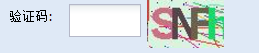
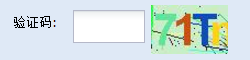


登錄 Action 中從 Session 取出 code,與用戶輸入比對(忽略大小寫),驗證失敗則清除 Session code、返回錯誤提示,前端自動刷新驗證碼圖片。