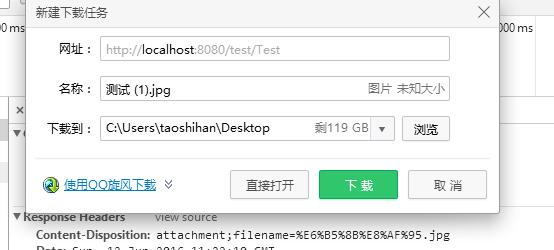
預設情況下瀏覽器會嘗試直接顯示圖片,若需觸發「另存為」下載對話框,必須正確設定 HTTP 回應標頭。本文示範 Servlet 中圖片下載的完整流程,含中文檔名編碼處理。
FileInputStream 讀取圖片(路徑用 getServletContext().getRealPath() 解析)。ServletOutputStream 寫入回應。Content-Disposition: attachment; filename=... 強制下載。URLEncoder.encode),避免 ISO-8859-1 亂碼。@Override
protected void doGet(HttpServletRequest req, HttpServletResponse resp) throws ServletException, IOException {
// 1. 設定下載標頭,處理中文檔名
String fileName = "測試.jpg";
String encodedName = URLEncoder.encode(fileName, "UTF-8");
resp.setHeader("Content-Disposition", "attachment;filename=" + encodedName);
// 2. 獲取圖片輸入流
String realPath = getServletContext().getRealPath("/1.jpg");
try (FileInputStream fis = new FileInputStream(realPath)) {
// 3. 獲取輸出流
ServletOutputStream os = resp.getOutputStream();
// 4. 流拷貝
byte[] buffer = new byte[1024];
int len;
while ((len = fis.read(buffer)) != -1) {
os.write(buffer, 0, len);
}
os.flush();
// 注意:此處不關閉 os,由容器統一管理
}
}
| 操作 | 直接顯示 | 觸發下載 |
|---|---|---|
| Content-Disposition | 無 / inline | attachment; filename=xxx |
| 中文檔名 | 瀏覽器自行猜測編碼 | 必須 URLEncoder.encode(UTF-8) |
| 輸出流關閉 | 容器管理 | 容器管理(勿手動關閉) |
Content-Length、啟用 BufferedInputStream、考慮 Transfer-Encoding: chunked。Range 請求標頭,返回 206 Partial Content。掌握 Response 輸出流與標頭控制,是 Java Web 檔案下載功能的核心基礎。