在 Java Swing 中,面板是一種特殊的容器組件,它本身繼承自 java.awt.Container,既可以容納其他組件進行佈局,又必須被添加到其他頂層容器(如 JFrame、JDialog)中才能顯示。Swing 提供了兩種最常用的面板實現:JPanel(通用面板)與 JScrollPane(帶滾動條面板)。
JPanel 的核心價值在於「組件聚合與佈局隔離」。透過巢狀面板結構,可將複雜介面分解為多個獨立佈局區域,每個區域套用不同的佈局管理器。
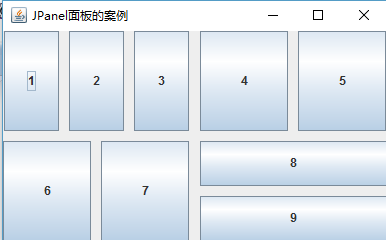
下範例示範如何利用四個 JPanel 搭配 GridLayout 構建計算機鍵盤風格介面:
package com.swing;

import java.awt.Container;
import java.awt.GridLayout;
import javax.swing.JButton;
import javax.swing.JFrame;
import javax.swing.JPanel;
import javax.swing.WindowConstants;

public class JPanelTest extends JFrame {
    public JPanelTest() {
        Container container = getContentPane();
        // 主視窗採用 2 行 1 列網格佈局
        container.setLayout(new GridLayout(2, 1, 10, 10));

        // 建立四個子面板,各自獨立佈局
        JPanel p1 = new JPanel(new GridLayout(1, 3, 10, 10));
        JPanel p2 = new JPanel(new GridLayout(1, 2, 10, 10));
        JPanel p3 = new JPanel(new GridLayout(1, 2, 10, 10));
        JPanel p4 = new JPanel(new GridLayout(2, 1, 10, 10));

        // 向面板添加按鈕組件
        p1.add(new JButton("1")); p1.add(new JButton("2")); p1.add(new JButton("3"));
        p2.add(new JButton("4")); p2.add(new JButton("5"));
        p3.add(new JButton("6")); p3.add(new JButton("7"));
        p4.add(new JButton("8")); p4.add(new JButton("9"));

        // 關鍵步驟:將面板實例加入主容器
        container.add(p1); container.add(p2);
        container.add(p3); container.add(p4);

        // 視窗屬性配置
        setTitle("JPanel 面板巢狀佈局範例");
        setSize(400, 250);
        setVisible(true);
        setDefaultCloseOperation(WindowConstants.EXIT_ON_CLOSE);
    }

    public static void main(String[] args) {
        new JPanelTest();
    }
}
當需要在有限視窗空間顯示超大內容(如長文本、大圖片、複雜表格)時,JScrollPane 是首選方案。其核心特性包括:
JPanel,再將該面板作為整體加入 JScrollPanepackage com.swing;
import java.awt.Container;
import javax.swing.JFrame;
import javax.swing.JScrollPane;
import javax.swing.JTextArea;
import javax.swing.WindowConstants;
public class JScrollPaneTest extends JFrame {
public JScrollPaneTest() {
Container container = getContentPane();
// 建立 20 行 50 列的文本區域
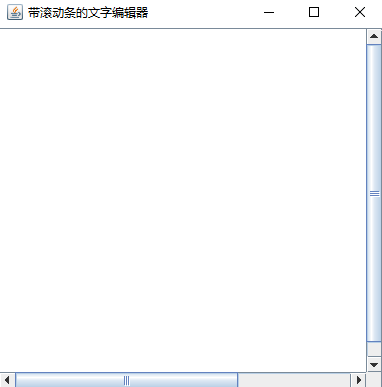
JTextArea textArea = new JTextArea(20, 50);
// 將文本區域包裹在滾動面板中
JScrollPane scrollPane = new JScrollPane(textArea);
// 將滾動面板加入容器
container.add(scrollPane);
setTitle("帶滾動條的文字編輯器");
setSize(400, 400);
setVisible(true);
setDefaultCloseOperation(WindowConstants.EXIT_ON_CLOSE);
}
public static void main(String[] args) {
new JScrollPaneTest();
}
}
| 特性 | JPanel | JScrollPane |
|---|---|---|
| 主要用途 | 組件分組、佈局隔離 | 大內容滾動顯示 |
| 組件容納數 | 無限制 | 僅限 1 個直接子組件 |
| 佈局管理器 | 支援任意佈局 | 不可直接設定 |
| 滾動條 | 無 | 內建自動管理 |
| 典型場景 | 工具欄、表單分區、複雜介面拆解 | 文本編輯器、日誌檢視、大圖預覽、表格數據 |
JFrame 設定主佈局,內層多個 JPanel 負責局部佈局JScrollPane:直接將內容組件(JTextArea、JTable、JTree 等)傳入建構子JPanel,再將該面板放入 JScrollPane