在 Java 圖形開發中,Graphics 類是所有繪圖上下文的抽象基類,而 Graphics2D 繼承自它並提供更強大的繪圖功能集合。由於 Graphics2D 是 Graphics 的擴展,也是官方推薦使用的繪圖類,本文將重點介紹如何使用 Graphics2D 實現 Java 繪圖。
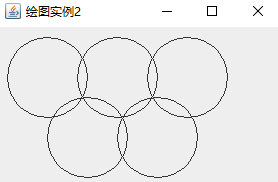
以下範例展示如何建立視窗並在面板上繪製五個圓形:
package com.graphics;
import java.awt.Graphics;
import javax.swing.JFrame;
import javax.swing.JPanel;

public class DrawCircle extends JFrame {
    private final int OVAL_WIDTH = 80;
    private final int OVAL_HEIGHT = 80;

    public DrawCircle() {
        super();
        initialize();
    }

    private void initialize() {
        this.setSize(300, 200);
        setDefaultCloseOperation(JFrame.EXIT_ON_CLOSE);
        setContentPane(new DrawPanel());
        this.setTitle("繪圖實例");
    }

    class DrawPanel extends JPanel {
        public void paint(Graphics g) {
            super.paint(g);
            g.drawOval(10, 10, OVAL_WIDTH, OVAL_HEIGHT);
            g.drawOval(80, 10, OVAL_WIDTH, OVAL_HEIGHT);
            g.drawOval(150, 10, OVAL_WIDTH, OVAL_HEIGHT);
            g.drawOval(50, 70, OVAL_WIDTH, OVAL_HEIGHT);
            g.drawOval(120, 70, OVAL_WIDTH, OVAL_HEIGHT);
        }
    }

    public static void main(String[] args) {
        DrawCircle dc = new DrawCircle();
        dc.setVisible(true);
    }
}
執行結果將顯示五個排列整齊的圓形:
Graphics2D 可以分別使用不同的類別表示不同形狀(如 Line2D、Rectangle2D、Ellipse2D 等)。要繪製指定形狀,需先建立實作 Shape 介面的物件,再呼叫 draw() 繪製輪廓或 fill() 填充形狀。
package com.graphics;
import java.awt.Graphics;
import java.awt.Graphics2D;
import java.awt.Shape;
import java.awt.geom.Ellipse2D;
import java.awt.geom.Rectangle2D;
import javax.swing.JFrame;
import javax.swing.JPanel;
import javax.swing.WindowConstants;

public class DrawFrame extends JFrame {
    public DrawFrame() {
        super();
        initialize();
    }

    public void initialize() {
        this.setSize(300, 200);
        setDefaultCloseOperation(WindowConstants.EXIT_ON_CLOSE);
        add(new CanvasPanel());
        this.setTitle("Graphics2D 繪圖實例");
    }

    class CanvasPanel extends JPanel {
        public void paint(Graphics g) {
            super.paint(g);
            Graphics2D g2 = (Graphics2D) g;

            Shape[] shapes = new Shape[4];
            shapes[0] = new Ellipse2D.Double(5, 5, 100, 100);
            shapes[1] = new Rectangle2D.Double(110, 5, 100, 100);
            shapes[2] = new Rectangle2D.Double(15, 15, 80, 80);
            shapes[3] = new Ellipse2D.Double(120, 15, 80, 80);

            for (Shape shape : shapes) {
                Rectangle2D bounds = shape.getBounds2D();
                if (bounds.getWidth() == 80) {
                    g2.fill(shape);
                } else {
                    g2.draw(shape);
                }
            }
        }
    }

    public static void main(String[] args) {
        DrawFrame df = new DrawFrame();
        df.setVisible(true);
    }
}
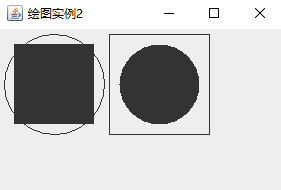
程式會根據形狀寬度決定是填充還是繪製輪廓,執行結果如下:
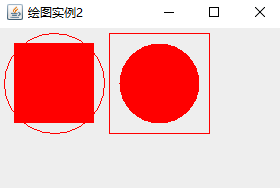
透過 Graphics2D 的 setColor() 方法還可以靈活設定繪圖顏色,例如 g2.setColor(Color.RED),讓圖形呈現更豐富的視覺效果。






