過濾器是一個位於客戶端請求與目標資源之間的中介組件。形象地比喻:如同淨水器將污水轉為純淨水,過濾器在請求到達 Servlet/JSP 之前攔截並處理請求/響應,實現編碼統一、權限驗證、日誌記錄等橫切關注點。
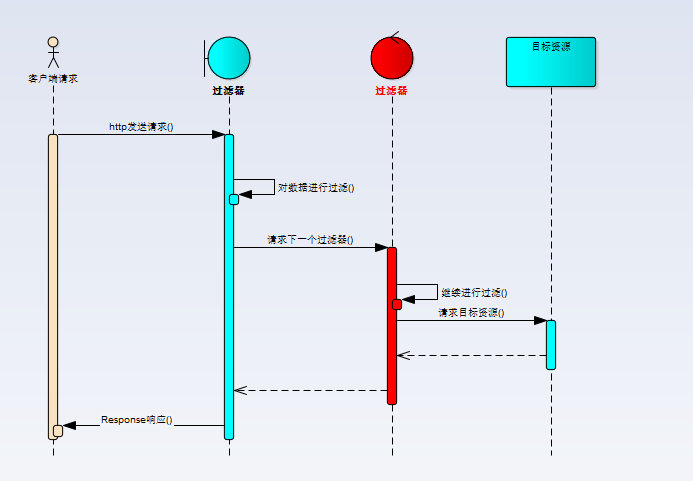
初始化方法,容器啟動時調用一次。透過 FilterConfig 可獲取:
<init-param>)ServletContext 物件核心處理方法,每次請求都會調用。職責包括:
chain.doFilter() 將請求傳遞給下一個過濾器或目標資源銷毀方法,容器關閉時調用,用於釋放資源。
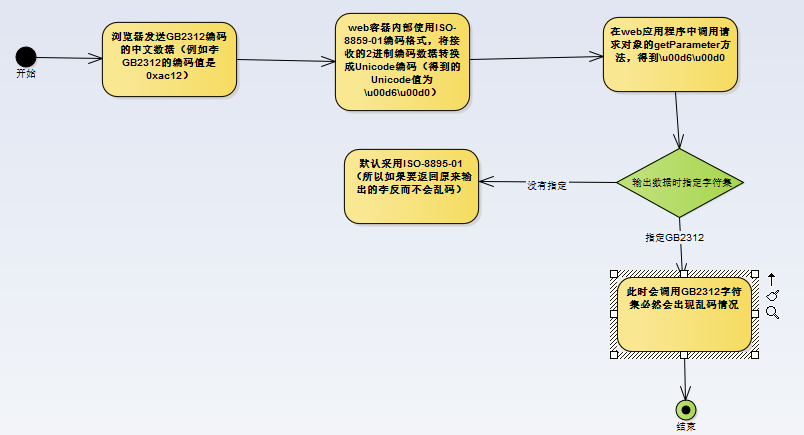
<filter-name>:過濾器邏輯名稱<filter-class>:完整類名<init-param>:初始化參數(含 param-name、param-value)<filter-name>:引用已宣告的過濾器<url-pattern>:攔截特定 URL 路徑<servlet-name>:攔截特定 Servlet(二擇一)Web 容器預設使用 ISO-8859-1 解碼請求參數。即使 JSP 設定 UTF-8,容器仍會先按 ISO-8859-1 解碼一次,導致中文亂碼。
public class EncodingFilter implements Filter {
    protected String encoding = null;

    // 內部類:包裝 HttpServletRequest,重寫 getParameter
    class MyRequestWrapper extends HttpServletRequestWrapper {
        public MyRequestWrapper(HttpServletRequest request) {
            super(request);
        }

        @Override
        public String getParameter(String param) {
            String value = null;
            try {
                // POST 請求:直接設定編碼
                super.setCharacterEncoding(encoding);
                value = super.getParameter(param);

                // GET 請求:需手動轉碼
                if (super.getMethod().equalsIgnoreCase("GET")) {
                    if (value != null) {
                        value = new String(value.getBytes("ISO-8859-1"), encoding);
                    }
                }
            } catch (UnsupportedEncodingException e) {
                e.printStackTrace();
            }
            return value;
        }
    }

    @Override
    public void init(FilterConfig filterConfig) throws ServletException {
        this.encoding = filterConfig.getInitParameter("encoding");
    }

    @Override
    public void doFilter(ServletRequest request, ServletResponse response,
                         FilterChain chain) throws IOException, ServletException {
        // 設定響應編碼防止輸出亂碼
        response.setContentType("text/html;charset=" + this.encoding);
        // 使用包裝器傳遞給下一級
        chain.doFilter(new MyRequestWrapper((HttpServletRequest) request), response);
    }

    @Override
    public void destroy() {
        this.encoding = null;
    }
}
<filter>
    <filter-name>encoding</filter-name>
    <filter-class>com.lp.filters.EncodingFilter</filter-class>
    <init-param>
        <param-name>encoding</param-name>
        <param-value>UTF-8</param-value>
    </init-param>
</filter>
<filter-mapping>
    <filter-name>encoding</filter-name>
    <servlet-name>LoginServlet</servlet-name>
    <!-- <url-pattern>/LoginServlet</url-pattern> -->
</filter-mapping>
request.setCharacterEncoding()URIEncoding="UTF-8";舊版需手動轉碼完整代碼已可直接用於生產環境,建議根據專案實際情況調整攔截路徑。