[某機構]Java基礎_第01課_...mp4),難以快速識別內容。.docx、.pdf 等特定類型文件平鋪收集到單一目錄便於管理。.exe 的桌面小工具練手 (打包流程:Maven Shade Plugin 打 Fat Jar → Launch4j 或 exe4j 包裝 EXE)。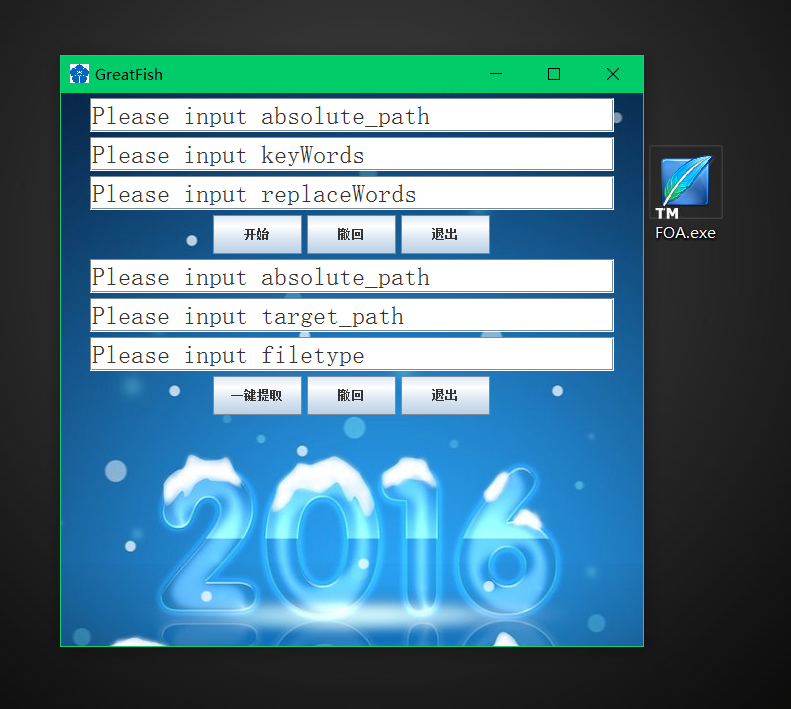
工具主界面:左側重命名區,右側文件提取區
[某機構]_Java_ 前綴。[某機構]_Java_,替換詞留空 (或自定義)。docx、pdf、jpg (不帶點)。report.docx → report1.docx、report2.docx),避免覆蓋。public class Test {
public static void main(String[] args) {
// 啟動 Swing GUI (EDT 線程安全啟動更佳)
SwingUtilities.invokeLater(ShowGui::new);
}
}FlowLayout 簡單垂直堆疊:6 個文本框 (路徑、關鍵字、替換詞、源路徑、目標路徑、類型) + 6 個按鈕 (開始/撤銷/退出 × 2 組)。JFrame 覆蓋 getContentPane() 加入 JLabel 載入 ImageIcon,設置圖層為最底层 (Integer.MIN_VALUE)。MouseAdapter,mouseClicked 中校驗輸入、調用業務邏輯類。public class RenameFunction {
// 靜態緩存原文件名數組,供撤銷使用
public static String[] originalNames;
public static void sure(String dirPath, String keyword, String replaceWord) throws Exception {
File dir = new File(dirPath);
String[] names = dir.list(); // 獲取文件名列表
if (names == null) return;
originalNames = names.clone(); // 關鍵:備份原名
File[] files = dir.listFiles();
for (int i = 0; i < names.length; i++) {
if (names[i].contains(keyword)) {
names[i] = names[i].replace(keyword, replaceWord); // 內存中修改名單
}
}
// 實際重命名:遍歷 File 對象,按順序對應修改後的名單
int idx = 0;
for (File f : files) {
if (f.isFile() && idx < names.length) {
f.renameTo(new File(dirPath + File.separator + names[idx++]));
}
}
}
}
// 撤銷類
public class RevokeRename {
public static void revoke(String dirPath) throws Exception {
File dir = new File(dirPath);
File[] files = dir.listFiles();
int idx = 0;
for (File f : files) {
if (f.isFile() && idx < RenameFunction.originalNames.length) {
f.renameTo(new File(dirPath + File.separator + RenameFunction.originalNames[idx++]));
}
}
}
}注意點: list() 與 listFiles() 返回順序一致 (文件系統順序),利用此特性建立索引映射。生產環境建議用 Map<File, String> 顯式綁定更安全。
public class SearchFileFunction {
    private static int duplicateCounter = 1; // 重名計數器

    public static void startCopy(String srcRoot, String targetDir, String fileType) {
        new File(targetDir).mkdirs(); // 確保目標目錄存在
        recurseCopy(new File(srcRoot), targetDir, fileType);
    }

    private static void recurseCopy(File srcFile, String targetDir, String fileType) {
        if (srcFile.isFile()) {
            if (srcFile.getName().endsWith("." + fileType)) {
                copyWithRenameIfDuplicate(srcFile, targetDir);
            }
            return; // 文件不匹配類型直接返回
        }
        // 目錄:遞歸遍歷
        File[] children = srcFile.listFiles();
        if (children != null) {
            for (File child : children) {
                recurseCopy(child, targetDir, fileType);
            }
        }
    }

    private static void copyWithRenameIfDuplicate(File src, String targetDir) {
        String targetName = src.getName();
        File targetFile = new File(targetDir, targetName);

        // 重名處理:在擴展名前插入計數器
        while (targetFile.exists()) {
            int dotIdx = targetName.lastIndexOf('.');
            String base = (dotIdx == -1) ? targetName : targetName.substring(0, dotIdx);
            String ext = (dotIdx == -1) ? "" : targetName.substring(dotIdx);
            targetName = base + duplicateCounter++ + ext;
            targetFile = new File(targetDir, targetName);
        }

        // 緩衝流複製 (10 byte 示例,實際建議 8192 或 16384)
        try (BufferedInputStream bis = new BufferedInputStream(new FileInputStream(src));
             BufferedOutputStream bos = new BufferedOutputStream(new FileOutputStream(targetFile))) {
            byte[] buffer = new byte[8192];
            int len;
            while ((len = bis.read(buffer)) != -1) {
                bos.write(buffer, 0, len);
            }
        } catch (IOException e) {
            e.printStackTrace();
        }
    }
}

// 撤銷提取:遞歸刪除目標目錄下所有文件 (保留目錄結構)
public class RemoveTargetFile {
    public static void startDelete(String targetDir) {
        deleteRecursively(new File(targetDir));
    }
    private static void deleteRecursively(File file) {
        if (file.isDirectory()) {
            File[] children = file.listFiles();
            if (children != null) for (File c : children) deleteRecursively(c);
        } else {
            file.delete();
        }
    }
}File.listFiles() 可能返回 null (非目錄、無權限、IO錯誤),必須非空判斷。lastIndexOf('.') 而非 split("\\."),避免文件名含多個點出錯。BufferedInputStream/OutputStream 成對使用,try-with-resources 自動關閉 (Java 7+)。8KB-16KB,平衡內存與系統調用開銷。SwingWorker 或新線程,避免阻塞 EDT 導致界面凍結 (本demo簡化省略)。mvn clean package 生成含依賴的 Fat Jar (maven-shade-plugin 配置 Main-Class)。-Xmx512m)。.exe,可選生成安裝包 (Inno Setup / NSIS)。源碼地址: (此處可補充 GitHub/Gitee 鏈接)
歡迎 Star、Fork、提 Issue 改進 (如增加正則替換、預覽模式、多線程複製優化等)。