在 Java 開發中,建立資料庫連線是基礎且關鍵的步驟。本文將詳細介紹如何透過 JDBC Driver 介面獲取資料庫連線,並展示從硬編碼到使用屬性配置檔案解耦的進階做法。
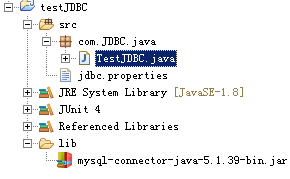
首先看一下專案結構:在當前套件下有一個 jdbc.properties 配置檔案,專案根目錄下的 lib 資料夾存放 MySQL 驅動 JAR 包(mysql-connector-java-5.1.39-bin.jar)。
Driver 是一個介面,資料庫廠商必須提供實現。我們可以透過 Driver 實現類的物件來獲取資料庫連線。
@Test
public void testDriver() throws Exception {
    // 1. 建立 Driver 實現類的物件
    Driver driver = new com.mysql.jdbc.Driver();

    // 2. 準備連線資訊:url、user、password
    String url = "jdbc:mysql://localhost:3306/test";
    Properties info = new Properties();
    info.put("user", "root");
    info.put("password", "123456");

    // 3. 呼叫 Driver.connect() 獲取連線
    Connection connection = driver.connect(url, info);
    System.out.println(connection); // com.mysql.jdbc.JDBC4Connection@73f712
}
為了讓程式更通用、不修改原始碼就能切換資料庫,我們將驅動類全名、URL、帳號、密碼放入配置檔案,透過反射動態載入。
# Oracle 範例
#driver=oracle.jdbc.driver.OracleDriver
#jdbcUrl=jdbc:oracle:thin:@localhost:1521:orcl
#user=scott
#password=java

# MySQL 實際配置
driver=com.mysql.jdbc.Driver
jdbcUrl=jdbc:mysql://localhost:3306/test
user=root
password=123456
public Connection getConnection() throws Exception {
    String driverClass = null;
    String jdbcUrl = null;
    String user = null;
    String password = null;

    // 讀取類路徑下的 jdbc.properties
    InputStream in = getClass().getClassLoader().getResourceAsStream("jdbc.properties");
    Properties properties = new Properties();
    properties.load(in);

    driverClass = properties.getProperty("driver");
    jdbcUrl = properties.getProperty("jdbcUrl");
    user = properties.getProperty("user");
    password = properties.getProperty("password");

    // 透過反射建立 Driver 物件
    Driver driver = (Driver) Class.forName(driverClass).newInstance();

    Properties info = new Properties();
    info.put("user", user);
    info.put("password", password);

    // 獲取資料庫連線
    Connection connection = driver.connect(jdbcUrl, info);
    return connection;
}

@Test
public void testGetConnection() throws Exception {
    System.out.println(getConnection()); // com.mysql.jdbc.JDBC4Connection@1556938
}
這樣當需要連線其他資料庫時,只需修改屬性檔案即可,完全不需要動到 Java 程式碼,實現了真正的解耦。