前後端分離架構下,Controller 直接返回 JSON 是標準做法。Spring MVC 內置 `HttpMessageConverter` 機制,配合 Jackson 庫可實現對象自動序列化為 JSON。本文詳述 Maven 依賴、XML 配置、前端調用、Controller 寫法全鏈路。
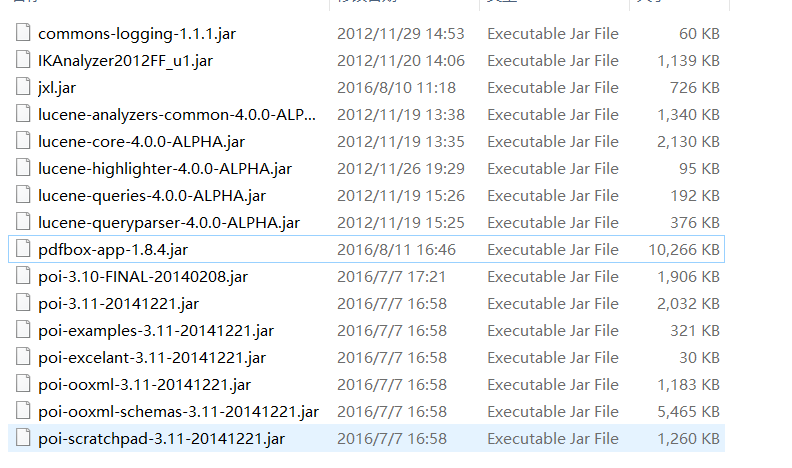
<dependencies>
    <!-- Jackson 核心 (Spring MVC 4.x 默認整合) -->
    <dependency>
        <groupId>com.fasterxml.jackson.core</groupId>
        <artifactId>jackson-databind</artifactId>
        <version>2.9.10</version>
    </dependency>
    <!-- 兼容舊版 codehaus 依賴 (可選) -->
    <dependency>
        <groupId>org.codehaus.jackson</groupId>
        <artifactId>jackson-core-asl</artifactId>
        <version>1.9.13</version>
    </dependency>
    <dependency>
        <groupId>org.codehaus.jackson</groupId>
        <artifactId>jackson-mapper-asl</artifactId>
        <version>1.9.13</version>
    </dependency>
</dependencies>
建議統一使用 `com.fasterxml.jackson` 系列 (Jackson 2.x),`codehaus` 為 1.x 老版本,僅為兼容歷史代碼保留。
<beans xmlns:mvc="https://www.springframework.org/schema/mvc" ...>
    <!-- 1. 啟用註解驅動,自動註冊 RequestMappingHandlerMapping/Adapter 及 默認 HttpMessageConverter -->
    <mvc:annotation-driven>
        <mvc:message-converters>
            <!-- 2. 顯式配置 MappingJackson2HttpMessageConverter (Jackson 2.x) -->
            <bean class="org.springframework.http.converter.json.MappingJackson2HttpMessageConverter">
                <property name="supportedMediaTypes">
                    <list>
                        <value>application/json;charset=UTF-8</value>
                        <value>text/html;charset=UTF-8</value>
                    </list>
                </property>
                <!-- 可選:自定義 ObjectMapper -->
                <property name="objectMapper">
                    <bean class="com.fasterxml.jackson.databind.ObjectMapper">
                        <property name="dateFormat">
                            <bean class="java.text.SimpleDateFormat">
                                <constructor-arg value="yyyy-MM-dd HH:mm:ss"/>
                            </bean>
                        </property>
                        <property name="serializationInclusion">
                            <value type="com.fasterxml.jackson.annotation.JsonInclude.Include">NON_NULL</value>
                        </property>
                    </bean>
                </property>
            </bean>
        </mvc:message-converters>
    </mvc:annotation-driven>
</beans>
若不顯式配置 `
<script src="https://cdn.bootcdn.net/ajax/libs/jquery/3.6.0/jquery.min.js"></script>
<script>
function loadUsers() {
    $.ajax({
        type: "POST",
        url: "/api/users",           // 對應 Controller @RequestMapping
        dataType: "json",            // 預期返回 JSON
        contentType: "application/json", // 發送 JSON 時需設置
        data: JSON.stringify({ page: 1, size: 10 }), // 發送複雜對象時
        success: function(resp) {
            // resp 為 JSON 對象/數組,直接操作
            var html = '<table><tr><th>ID</th><th>用戶名</th></tr>';
            $.each(resp, function(i, user) {
                html += '<tr><td>' + user.id + '</td><td>' + user.username + '</td></tr>';
            });
            html += '</table>';
            $('#userTable').html(html);
        },
        error: function(xhr) {
            alert('加載失敗: ' + xhr.status);
        }
    });
}
</script>
@RestController // 組合 @Controller + @ResponseBody
@RequestMapping("/api")
public class UserController {

    @Autowired private UserService userService;

    @GetMapping("/users")
    public List listUsers(@RequestParam(defaultValue = "1") int page,
                                @RequestParam(defaultValue = "10") int size) {
        return userService.findPage(page, size); // 直接返回 List,自動序列化為 JSON 數組
    }

    @GetMapping("/users/{id}")
    public User getUser(@PathVariable Long id) {
        return userService.findById(id); // 返回單對象,序列化為 JSON 對象
    }

    @PostMapping("/users")
    public Map createUser(@RequestBody User user) {
        User saved = userService.save(user);
        Map resp = new HashMap<>();
        resp.put("code", 200);
        resp.put("message", "創建成功");
        resp.put("data", saved);
        return resp; // Map 也可直接序列化
    }
}
@Controller
@RequestMapping("/legacy")
public class LegacyController {

    @RequestMapping(value = "/data", method = RequestMethod.GET)
    public ModelAndView getData() {
        Map map = new HashMap<>();
        map.put("user1", new User(1, "Alice"));
        map.put("user2", new User(2, "Bob"));
        // 指定視圖為 MappingJackson2JsonView,模型數據直接轉 JSON
        return new ModelAndView(new MappingJackson2JsonView(), map);
    }
}
| 問題 | 原因 | 解決 |
|---|---|---|
| 返回中文亂碼 | 默認 ISO-8859-1 編碼 | 配置 produces="application/json;charset=UTF-8" 或 MappingJackson2HttpMessageConverter supportedMediaTypes 包含 UTF-8 |
| 日期格式為時間戳 | Jackson 默認序列化 Date 為長整數 | ObjectMapper 設置 dateFormat 或 @JsonFormat(pattern="yyyy-MM-dd HH:mm:ss") |
| 循環引用報錯 | 雙向關聯 (User→Order→User) | @JsonIgnore / @JsonManagedReference + @JsonBackReference / 配置 ObjectMapper.setSerializationInclusion |
| Null 字段不輸出 | 默認輸出 null | ObjectMapper.setSerializationInclusion(JsonInclude.Include.NON_NULL) |
| 406 Not Acceptable | 請求 Accept 頭不匹配 | 前端設置 dataType: "json" 或 Accept: application/json |
掌握 Spring MVC + Jackson JSON 整合,是構建現代 RESTful API 的核心基礎技能。