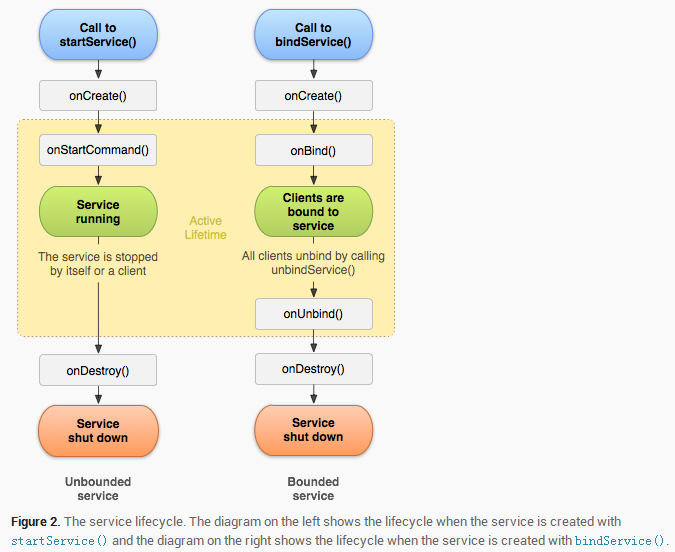
Service(服務)是 Android 四大組件之一,專門用於在後台執行長時間運行的操作,不提供用戶界面。根據啟動方式不同,Service 分為啟動式服務和綁定式服務,兩者生命周期、使用場景、通信機制截然不同。本文將通過原理講解、生命周期圖解、完整代碼實戰,幫助你徹底掌握 Service 核心用法。
| 維度 | 啟動式服務 | 綁定式服務 |
|---|---|---|
| 啟動方式 | startService(Intent) | bindService(Intent, ServiceConnection, flags) |
| 生命周期 | 獨立於調用者,可長期運行 | 依附於調用者,所有客戶端解綁即銷毀 |
| 停止方式 | stopSelf() 或 stopService() | unbindService() |
| 通信方式 | 無直接通信通道(可用廣播/EventBus) | IBinder 接口雙向通信 |
| 多客戶端 | 多次 startService 不創建多實例 | 支持多客戶端同時綁定 |
| 典型場景 | 音樂播放、文件下載、定時任務 | 進程間通信 (IPC)、客戶端需頻繁調用服務方法 |
package com.jredu.helloworld.service;

import android.app.Service;
import android.content.Intent;
import android.media.MediaPlayer;
import android.os.IBinder;

public class MyService extends Service {
    private MediaPlayer mediaPlayer;

    @Override
    public void onCreate() {
        super.onCreate();
        // 初始化媒體播放器,載入原始資源
        mediaPlayer = MediaPlayer.create(this, R.raw.bieli); // 注意資源文件名建議用英文
    }

    @Override
    public int onStartCommand(Intent intent, int flags, int startId) {
        // 啟動式服務核心邏輯入口
        mediaPlayer.start();
        // 返回標識決定服務被殺死後是否重建
        // START_STICKY: 被殺死後重建,intent 為 null
        // START_NOT_STICKY: 不重建
        // START_REDELIVER_INTENT: 重建並重傳最後一個 intent
        return super.onStartCommand(intent, flags, startId);
    }

    @Override
    public void onDestroy() {
        super.onDestroy();
        mediaPlayer.stop(); // 釋放資源
        mediaPlayer.release();
    }

    @Override
    public IBinder onBind(Intent intent) {
        // 啟動式服務通常不綁定,返回 null
        return null;
    }
}
// 啟動服務
Intent startIntent = new Intent(this, MyService.class);
startService(startIntent);

// 停止服務
Intent stopIntent = new Intent(this, MyService.class);
stopService(stopIntent);
public class MyService extends Service {
    private MediaPlayer mediaPlayer;

    // 自定義 Binder,暴露服務實例給客戶端
    public class MyBinder extends Binder {
        public MyService getService() {
            return MyService.this;
        }
    }
    private final IBinder binder = new MyBinder();

    @Override
    public IBinder onBind(Intent intent) {
        mediaPlayer.start();
        return binder; // 返回自定義 Binder
    }

    @Override
    public boolean onUnbind(Intent intent) {
        mediaPlayer.stop();
        return super.onUnbind(intent); // 返回 true 表示支持 rebind
    }

    // 業務方法供客戶端調用
    public void play() { mediaPlayer.start(); }
    public void pause() { mediaPlayer.pause(); }
    public boolean isPlaying() { return mediaPlayer.isPlaying(); }
}
public class ServiceActivity extends AppCompatActivity {
    private Button btnBind, btnUnbind, btnStart, btnStop;
    private MyService myService;
    private boolean isBound = false;

    // ServiceConnection 監聽綁定狀態
    private final ServiceConnection connection = new ServiceConnection() {
        @Override
        public void onServiceConnected(ComponentName name, IBinder service) {
            // 獲取服務實例,建立通信通道
            MyService.MyBinder binder = (MyService.MyBinder) service;
            myService = binder.getService();
            isBound = true;
            // 現在可以直接調用 myService.play() 等方法
        }

        @Override
        public void onServiceDisconnected(ComponentName name) {
            // 異常斷開(如服務崩潰),不會在正常 unbind 時調用
            isBound = false;
            myService = null;
        }
    };

    @Override
    protected void onCreate(Bundle savedInstanceState) {
        super.onCreate(savedInstanceState);
        setContentView(R.layout.activity_service);

        btnBind = findViewById(R.id.bind);
        btnUnbind = findViewById(R.id.unbind);
        btnStart = findViewById(R.id.start);
        btnStop = findViewById(R.id.stop);

        btnBind.setOnClickListener(v -> {
            Intent intent = new Intent(this, MyService.class);
            // BIND_AUTO_CREATE: 服務不存在時自動創建
            bindService(intent, connection, Context.BIND_AUTO_CREATE);
        });

        btnUnbind.setOnClickListener(v -> {
            if (isBound) {
                unbindService(connection);
                isBound = false;
                myService = null;
            }
        });

        btnStart.setOnClickListener(v ->
            startService(new Intent(this, MyService.class)));

        btnStop.setOnClickListener(v ->
            stopService(new Intent(this, MyService.class)));
    }

    @Override
    protected void onDestroy() {
        super.onDestroy();
        if (isBound) {
            unbindService(connection); // 防止內存洩漏
        }
    }
}
實際開發中常見場景:音樂播放器需後台持續播放(啟動式),同時 UI 需控制播放/暫停/進度(綁定式)。
// 先啟動,保證服務存活
startService(new Intent(this, MyService.class));
// 再綁定,獲取通信通道
bindService(intent, connection, Context.BIND_AUTO_CREATE);

// 停止時:先解綁,再停止服務
unbindService(connection);
stopService(new Intent(this, MyService.class));
關鍵點:onStartCommand 返回 START_STICKY 確保服務被殺死後自動重啟;onUnbind 返回 true 支持 onRebind 重新綁定。
<service
    android:name=".service.MyService"
    android:enabled="true"
    android:exported="false" />  // exported=false 僅應用內部使用,跨進程需 true 並配置 intent-filter
IntentService(已棄用,建議用 JobIntentService 或 WorkManager)unbindService,否則 Service 持有 Activity 引用導致無法回收startForeground() 顯示通知,否則幾分鐘後被系統殺死AIDL 或 Messenger 實現多進程調用onDestroy 中釋放 MediaPlayer、關閉數據庫、取消定時器等Service 是 Android 後台計算的核心組件。掌握啟動式服務的獨立生命周期與綁定式服務的 IBinder 通信機制,並根據業務場景靈活選擇或組合使用,是開發高質量 Android 應用的必備技能。現代 Android 開發中,配合 WorkManager(可延遲任務)、Foreground Service(長時任務)、LiveData/Flow(數據觀察)能構建更健壯的後台處理架構。