Eclipse WTP(Web Tools Platform)預設將編譯輸出 .class 文件放在專案根目錄下的 build/classes,而 Tomcat 運行時掃描的是 wtpwebapps/專案名/WEB-INF/classes。兩者路徑不一致導致類找不到,進而 404。本文詳細記錄修正發布部署路徑、Build Path 輸出目錄、Servlet 註解與 web.xml 雙重保險的完整流程。
package com.vastsum;
import jakarta.servlet.ServletException;
import jakarta.servlet.annotation.WebServlet;
import jakarta.servlet.http.HttpServlet;
import jakarta.servlet.http.HttpServletRequest;
import jakarta.servlet.http.HttpServletResponse;
import java.io.IOException;
@WebServlet("/hello")
public class HelloServlet extends HttpServlet {
@Override
protected void doGet(HttpServletRequest req, HttpServletResponse resp) throws ServletException, IOException {
resp.setContentType("text/html;charset=UTF-8");
resp.getWriter().write("Test Servlet OK
Time: " + new java.util.Date() + "
");
}
}
<?xml version="1.0" encoding="UTF-8"?>
<web-app version="3.1" xmlns="https://xmlns.jcp.org/xml/ns/javaee"
         xmlns:xsi="https://www.w3.org/2001/XMLSchema-instance"
         xsi:schemaLocation="https://xmlns.jcp.org/xml/ns/javaee
         https://xmlns.jcp.org/xml/ns/javaee/web-app_3_1.xsd">

    <servlet>
        <servlet-name>HelloServlet</servlet-name>
        <servlet-class>com.vastsum.HelloServlet</servlet-class>
    </servlet>

    <servlet-mapping>
        <servlet-name>HelloServlet</servlet-name>
        <url-pattern>/hello</url-pattern>
    </servlet-mapping>

</web-app>
Run As → Run on Server → 選擇 Tomcat → Finish。https://localhost:8080/MyWeb/hello。ClassNotFoundException: com.vastsum.HelloServlet。工作空間目錄結構: MyWeb/ ├── build/ <-- Eclipse 預設編譯輸出 │ └── classes/ │ └── com/vastsum/HelloServlet.class ├── src/ │ └── com/vastsum/HelloServlet.java ├── WebContent/ <-- Web 根目錄 │ ├── WEB-INF/ │ │ ├── web.xml │ │ ├── classes/ <-- 空!Tomcat 實際掃描這裡 │ │ └── lib/ │ └── index.jsp └── .settings/
Tomcat 類加載器只掃描 WEB-INF/classes 與 WEB-INF/lib,不認識 build/classes。
Remove 專案 MyWeb。Clean(清理 wtpwebapps 暫存)。Clean Tomcat Work Directory(清理 JSP 編譯緩存)。Tomcat v9.0 Server at localhost 打開編輯器。wtpwebapps(預設即可)。原理:此模式下,Eclipse 將專案以 Context 形式發布到 .metadata/.plugins/org.eclipse.wst.server.core/tmp0/wtpwebapps/MyWeb,並自動同步 WebContent 內容。
Properties → Java Build Path → Source 標籤。MyWeb/src → Default output folder 點擊 Browse...。MyWeb/WebContent/WEB-INF/classes → OK。效果:Eclipse 編譯 src 下的 .java 直接輸出 .class 到 WebContent/WEB-INF/classes,Tomcat 類加載器即可直接發現。
Run As → Run on Server(或 Servers 視圖右鍵 Tomcat → Restart)。ClassNotFoundException,啟動耗時正常。https://localhost:8080/MyWeb/hello → 顯示「Test Servlet OK」。| 問題 | 原因 | 解決 |
|---|---|---|
| 新建 Dynamic Web Project 無 web.xml | Eclipse 新版預設 Servlet 3.0+ 註解式,不強制生成 | New Web Project 向導最後一步勾選 "Generate web.xml deployment descriptor" |
| 修改 Build Path 後類仍不生效 | Eclipse 增量編譯緩存 | 專案右鍵 → Clean → 勾選 Start a build immediately;或手動刪除 WebContent/WEB-INF/classes 重新 Build |
| JSP 修改不生效 | Tomcat 緩存編譯後的 Servlet | Server 編輯器 → Server Options 勾選 Serve modules without publishing;或 Clean Tomcat Work Directory |
| 中文亂碼 | 編碼未統一 | 1. web.xml 添加 <filter> CharacterEncodingFilter UTF-8 true2. server.xml Connector 加 URIEncoding="UTF-8"3. JSP 頁面 <%@ page contentType="text/html;charset=UTF-8" %> |
| Servlet 404 但類文件存在 | url-pattern 不匹配 / Context Root 錯誤 | 檢查 @WebServlet("/hello")、web.xml url-pattern、專案屬性 Web Project Settings → Context root |
| Tomcat 啟動端口衝突 | 8080 被佔用 | netstat -ano | findstr :8080 找 PID 殺進程,或修改 server.xml Connector port |
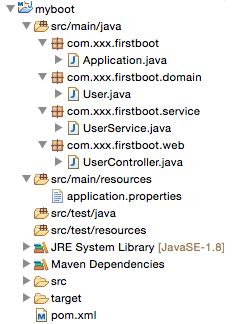
# 推薦:使用 Maven 專案結構,Eclipse 導入即可自動配置輸出目錄
MyWeb/
├── src/main/java/           <-- Java 源碼
├── src/main/resources/      <-- 資源文件
├── src/main/webapp/         <-- WebContent 等價 (WEB-INF/web.xml, jsp, 靜態資源)
├── src/test/java/           <-- 測試代碼
├── pom.xml                  <-- 依賴管理、打包插件
└── target/                  <-- 編譯輸出 (自動映射到 WEB-INF/classes)
Eclipse 安裝 m2e (Maven Integration) 插件(新版內置),File → Import → Existing Maven Projects 選擇專案根目錄,自動識別 src/main/webapp 為部署根目錄,target/classes 映射到 WEB-INF/classes,**零手動配置**。
WebContent/WEB-INF/classes。ClassNotFoundException、NoClassDefFoundError;wtpwebapps 實際發布目錄檢查 WEB-INF/classes 是否有 .class 文件。掌握 Eclipse WTP 發布機制與 Build Path 映射關係,是 Java Web 開發者從「能跑通」走向「理解原理、快速排錯」的必經之路。建議將本文操作步驟製成團隊《Eclipse 專案導入檢查清單》,新專案、新成員零門檻上手。