InputStream/OutputStream,最小單位 byte,適用圖片、視頻、二進制文件。Reader/Writer,最小單位 char(2 字節),自動處理編碼轉換,適用文本文件。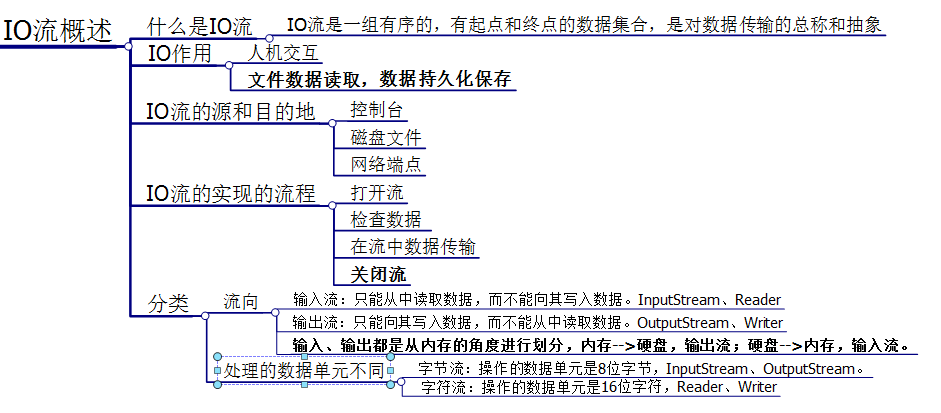
package lib;

import java.io.*;

public class CharStreamDemo {
    private final File file = new File("F:\\test.txt");

    // 寫入:PrintWriter + FileWriter,true=追加模式
    public void write() throws IOException {
        try (PrintWriter pw = new PrintWriter(new FileWriter(file, true))) {
            pw.write("測試寫入字符串到文件中2");
        }
    }

    // 讀取:BufferedReader 按行讀取
    public String read() throws IOException {
        StringBuilder sb = new StringBuilder();
        try (BufferedReader br = new BufferedReader(new FileReader(file))) {
            String line;
            while ((line = br.readLine()) != null) {
                sb.append(line);
            }
        }
        return sb.toString();
    }

    public static void main(String[] args) throws IOException {
        CharStreamDemo demo = new CharStreamDemo();
        demo.write();
        System.out.println("文件內容:" + demo.read());
    }
}
關鍵點:try-with-resources 自動關閉流(JDK 7+),FileWriter(file, true) 追加寫入。
package com.file.test2;

import java.io.*;

public class ByteStreamCopy {
    public static void main(String[] args) throws IOException {
        File src = new File("D:\\test.txt");      // 必須存在
        File dest = new File("D:\\test2.txt");    // 目標文件
        byte[] buffer = new byte[1024];           // 1KB 緩衝區
        int len;

        try (FileInputStream in = new FileInputStream(src);
             FileOutputStream out = new FileOutputStream(dest)) {
            while ((len = in.read(buffer)) != -1) {
                out.write(buffer, 0, len);        // 精確寫入讀取長度
            }
            // 若需控制台輸出複製內容:
            // System.out.println(new String(buffer, 0, len));
        }
    }
}
注意:源文件必須存在,否則拋 FileNotFoundException。字節流不處理編碼,直接搬運二進制。
| 場景 | 推薦流 | 原因 |
|---|---|---|
| 文本配置、日志、源碼 | 字符流 | 自動編碼轉換,按行處理方便 |
| 圖片、音視頻、壓縮包 | 字節流 | 無編碼概念,逐字節完整複製 |
| 混合場景 | 字節流 + InputStreamReader/OutputStreamWriter | 字節流做傳輸,字符流做解碼 |
close() 導致文件鎖定或資源洩漏 → 用 try-with-resources。new String(bytes) 會用平台默認編碼,跨平台亂碼 → 顯式指定 StandardCharsets.UTF_8。