native 方法javac 編譯生成 .classjavah 生成 C/C++ 頭文件public class TestHello {
static {
System.loadLibrary("TestHello"); // 加載 TestHello.dll (Windows) 或 libTestHello.so (Linux)
}
public static native int add(int a, int b);
public static void main(String[] args) {
int c = add(2, 5);
System.out.println("result:::::" + c);
}
}
javac TestHello.java
javah TestHello
生成 TestHello.h,包含 JNI 規範的函數聲明:
/* DO NOT EDIT THIS FILE - it is machine generated */
#include <jni.h>
#ifndef _Included_TestHello
#define _Included_TestHello
#ifdef __cplusplus
extern "C" {
#endif
JNIEXPORT jint JNICALL Java_TestHello_add(JNIEnv *, jclass, jint, jint);
#ifdef __cplusplus
}
#endif
#endif
Visual Studio 2010:File → New → Project → Win32 Project → DLL → TestHello
項目屬性 → Configuration Properties → C/C++ → General → Additional Include Directories 添加:
%JAVA_HOME%\include%JAVA_HOME%\include\win32 (Windows)TestHello.h)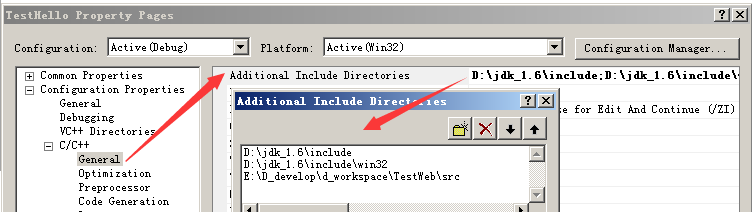
// TestHello.cpp : Defines the exported functions for the DLL application.
#include "stdafx.h"
#include "TestHello.h"
#include "dllApi.h"

JNIEXPORT jint JNICALL Java_TestHello_add(JNIEnv *env, jclass obj, jint a, jint b) {
    int var = 0;
    dllApi* test = new dllApi();
    var = test->DLL_API_ADD(a, b);
    delete test;
    return var;
}
#pragma once
class dllApi {
public:
    dllApi(void);
    ~dllApi(void);
    int DLL_API_ADD(int, int);
    int DLL_API_SUB(int, int);
    int DLL_API_MUL(int, int);
    int DLL_API_DIV(int, int);
};
#include "StdAfx.h"
#include "dllApi.h"

dllApi::dllApi(void) {}
dllApi::~dllApi(void) {}

int dllApi::DLL_API_ADD(int a, int b) { return (a + b); }
int dllApi::DLL_API_SUB(int a, int b) { return (a - b); }
int dllApi::DLL_API_MUL(int a, int b) { return (a * b); }
int dllApi::DLL_API_DIV(int a, int b) { return (a / b); }
VS 中 Build → Build Solution,生成 TestHello.dll(Debug/Release 目錄)。
# 將 dll 複製到 class 文件同級目錄
copy TestHello.dll .\

# 運行
java TestHello
# 輸出:result:::::7
Java_類名_方法名(包名用下劃線分隔)jint↔int、jdouble↔double、jstring↔String、jobject↔ObjectThrowNew 轉換System.loadLibrary 自動加前綴 lib 和後綴 .soGetIntArrayElements/ReleaseIntArrayElementsGetFieldID/SetIntField、GetMethodID/CallVoidMethodJNI_OnLoad 動態註冊,避免命名規範限制