記錄 JSP/Servlet 開發中常遇到的三個實戰問題與解決方案,涵蓋靜態資源路徑解析、跨平台 IP 獲取 Bug 修復、以及 Ajax 請求方法支援配置。
將靜態 HTML 直接複製到 JSP 時,相對路徑常失效。需動態取得專案上下文路徑構建基礎 URL。
<%
    String path = request.getContextPath();
    String basePath = request.getScheme() + "://"
                    + request.getServerName() + ":"
                    + request.getServerPort() + path + "/";
%>
<img src="<%=basePath%>/Icons/VerifyCode.png" />
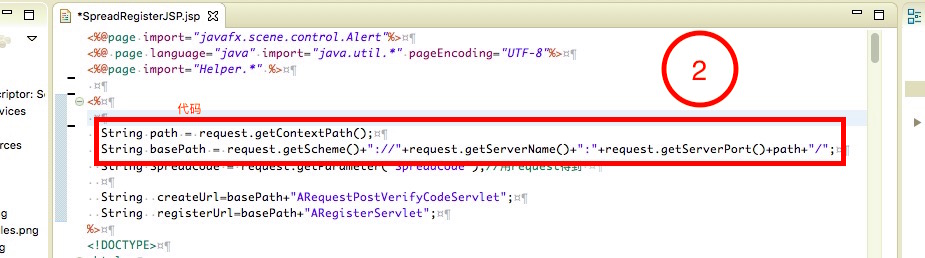
關鍵點:basePath 包含協定、域名、埠號與專案名,確保任何目錄層級的 JSP 都能正確定位資源。
在 Mac OS 開發環境下,標準 IP 獲取鏈條最後回退到 InetAddress.getLocalHost().getHostAddress() 時會拋出異常:this web application instance has been stopped already. Could not load [java.net.InetAddress]。
String ip = request.getHeader("X-Forwarded-For");
if (ip == null || ip.isEmpty() || "unknown".equalsIgnoreCase(ip)) {
    ip = request.getHeader("Proxy-Client-IP");
}
// ... 多層代理頭檢查 ...
if (ip == null || ip.isEmpty() || "unknown".equalsIgnoreCase(ip)) {
    ip = request.getRemoteAddr();
}
if ("127.0.0.1".equals(ip) || "0:0:0:0:0:0:0:1".equals(ip)) {
    try {
        ip = InetAddress.getLocalHost().getHostAddress(); // 這行在 Mac Tomcat 會炸
    } catch (UnknownHostException e) { }
}
在 <Host> 節點下添加 <Context> 明確指定專案路徑,避免類載入器問題:
<Context path="/Servlet" docBase="/Servlet" debug="0" reloadable="true"/>
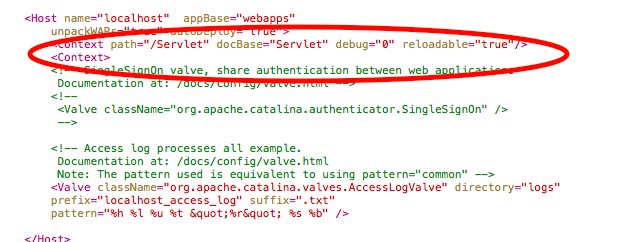
原理:明確部署上下文讓類載入器正確初始化,避免應用已停止卻仍嘗試載入類的競態條件。
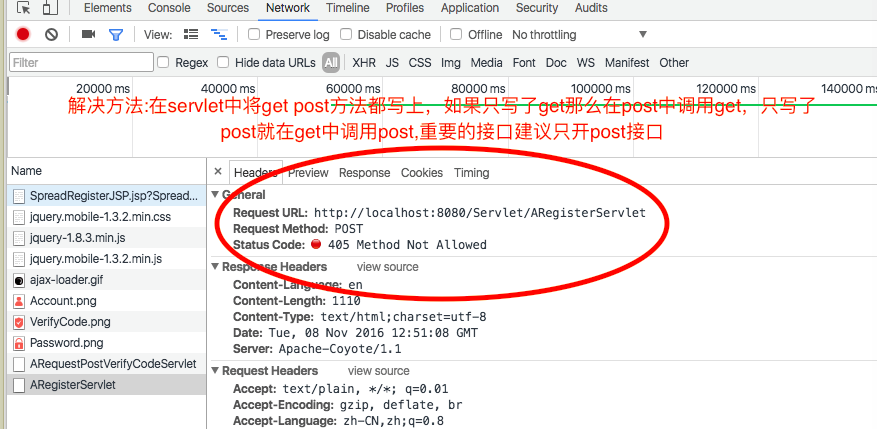
錯誤訊息:Request method 'POST' not supported。原因是 Servlet 僅實作 doGet() 或 doPost(),而前端 Ajax 使用對方未支援的方法。
doGet() 呼叫 doPost(),或反之,統一邏輯入口。@WebServlet("/api/user")
public class UserServlet extends HttpServlet {
protected void doPost(HttpServletRequest req, HttpServletResponse resp) {
// 核心業務邏輯
}
protected void doGet(HttpServletRequest req, HttpServletResponse resp) {
// 安全考量:GET 僅轉發或拒絕
// doPost(req, resp); // 若需支援 GET
resp.sendError(HttpServletResponse.SC_METHOD_NOT_ALLOWED);
}
}
JSP/Servlet 開發雖屬傳統技術,但在維護舊系統或嵌入式場景仍常見。掌握動態路徑構建、跨平台 IP 獲取容錯、RESTful 風格的方法限制三大實戰技巧,能顯著減少部署環境差異導致的疑難雜症。