在 Java AWT(Abstract Window Toolkit)中,Panel 是一個基礎且重要的容器類別。它本身無法獨立顯示,必須被放置在其他容器(如 Frame、Applet 或另一個 Panel)中才能使用。Panel 主要用於將相關的組件分組,並為它們提供一個獨立的佈局空間。
FlowLayout 作為佈局管理器。public class PanelTest extends Frame {
public static void main(String[] args) {
Frame f = new Frame();
Panel p = new Panel();
p.add(new TextField(20));
p.add(new Button("百度"));
f.add(p);
f.setBounds(50, 50, 300, 300);
f.setVisible(true);
}
}
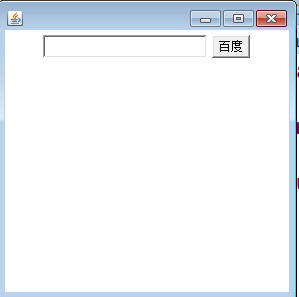
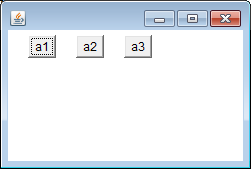
FlowLayout 是最簡單的佈局管理器,組件像流水一樣從左到右、從上到下依序排列。當遇到容器邊界時會自動換行。它是 Panel 的預設佈局管理器。
FlowLayout():使用預設置中對齊、預設水平與垂直間距(5 像素)。FlowLayout(int align):指定對齊方式(LEFT、CENTER、RIGHT),間距使用預設值。FlowLayout(int align, int hgap, int vgap):完整指定對齊方式、水平間距與垂直間距。public class FlowLayoutTest {
public static void main(String[] args) {
Frame f = new Frame();
f.setLayout(new FlowLayout(FlowLayout.LEFT, 20, 5));
Button b1 = new Button("a1");
Button b2 = new Button("a2");
Button b3 = new Button("a3");
f.add(b1);
f.add(b2);
f.add(b3);
f.pack();
f.setVisible(true);
}
}
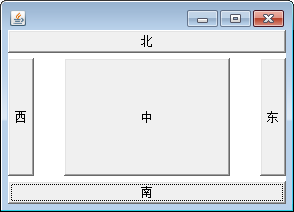
BorderLayout 將容器劃分為五個區域:NORTH(北)、SOUTH(南)、WEST(西)、EAST(東)、CENTER(中)。每個區域只能放置一個組件,若添加多個則後者覆蓋前者。它是 Frame 與 Dialog 的預設佈局管理器。
BorderLayout():無間距。BorderLayout(int hgap, int vgap):指定水平與垂直間距。public class BorderLayoutTest extends Frame {
public static void main(String[] args) {
Frame f = new Frame();
f.setLayout(new BorderLayout(30, 5));
f.add(new Button("南"), BorderLayout.SOUTH);
f.add(new Button("北"), BorderLayout.NORTH);
f.add(new Button("中")); // 預設加到 CENTER
f.add(new Button("東"), BorderLayout.EAST);
f.add(new Button("西"), BorderLayout.WEST);
f.pack();
f.setVisible(true);
}
}
GridLayout 將容器劃分為指定行數與列數的矩形網格,每個格子大小相等,組件按順序填入。適合製作計算機按鍵、表格式介面等規則佈局。
GridLayout(int rows, int cols):指定行數與列數,間距為 0。GridLayout(int rows, int cols, int hgap, int vgap):指定行、列與間距。(本文原始內容至此結束,GridLayout 程式碼範例未提供,讀者可自行嘗試。)
掌握 AWT 的容器與佈局管理器是建立桌面應用程式的基礎。實務上常將多種佈局管理器巢狀使用(例如在 BorderLayout 的各區域再放入使用 FlowLayout 或 GridLayout 的 Panel),以達成複雜的介面需求。雖然現代開發多改用 Swing 或 JavaFX,但理解 AWT 佈局機制有助於深入掌握 Java GUI 程式設計的核心邏輯。