在企業級應用開發中,教學行程表、專案排程等場景常需要以「周」為單位呈現日期資料。本文提供一個完整的 WeekCalendarUtils 工具類,能依指定起迄日期生成結構化的週曆資料,並包含年、月、週、日的多層級模型,且自動統計每年、每月的週數。文末另附兩種 JSP 前端渲染範例:表格式與日曆式,滿足不同 UI 需求。
該類採用靜態方法 get(begin, end, hasMonFirstWeekDay) 回傳 Map<Integer, YearModel>,鍵為年份,值為包含月份、週次、日期的完整物件圖。內部定義四個靜態內部類:
關鍵邏輯:遍歷日期區間,利用 Calendar.WEEK_OF_MONTH 判斷屬於當月第幾週,組合鍵 year_month_weekOfMonth 區分週次;同時依 hasMonFirstWeekDay 參數決定週一或週日為每週第一天。
 1 import java.util.Calendar;
 2 import java.util.Date;
 3 import java.util.Map;
 4
 5 import org.apache.commons.lang3.builder.ReflectionToStringBuilder;
 6 import org.apache.commons.lang3.builder.ToStringStyle;
 7 import org.apache.commons.lang3.time.DateFormatUtils;
 8 import org.apache.commons.lang3.time.DateUtils;
 9
10 import com.google.common.collect.Maps;
11
12 /**
13  * <b>function:</b> 週曆
14  * @author hoojo
15  * @createDate 2016-11-21
16  */
public abstract class WeekCalendarUtils {
    public final static String DATE_FORMAT = "yyyy-MM-dd";

    private static String getWeekDay(Calendar cal) { /* ... */ }
    private static String getSimpleWeekDay(Calendar cal) { /* ... */ }
    public static String[] getWeekDays(boolean hasMonFirstWeekDay) { /* ... */ }

    /**
     * 取得週曆資料
     * @param begin 起始日期字串
     * @param end 結束日期字串
     * @param hasMonFirstWeekDay 是否週一為每週第一天
     * @return 年份對應 YearModel 的有序 Map
     */
    public static Map<Integer, YearModel> get(String begin, String end, boolean hasMonFirstWeekDay) {
        Map<Integer, YearModel> years = Maps.newLinkedHashMap();
        Date beginDate = null, endDate = null;
        try {
            beginDate = DateUtils.parseDate(begin, DATE_FORMAT);
            endDate = DateUtils.parseDate(end, DATE_FORMAT);
            if (beginDate.compareTo(endDate) > 0) return null;

            int weekCount = 0, monthWeekCount = 0;
            do {
                Calendar cal = DateUtils.toCalendar(beginDate);
                if (hasMonFirstWeekDay) cal.setFirstDayOfWeek(Calendar.MONDAY);

                Map<Integer, MonthModel> months = Maps.newLinkedHashMap();
                int year = cal.get(Calendar.YEAR);
                YearModel yearModel = years.computeIfAbsent(year, y -> {
                    weekCount = 0;
                    return new YearModel(y, y + "年", months);
                });
                months = yearModel.getMonths();

                Map<String, WeekModel> weeks = Maps.newLinkedHashMap();
                int month = cal.get(Calendar.MONTH) + 1;
                MonthModel monthModel = months.computeIfAbsent(month, m -> {
                    monthWeekCount = 0;
                    return new MonthModel(m, year + "年" + m + "月", weeks);
                });
                weeks = monthModel.getWeeks();

                Map<String, DayModel> days = Maps.newLinkedHashMap();
                int weekInMonth = cal.get(Calendar.WEEK_OF_MONTH);
                String weekKey = cal.getWeekYear() + "_" + month + "_" + weekInMonth;
                WeekModel weekModel = weeks.computeIfAbsent(weekKey, k -> {
                    monthWeekCount++; weekCount++;
                    monthModel.setWeekCount(monthWeekCount);
                    yearModel.setWeekCount(weekCount);
                    return new WeekModel(weekInMonth, month + "月第" + weekInMonth + "周", days);
                });
                days = weekModel.getDays();

                String weekDay = getWeekDay(cal);
                days.put(weekKey + "_" + weekDay,
                        new DayModel(cal.get(Calendar.DAY_OF_MONTH), weekDay, getSimpleWeekDay(cal), beginDate));

                beginDate = DateUtils.addDays(beginDate, 1);
            } while (beginDate.compareTo(endDate) <= 0);
        } catch (Exception e) { e.printStackTrace(); }
        return years;
    }

    // 重載接受 Date 參數的版本
    public static Map<Integer, YearModel> get(Date beginDate, Date endDate, boolean hasMonFirstWeekDay) {
        try {
            return get(DateFormatUtils.format(beginDate, DATE_FORMAT),
                       DateFormatUtils.format(endDate, DATE_FORMAT), hasMonFirstWeekDay);
        } catch (Exception e) { e.printStackTrace(); }
        return null;
    }

    // 內部模型類別 YearModel, MonthModel, WeekModel, DayModel 略...
    public static void main(String[] args) {
        System.out.println(get("2016-06-01", "2017-07-03", false));
    }
}
適用於需要完整列出每週七天日期的場景,利用 JSTL <c:forEach> 巢狀迭代 Year → Month → Week,並以 rowspan 合併年、月儲存格。
 1 <style type="text/css">
 2 td { border: 1px solid black; background-color: #eeeeee; padding: 5px; text-align: center; }
 3 table { border-collapse: collapse; border-spacing: 5px; border: 1px solid black; }
 4 th { border: 1px solid black; background: #9DACBF; color: #FFF; height: 20px; line-height: 20px }
 5 .head { background-color: #ccc; font-weight: bold; }
 6 .head b { color: #337ab7; }
 7 .odd td { background-color: white; }
 8 .even td { background-color: lavender; }
 9 </style>
10
11 <table class="xuenianTable" width="100%" cellspacing="0" cellpadding="0" border="0">
12 <thead>
13 <tr height="55"><th colspan="10"> (${param.fileName })教學周歷</th></tr>
14 <tr height="35">
15 <th width="10%">年份</th><th width="10%">月份</th><th width="10%">周次</th>
16 <th width="10%">一</th><th width="10%">二</th><th width="10%">三</th>
17 <th width="10%">四</th><th width="10%">五</th><th width="10%">六</th><th width="10%">七</th>
18 </tr></thead><tbody>
19 <c:set var="weekCount" value="1"/>
20 <c:forEach items="${result }" varStatus="st" var="year">
21 <c:set var="yearFirst" value="true"/>
22 <c:forEach items="${year.value.months }" var="month">
23 <c:set var="monthFirst" value="true"/>
24 <c:forEach items="${month.value.weeks }" var="week">
25 <tr class="zhuanjafora ${st.index % 2 == 0 ? 'odd' : 'even' }">
26 <c:if test="${yearFirst }"><c:set var="yearFirst" value="false"/>
27 <td rowspan="${year.value.weekCount }" title="${year.value.displayName }">${year.value.displayName }</td></c:if>
28 <c:if test="${!monthFirst}"><c:set var="weekCount" value="${weekCount + 1 }"/></c:if>
29 <c:if test="${monthFirst }"><c:set var="monthFirst" value="false"/>
30 <td rowspan="${month.value.weekCount }" title="${month.value.displayName }">${month.value.monthName }月</td></c:if>
31 <td title="${week.value.displayName }">${weekCount }周</td>
32 <c:forEach items="${weekDays }" var="weekDay">
33 <c:set var="weekDayKey" value="${week.key}_${weekDay }"/>
34 <td title='${week.value.days[weekDayKey].displayName } <fmt:formatDate value="${week.value.days[weekDayKey].date }" pattern="yyyy-MM-dd"/>'>
35 ${week.value.days[weekDayKey].dayName }</td>
36 </c:forEach></tr>
37 </c:forEach></c:forEach></c:forEach>
38 </tbody></table>
確保每個月佔固定 6 列,不足週數以空白列填充,版面不錯位。核心在 fillWeekCount = 6 - month.value.weeks.size() 計算補列數,並在 rowspan 加上該值。
1 <div>
2 <c:set var="weekCount" value="1"/>
3 <c:forEach items="${result }" var="year">
4 <c:set var="yearFirst" value="true"/>
5 <c:forEach items="${year.value.months }" var="month" varStatus="st">
6 <c:set var="monthFirst" value="true"/>
7 <div><table border="0" cellspacing="0" cellpadding="0" width="100%" class="zhouli">
8 <thead><tr height="35">
9 <th width="10%">年份</th><th width="10%">月份</th><th width="10%">周次</th>
10 <th width="10%">一</th><th width="10%">二</th><th width="10%">三</th>
11 <th width="10%">四</th><th width="10%">五</th><th width="10%">六</th><th width="10%">七</th>
12 </tr></thead><tbody>
13 <c:set var="fillWeekCount" value="${6 - fn:length(month.value.weeks) }"/>
14 <c:forEach items="${month.value.weeks }" var="week">
15 <tr class="zhuanjafora ${st.index % 2 == 0 ? 'odd' : 'even' }">
16 <c:if test="${!monthFirst}"><c:set var="weekCount" value="${weekCount + 1 }"/></c:if>
17 <c:if test="${monthFirst }"><c:set var="monthFirst" value="false"/>
18 <td rowspan="${month.value.weekCount + fillWeekCount }" title="${year.value.displayName }">${year.value.yearName }</td>
19 <td rowspan="${month.value.weekCount + fillWeekCount }" title="${month.value.displayName }">${month.value.monthName }月</td>
20 </c:if>
21 <td title="${week.value.displayName }">${weekCount }周</td>
22 <c:forEach items="${weekDays }" var="weekDay">
23 <c:set var="weekDayKey" value="${week.key}_${weekDay }"/>
24 <td title='${week.value.days[weekDayKey].displayName } <fmt:formatDate value="${week.value.days[weekDayKey].date }" pattern="yyyy-MM-dd"/>'>
25 ${week.value.days[weekDayKey].dayName }</td>
26 </c:forEach></tr>
27 </c:forEach>
28 <c:forEach begin="1" end="${fillWeekCount }" var="i">
29 <tr class="zhuanjafora ${st.index % 2 == 0 ? 'odd' : 'even' }">
30 <td> </td><td> </td><td> </td><td> </td>
31 <td> </td><td> </td><td> </td></tr>
32 </c:forEach></tbody></table></div>
33 </c:forEach></c:forEach></div>
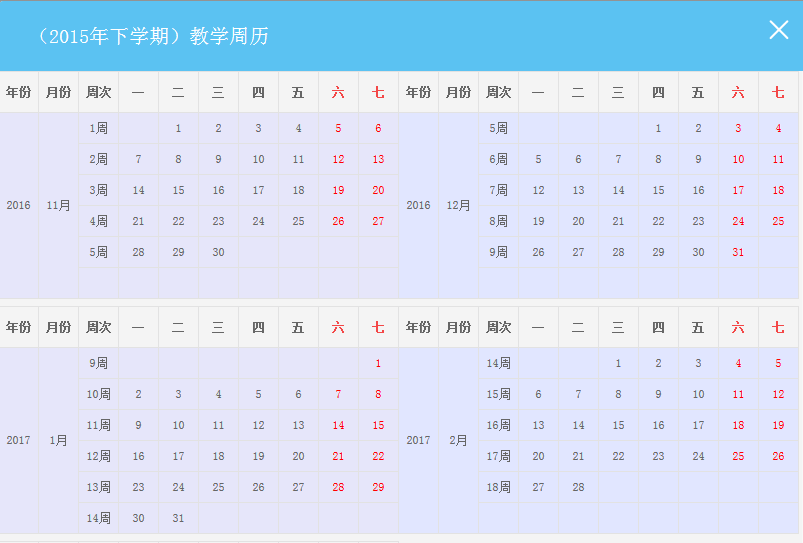
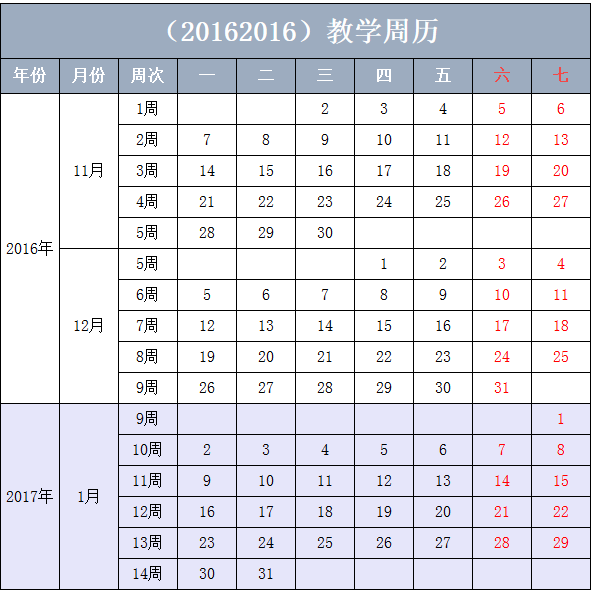

commons-lang3 与 guava 依賴。WeekCalendarUtils.get("2024-01-01", "2024-12-31", true) 取得資料,放入 request 屬性 result。