前端 DataGrid 配置
$("#dg").datagrid({
    url: 'StudentServlet',           // 數據源
    frozenColumns: [[                // 凍結列
        {field:'id', checkbox:true},
        {field:'sno', title:'學號', width:100, sortable:true}
    ]],
    columns: [[                      // 顯示列
        {field:'sname', title:'姓名', width:100},
        {field:'sclass', title:'班級', width:100, align:'right'},
        {field:'ssex', title:'性別', width:100, align:'center'},
        {field:'sbirthday', title:'生日', width:100, align:'center'}
    ]],
    fitColumns: true,
    striped: true,                   // 斑馬紋
    idField: 'sno',                  // 主鍵
    rownumbers: true,                // 行號
    singleSelect: false,
    pagination: true,                // 分頁欄
    pageList: [5,10,20],             // 頁大小選項
    pageSize: 5,                     // 默認頁大小
    remoteSort: false,               // 前端排序
    toolbar: [
        {iconCls:'icon-edit', text:'跳第2頁', handler:()=>$('#dg').datagrid('gotoPage',2)},
        {iconCls:'icon-edit', text:'跳第3頁', handler:()=>$('#dg').datagrid('gotoPage',3)}
    ]
});
Servlet 接收分頁參數
protected void doGet(HttpServletRequest req, HttpServletResponse resp)
        throws ServletException, IOException {
    req.setCharacterEncoding("UTF-8");
    resp.setCharacterEncoding("UTF-8");
    resp.setContentType("application/json;charset=UTF-8");

    String pageStr = req.getParameter("page");     // EasyUI 自動傳 page
    String rowsStr = req.getParameter("rows");     // EasyUI 自動傳 rows

    if (pageStr != null && rowsStr != null) {
        int page = Integer.parseInt(pageStr);
        int rows = Integer.parseInt(rowsStr);
        String json = new StudentService().getPageJSON(page, rows);
        resp.getWriter().println(json);
    } else {
        resp.getWriter().println("{\"total\":0,\"rows\":[]}");
    }
}
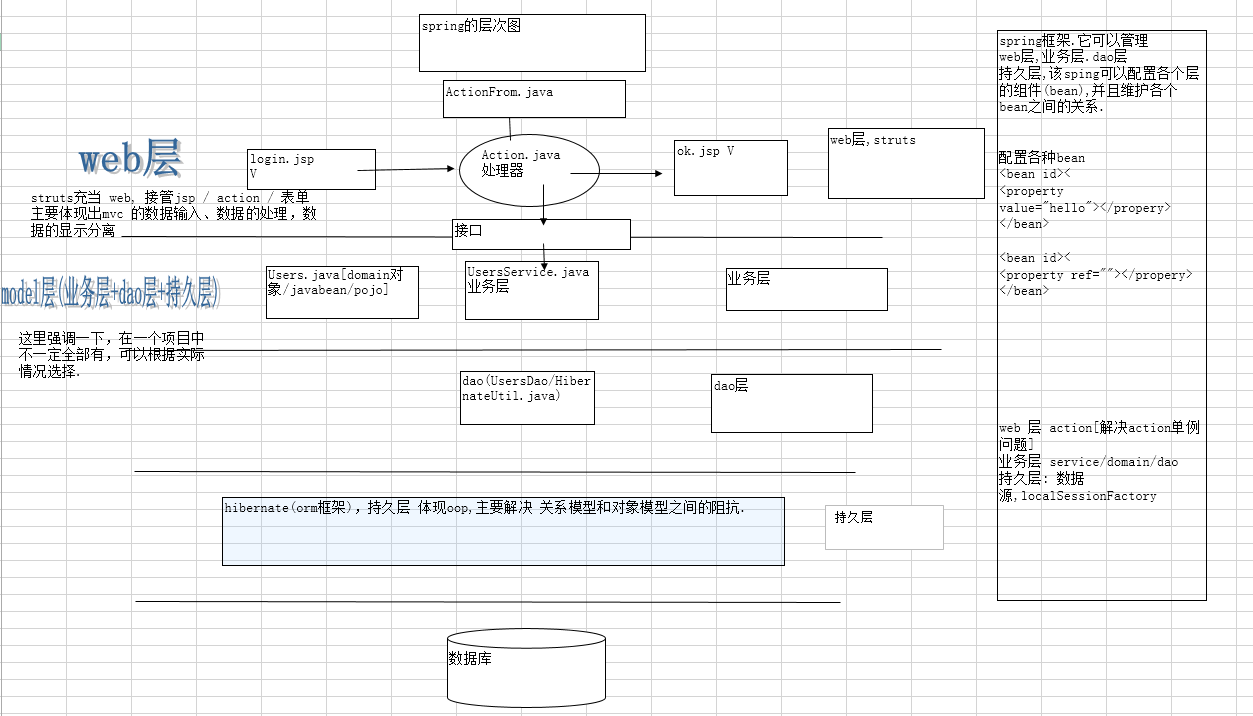
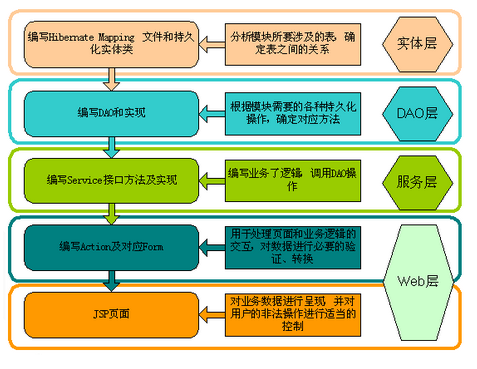
Service 組裝 JSON
public class StudentService {
    public String getPageJSON(int page, int rows) {
        int total = new StudentDAO().getTotal();
        if (total == 0) return "{\"total\":0,\"rows\":[]}";

        List<Student> list = new StudentDAO().getPageList(page, rows);
        String rowsJson = JSONArray.toJSONString(list); // Fastjson/Jackson
        return "{\"total\":" + total + ",\"rows\":" + rowsJson + "}";
    }
}
DAO 分頁查詢
public class StudentDAO {
    // Hibernate HQL 分頁
    public List<Student> getPageList(int page, int rows) {
        Session se = getSession();
        List<Student> list = se.createQuery("from Student order by sno")
                .setFirstResult((page - 1) * rows)
                .setMaxResults(rows)
                .list();
        closeSession();
        return list;
    }

    public int getTotal() {
        Session se = getSession();
        List<Object> lo = se.createQuery("select count(1) from Student").list();
        closeSession();
        return (lo != null && !lo.isEmpty()) ? Integer.parseInt(lo.get(0).toString()) : 0;
    }
}
關鍵協議細節
- 請求參數:
page(當前頁,從 1 開始)、rows(頁大小)
- 響應格式:
{"total": 總行數, "rows": [數據數組]}
- 字段名與 DataGrid
field 屬性一一對應
常見坑點
- Content-Type 缺失:導致前端解析失敗,必須設
application/json
- 中文亂碼:請求/響應雙向設 UTF-8
- 總數查詢效率:大表用
count(1) 或緩存總數
- 排序模式:
remoteSort:false 時前端排序,大數據建議改 true 由 SQL 排序