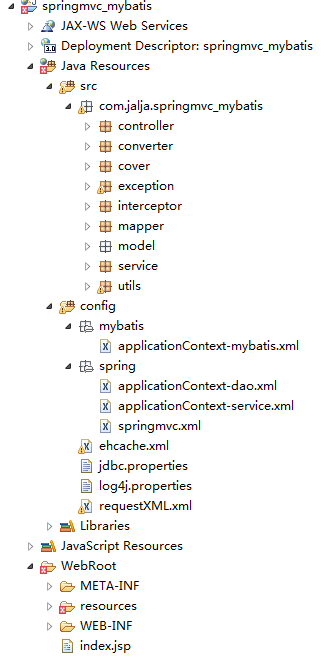
MyBatis 配置文件是 ORM 映射核心。本文通過實例講解 resultMap 複雜關聯映射、association/collection、動態 SQL 標簽、Mapper 註冊方式,並給出生產級配置模板。
<?xml version="1.0" encoding="UTF-8"?>
<!DOCTYPE configuration PUBLIC "-//mybatis.org//DTD Config 3.0//EN"
  "https://mybatis.org/dtd/mybatis-3-config.dtd">
<configuration>
  <properties resource="jdbc.properties"/>
  <typeAliases>
    <package name="com.example.entity"/>
  </typeAliases>
  <environments default="development">
    <environment id="development">
      <transactionManager type="JDBC"/>
      <dataSource type="POOLED">...</dataSource>
    </environment>
  </environments>
  <mappers>
    <package name="com.example.mapper"/>  <!-- 掃描包自動註冊 -->
  </mappers>
</configuration>場景:員工表關聯部門表,一對一映射
<mapper namespace="com.example.mapper.EmpMapper">
  <resultMap id="empDeptMap" type="Emp">
    <id property="empId" column="emp_no"/>
    <result property="empName" column="ename"/>
    <result property="job" column="job"/>
    <!-- 一對一關聯:association -->
    <association property="dept" javaType="Dept">
      <id property="deptNo" column="dept_no"/>
      <result property="deptName" column="dname"/>
      <result property="loc" column="loc"/>
    </association>
  </resultMap>

  <select id="selectEmpWithDept" resultMap="empDeptMap">
    SELECT e.*, d.dept_no, d.dname, d.loc
    FROM emp e JOIN dept d ON e.dept_no = d.dept_no
  </select>
</mapper><resultMap id="deptEmpsMap" type="Dept">
<id property="deptNo" column="dept_no"/>
<result property="deptName" column="dname"/>
<!-- 一對多:collection -->
<collection property="emps" ofType="Emp">
<id property="empId" column="emp_no"/>
<result property="empName" column="ename"/>
</collection>
</resultMap>| 標簽 | 用途 | 示例 |
|---|---|---|
| <if> | 條件判斷 | <if test="name != null">AND name=#{name}</if> |
| <where> | 智能 WHERE/AND/OR 處理 | 自動去除首個 AND/OR |
| <trim> | 自定義前後綴處理 | <trim prefix="WHERE" suffixOverrides="AND|OR"> |
| <foreach> | 集合遍歷 | <foreach item="id" collection="ids" separator=",">#{id}</foreach> |
| <choose/when/otherwise> | 多分支 | 類似 switch-case |
| <bind> | 定義變量 | <bind name="pattern" value="'%' + name + '%'" /> |
<select id="selectByCondition" resultType="Emp">
  SELECT * FROM emp
  <where>
    <if test="empName != null and empName != ''">
      AND ename LIKE #{empName}
    </if>
    <if test="deptNo != null">
      AND dept_no = #{deptNo}
    </if>
    <if test="job != null">
      AND job = #{job}
    </if>
  </where>
  ORDER BY emp_no
</select>#{ }:預編譯參數佔位符,防 SQL 注入,MyBatis 生成 PreparedStatement,參數設置用 setString/setInt${ }:字符串直接替換,構建 SQL 片段(如表名、排序字段),有注入風險,僅用於不可參數化場景<mapper resource="mapper/EmpMapper.xml"/><mapper class="com.example.mapper.EmpMapper"/>(需接口+XML同名同目錄)<package name="com.example.mapper"/>,Spring 整合用 MapperScannerConfigurerpublic class Dept {
private Integer deptNo;
private String deptName;
private String loc;
// getter/setter
}
public interface DeptMapper {
List<Dept> selectAll();
int insert(Dept dept);
int deleteById(Integer deptNo);
List<Dept> selectLikeName(@Param("name") String name);
}@Test
public void testSelectAll() {
SqlSession session = sqlSessionFactory.openSession();
DeptMapper mapper = session.getMapper(DeptMapper.class);
List<Dept> list = mapper.selectAll();
list.forEach(System.out::println);
}MyBatis 配置核心:resultMap 解決對象關係映射、動態 SQL 構建靈活查詢、#{ } 防注入、包掃描簡化註冊。生產環境建議:XML 與接口同包同名、複雜 SQL 抽取為片段(<sql>)、適當使用緩存(<cache>)、開啟 mapUnderscoreToCamelCase 自動駝峰映射。