JSP 容器自動提供九大內置對象,無需聲明即可在腳本片段、表達式、EL 表達式中直接使用。掌握它們的類型、作用域與典型用法,是 JSP 開發的基礎功夫。
| 對象名 | 類型 | 作用域 | 核心用途 |
|---|---|---|---|
request | HttpServletRequest | 請求 | 獲取請求參數、Header、屬性;請求轉發 |
response | HttpServletResponse | 頁面 | 設置狀態碼、Header、Cookie、重定向、輸出流 |
session | HttpSession | 會話 | 用戶狀態維持、屬性存取、登入狀態管理 |
application | ServletContext | 應用 | 全局配置、資源路徑、應用級共享數據、初始化參數 |
out | JspWriter | 頁面 | 向客戶端輸出內容、緩衝區控制、clear()/flush() |
pageContext | PageContext | 頁面 | 訪問其他內置對象、屬性跨作用域操作、引入資源 |
config | ServletConfig | 頁面 | 獲取 Servlet 初始化參數、Servlet 名稱 |
page | Object (this) | 頁面 | 當前 JSP 頁面實例 (轉換後的 Servlet),極少直接使用 |
exception | Throwable | 頁面 | 錯誤頁面 (isErrorPage=true) 中獲取異常信息 |
application (最廣) → session → request → page (最窄)
屬性設置遵循:setAttribute(name, value),獲取:getAttribute(name)。較大作用域可訪問較小作用域屬性,反之不可。
request)// 獲取參數
String username = request.getParameter("username");
// 請求轉發 (服務端跳轉,地址欄不變)
request.getRequestDispatcher("/success.jsp").forward(request, response);
// 設置請求屬性傳遞數據
request.setAttribute("user", userObj);
response)// 重定向 (客戶端跳轉,地址欄變化)
response.sendRedirect("/login.jsp");
// 設置 Cookie
Cookie cookie = new Cookie("token", "abc123");
response.addCookie(cookie);
// 直接輸出 JSON (AJAX 回應)
response.setContentType("application/json;charset=UTF-8");
response.getWriter().write(jsonString);
session)// 登入成功存入用戶信息
session.setAttribute("currentUser", user);
// 獲取登入用戶
User user = (User) session.getAttribute("currentUser");
// 註銷
session.invalidate();
application)// 獲取真實路徑
String realPath = application.getRealPath("/WEB-INF/config.xml");
// 全局計數器
application.setAttribute("visitCount", count);
out)out.println("<h1>Hello JSP</h1>");
// 緩衝區操作
out.clear(); // 清空緩衝區 (未 flush 前有效)
out.flush(); // 強制輸出
<% %>),提升可讀性與安全性。exception 對象集中處理錯誤展示。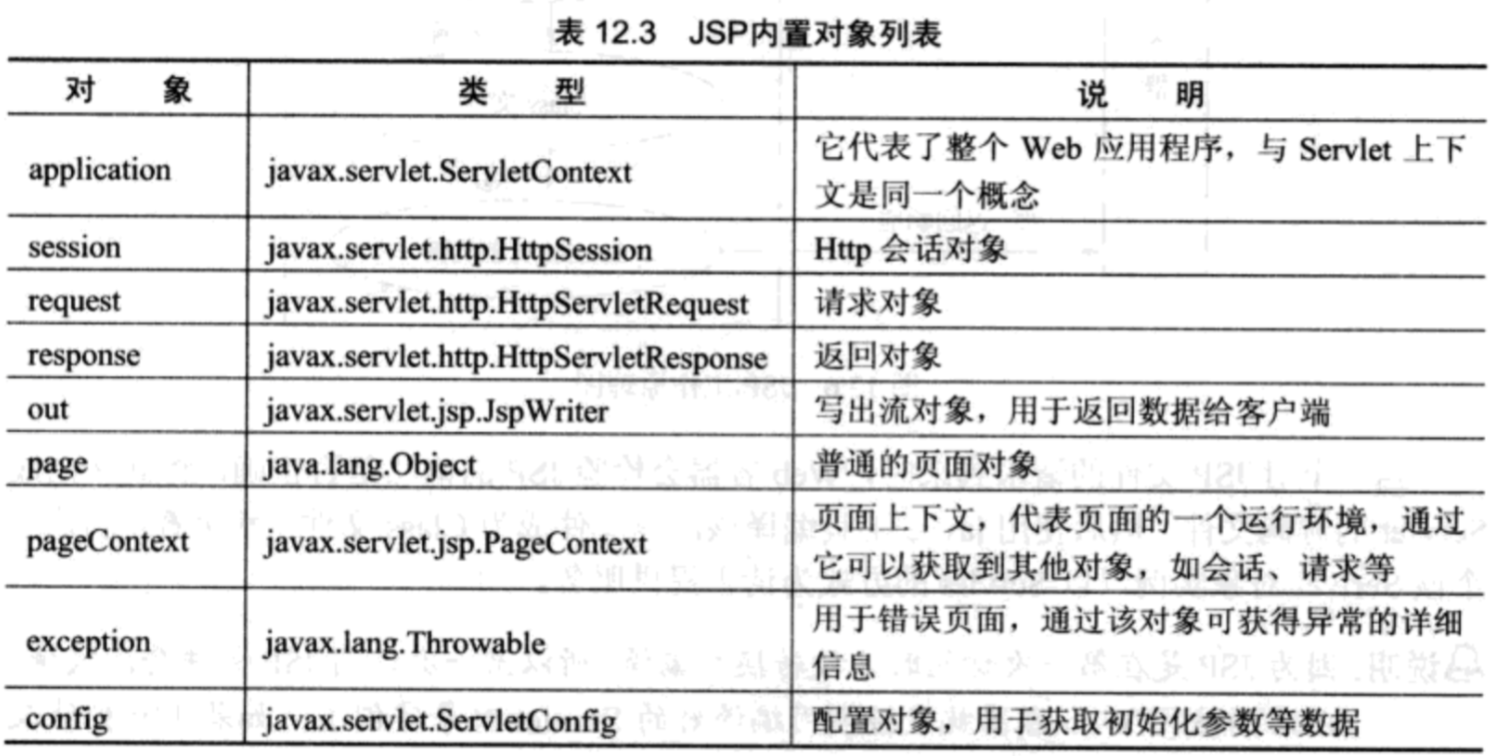
掌握九大內置對象,是從「能寫動態頁」進階到「寫好可維護 Web 應用」的必經之路。