本文承接基礎環境搭建,詳細示範 MyBatis 3.2.x 如何透過 XML 映射檔與 Mapper 介面代理模式,實現資料庫的增刪改查,並解析關鍵配置細節與常見坑點。
<dependency>
  <groupId>org.mybatis</groupId>
  <artifactId>mybatis</artifactId>
  <version>3.2.0</version>
</dependency>
<dependency>
  <groupId>mysql</groupId>
  <artifactId>mysql-connector-java</artifactId>
  <version>5.1.22</version>
</dependency>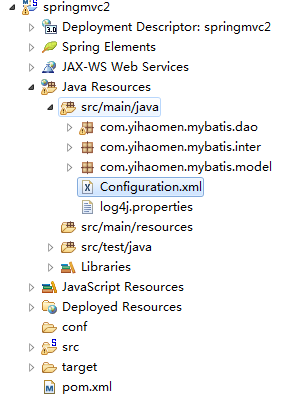
Configuration.xml<?xml version="1.0" encoding="UTF-8"?>
<!DOCTYPE configuration PUBLIC "-//mybatis.org//DTD Config 3.0//EN" "https://mybatis.org/dtd/mybatis-3-config.dtd">
<configuration>
<typeAliases>
<typeAlias alias="User" type="com.yihaomen.mybatis.model.User"/>
</typeAliases>
<environments default="development">
<environment id="development">
<transactionManager type="JDBC"/>
<dataSource type="POOLED">
<property name="driver" value="com.mysql.jdbc.Driver"/>
<property name="url" value="jdbc:mysql://192.168.6.1:3306/test"/>
<property name="username" value="dev"/>
<property name="password" value="123qwe"/>
</dataSource>
</environment>
</environments>
<mappers>
<mapper resource="com/yihaomen/mybatis/model/User.xml"/>
</mappers>
</configuration>重點:typeAlias 為實體類定義別名,映射檔中 resultType 直接使用別名;POOLED 資料源內建連線池。
User.xmlUser.javapublic class User {
private int id;
private String userName;
private int userAge;
private String userAddress;
// getter/setter 省略
}<?xml version="1.0" encoding="UTF-8"?>
<!DOCTYPE mapper PUBLIC "-//mybatis.org//DTD Mapper 3.0//EN" "https://mybatis.org/dtd/mybatis-3-mapper.dtd">
<mapper namespace="com.yihaomen.mybatis.dao.IUserOperation">
<select id="selectUserByID" parameterType="int" resultType="User">
select * from `user` where id = #{id}
</select>
<insert id="addUser" parameterType="User" useGeneratedKeys="true" keyProperty="id">
insert into user(userName,userAge,userAddress) values(#{userName},#{userAge},#{userAddress})
</insert>
<update id="updateUser" parameterType="User">
update user set userName=#{userName},userAge=#{userAge},userAddress=#{userAddress} where id=#{id}
</update>
<delete id="deleteUser" parameterType="int">
delete from user where id=#{id}
</delete>
<select id="list" resultType="User">
select * from `user`
</select>
<select id="findUserByName" parameterType="String" resultType="User">
select * from `user` where username like '%${value}%'
</select>
</mapper>useGeneratedKeys="true" keyProperty="id":MySQL 自增主鍵回填。#{}:預編譯佔位符,防 SQL 注入,支援 POJO/Map/簡單型別(OGNL 存取屬性)。${}:字串拼接,**易導致 SQL 注入**,僅用於動態表名/欄位名或 LIKE '%${value}%' 此類無法用預編譯場景。parameterType:輸入參數型別;resultType:單條結果映射型別。定義介面 IUserOperation,**介面全限定名 = namespace**,**方法名 = statement id**,即可透過 session.getMapper(IUserOperation.class) 獲得代理實現,完全免寫 session.selectOne("namespace.id", param) 硬編碼字串。
public interface IUserOperation {
    User selectUserByID(int id);
    void addUser(User user);
    void updateUser(User user);
    void deleteUser(int id);
    List<User> list();
    List<User> findUserByName(String name);
}public class Test {
private static SqlSessionFactory sqlSessionFactory;
static {
Reader reader = Resources.getResourceAsReader("Configuration.xml");
sqlSessionFactory = new SqlSessionFactoryBuilder().build(reader);
}
public void geFindUserByName(String name) {
try (SqlSession session = sqlSessionFactory.openSession()) {
IUserOperation op = session.getMapper(IUserOperation.class);
List<User> list = op.findUserByName(name);
System.out.println("匹配筆數:" + list.size());
}
}
// 其他 CRUD 方法類似,均使用 try-with-resources 自動關閉 session
}日誌輸出範例:
DEBUG - ==> Preparing: select * from `user` where username like '%小%'
DEBUG - ==> Parameters:
DEBUG - <== Total: 7| 概念 | 說明 |
|---|---|
#{} vs ${} | 前者為預編譯參數(安全),後者為字串拼接(注入風險) |
selectOne vs selectList | 前者要求結果 0 或 1 筆,多筆拋 TooManyResultsException;後者支援多筆 |
| Mapper 代理 | 介面方法名 = statement id,namespace = 介面全名,編譯期檢查,重構安全 |
| 自增鍵回填 | useGeneratedKeys + keyProperty,insert 後實體 id 自動更新 |
後續將介紹動態 SQL、關聯映射、緩存機制與 Spring 整合,敬請期待。