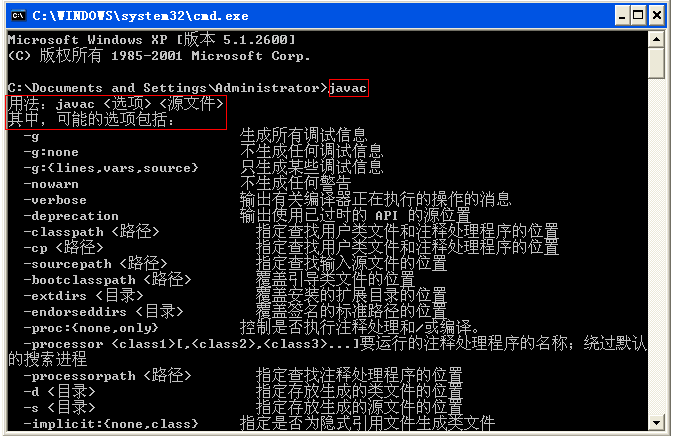
'java' is not recognized... → 未安裝 JDK 或 PATH 未含 %JAVA_HOME%\binjava: Command not found → Linux/Unix 環境變數未設定NoClassDefFoundError: hello (wrong name: Hello) → 大小寫不符,Java 區分大小寫NoClassDefFoundError: Hello/class → 執行時勿加 .class 副檔名即使類別名稱正確仍出現此錯誤,常見三大原因:
. 到 CLASSPATH,或類別宣告加 publicC:\Winnt)有舊版 java.exe 搶先被執行 → 刪除系統目錄下的 java.exe,確保使用 JDK bin 目錄版本package 陳述式與實際檔案路徑是否一致Throwable
├── Error // 嚴重系統錯誤,通常不可恢復
└── Exception // 應用程式可處理
├── RuntimeException // 非受檢異常:邏輯錯誤、程式 Bug
└── 其他 Exception // 受檢異常:必須 try-catch 或 throws 宣告| 異常類別 | 觸發情境 |
|---|---|
| ArithmeticException | 算術異常(如除以零) |
| NullPointerException | 存取 null 物件 |
| ArrayIndexOutOfBoundsException | 陣列索引越界 |
| ArrayStoreException | 陣列存入錯誤型別資料 |
| FileNotFoundException | 檔案不存在 |
| IOException | I/O 作業失敗 |
| NumberFormatException | 字串轉數值失敗 |
| OutOfMemoryError | 記憶體不足 |
| SecurityException | Applet 違反瀏覽器安全策略 |
| StackOverflowError | 堆疊空間耗盡 |
| StringIndexOutOfBoundsException | 字串索引越界 |
boolean testEx() throws Exception {
    boolean ret = true;
    try {
        ret = testEx1();
    } catch (Exception e) {
        System.out.println("catch exception");
        ret = false;
        throw e;  // 重新拋出
    } finally {
        System.out.println("finally; return=" + ret);
        return ret;  // finally 中 return 會覆蓋 try/catch 的 return
    }
}關鍵規則:
catch 順序:由具體到一般(子類在前,父類在後)catch (IOException | SQLException e) (Java 7+)finally 保證執行(除非 System.exit() 或 JVM 崩潰),適合資源釋放throws 宣告在方法簽名,throw 拋出具體異常物件成因:
解決:使用前檢查可用性、確保單次關閉、同一操作共享連線(連線池)。
核心原則:基本型別有預設值不會 NPE,所有 NPE 皆源自物件參考操作。
// 情境 1:直接使用可能為 null 的請求參數
out.println(request.getParameter("username"));  // 危險!

// 修正:防禦性檢查
String userName = request.getParameter("username");
if (userName == null) userName = "";  // 方式1:預設空字串
if (userName != null && userName.equals("root")) { ... }  // 方式2:短路求值
if (userName == null) { /* 提示錯誤 */ }  // 方式3:顯式錯誤處理
// 情境 2:對 null 物件呼叫方法
String userName = request.getParameter("username");
if (userName.equals("root")) { ... } // 危險!userName 可能為 null
// 修正:反轉比較順序或使用 Objects.equals (Java 7+)
if ("root".equals(userName)) { ... }
if (Objects.equals(userName, "root")) { ... }// 情境 3:Session 失效導致屬性為 null
String userName = session.getAttribute("session.username").toString(); // 危險!
// 修正:安全取值
Object attr = session.getAttribute("session.username");
String userName = (attr != null) ? attr.toString() : "";| 錯誤訊息 | 原因與解決 |
|---|---|
| No bean found under attribute key XXX | struts-config.xml 中 ActionForm 的 type 類別不存在,或 Action 的 name/attribute 指向不存在的 Form |
| Cannot find bean XXX in any scope | JSP 取用 request.getAttribute() 或標籤 name,但 Action 未 setAttribute() 或邏輯提前 forward |
| Missing message for key "XXX" | ApplicationResources.properties 缺少對應 key,多模組需在 struts-config-xxx.xml 指定資源檔 |
| No getter method for property XXX of bean YYY | JSP 標籤 property="XXX" 但 Bean 無對應 getter,檢查拼字(如 cade vs code) |
| Cannot retrieve mapping for action XXX | JSP <html:form action="/XXX"> 但 struts-config.xml 未定義該 action path |
| HTTP Status 404 - /xxx/xxx.jsp | Forward path 指向不存在的 JSP,模組間轉向需加 contextRelative="true" |
| 顯示空白頁、無異常 | Action 使用的 forward 名稱與 struts-config.xml 定義不符 |
| The element type "XXX" must be terminated... | struts-config.xml XML 格式錯誤,檢查標籤閉合 |
| Servlet.init() for servlet action threw exception | 通常伴隨堆疊追蹤,常見原因:struts-config.xml 遺失或損壞 |
| Resources not defined for Validator | validation.xml 參照的資源未定義,檢查 form 名稱與資源 key |
這三種策略不僅適用 NPE,對所有可預期的業務異常皆有效。建議建立統一的異常處理基礎設施(如全域例外攔截器、統一錯誤頁面、結構化日誌),將防禦性程式設計內化為團隊規範。