本文以一個最簡單的「輸入 success 顯示成功,否則失敗」範例,完整拆解 Struts 1.1 核心配置檔(struts-config.xml、web.xml)、ActionForm、Action、JSP 互動流程,並附上 Tomcat 部署步驟。
JAVA_HOME、CLASSPATHD:\TOMCATstruts-example.war 複製至 TOMCAT/webapps,啟動 startup.bat 驗證/你的專案/WEB-INF/classes/beans/ 放置 Java 類別/你的專案/*.jsp 放置 JSP<?xml version="1.0" encoding="ISO-8859-1"?>
<!DOCTYPE struts-config PUBLIC
"-//Apache Software Foundation//DTD Struts Configuration 1.1//EN"
"https://jakarta.apache.org/struts/dtds/struts-config_1_1.dtd">
<struts-config>
<!-- FormBean 定義:名稱 GetParameterForm 對應 beans.GetParameterForm 類別 -->
<form-beans>
<form-bean name="GetParameterForm" type="beans.GetParameterForm"/>
</form-beans>
<!-- 全域轉向:邏輯名稱 success/fail 對應 .do 請求 -->
<global-forwards>
<forward name="success" path="/success.do"/>
<forward name="fail" path="/fail.do"/>
</global-forwards>
<!-- Action 映射 -->
<action-mappings>
<!-- 處理 /showinput.do,使用 GetParameterForm,錯誤導向 index.jsp -->
<action path="/showinput"
type="beans.ShowAction"
name="GetParameterForm"
scope="request"
input="/index.jsp" />
<!-- 全域轉向對應的實際轉向 -->
<action path="/success" forward="/success.jsp"/>
<action path="/fail" forward="/error.jsp"/>
</action-mappings>
</struts-config><?xml version="1.0" encoding="ISO-8859-1"?>
<!DOCTYPE web-app PUBLIC
"-//Sun Microsystems, Inc.//DTD Web Application 2.3//EN"
"https://java.sun.com/j2ee/dtds/web-app_2_3.dtd">
<web-app>
<servlet>
<servlet-name>action</servlet-name>
<servlet-class>org.apache.struts.action.ActionServlet</servlet-class>
<init-param>
<param-name>config</param-name>
<param-value>/WEB-INF/struts-config.xml</param-value>
</init-param>
<load-on-startup>2</load-on-startup>
</servlet>
<servlet-mapping>
<servlet-name>action</servlet-name>
<url-pattern>*.do</url-pattern>
</servlet-mapping>
<welcome-file-list>
<welcome-file>index.jsp</welcome-file>
</welcome-file-list>
</web-app>package beans;
import org.apache.struts.action.ActionForm;
public class GetParameterForm extends ActionForm {
private String valu = "null";
public void setValu(String s) { valu = s; }
public String getValu() { return valu; }
}package beans;
import javax.servlet.http.*;
import org.apache.struts.action.*;
public final class ShowAction extends Action {
public ActionForward execute(ActionMapping mapping,
ActionForm form,
HttpServletRequest request,
HttpServletResponse response) throws Exception {
GetParameterForm userForm = (GetParameterForm) form;
if ("success".equals(userForm.getValu())) {
return mapping.findForward("success");
} else {
System.out.println("輸入值:" + userForm.getValu());
return mapping.findForward("fail");
}
}
}<%@ page contentType="text/html;charset=gb2312"%>
<form name="form1" method="post" action="showinput.do">
輸入 success 將返回成功頁面,否則失敗頁面<br><br>
input: <input type="text" name="valu"> <input type="submit" value="submit">
</form>
<br>
<a href="success.do">success</a><br>
<a href="fail.do">fail</a><%@ page contentType="text/html;charset=gb2312"%>
success! (或 error page!)WEB-INF/classes/beans/https://localhost:8080/你的專案/success → 顯示 success.jsp;其他 → 顯示 error.jsp
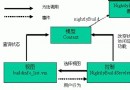
使用者請求 showinput.do
        ↓
ActionServlet 依 struts-config.xml 找到 mapping
        ↓
建立/取得 GetParameterForm (request scope)
        ↓
自動填充 form.valu = request.getParameter("valu")
        ↓
呼叫 ShowAction.execute()
        ↓
根據邏輯回傳 mapping.findForward("success" 或 "fail")
        ↓
ActionServlet 依 global-forwards 轉向 success.do / fail.do
        ↓
再次進入 action-mappings,轉向 success.jsp / error.jsp
此範例展示 Struts 核心機制:集中式配置管理導航、ActionForm封裝表單資料、Action處理業務邏輯並決定轉向。掌握此流程即可擴展至複雜企業級應用。