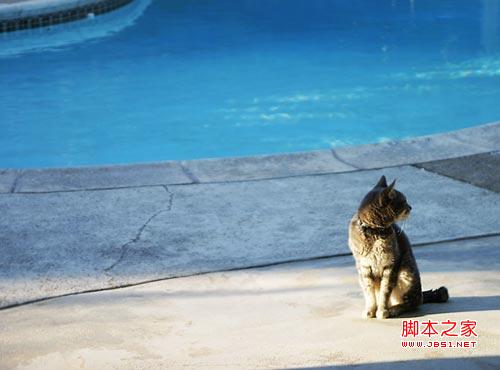
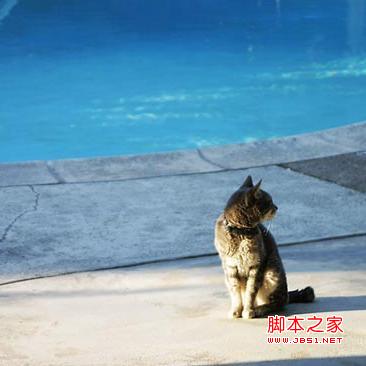
工具可對 JPEG/PNG 圖片進行任意矩形區域裁剪,保持原圖格式與畫質。以下為實際效果對比:
原圖:

裁剪後:
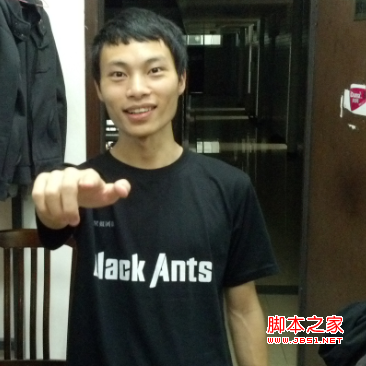
原圖:
裁剪後:
利用 Java javax.imageio 包中的 ImageReader 與 ImageReadParam,通過設置源區域(Rectangle)實現解碼時的裁剪,避免將完整圖片載入內存,節省資源且速度極快。
package com.b510;

import java.awt.Rectangle;
import java.awt.image.BufferedImage;
import java.io.File;
import java.io.FileInputStream;
import java.io.IOException;
import java.util.Date;
import java.util.Iterator;
import javax.imageio.ImageIO;
import javax.imageio.ImageReadParam;
import javax.imageio.ImageReader;
import javax.imageio.stream.ImageInputStream;

public class ImageCut {
    private String srcpath = "e:/poool.jpg";
    private String subpath = "e:/pool_end";
    private static final String IMG_JPG = "jpg";
    private static final String IMG_PNG = "png";
    private int x, y, width, height;

    public ImageCut() {}
    public ImageCut(int x, int y, int width, int height) {
        this.x = x; this.y = y; this.width = width; this.height = height;
    }

    public static void main(String[] args) throws Exception {
        new ImageCut(134, 0, 366, 366).cut("e:/poool.jpg", "e:/pool_end");
    }

    /** 根據副檔名獲取對應的 ImageReader 迭代器 */
    public Iterator<ImageReader> getImageReadersByFormatName(String postFix) {
        switch (postFix.toLowerCase()) {
            case IMG_JPG: return ImageIO.getImageReadersByFormatName(IMG_JPG);
            case IMG_PNG: return ImageIO.getImageReadersByFormatName(IMG_PNG);
            default:      return ImageIO.getImageReadersByFormatName(IMG_JPG);
        }
    }

    /** 執行裁剪並保存 */
    public void cut(String srcpath, String subpath) throws IOException {
        FileInputStream fis = null;
        ImageInputStream iis = null;
        try {
            fis = new FileInputStream(srcpath);
            String postFix = getPostfix(srcpath);
            System.out.println("圖片格式:" + postFix);

            Iterator<ImageReader> it = getImageReadersByFormatName(postFix);
            ImageReader reader = it.next();

            iis = ImageIO.createImageInputStream(fis);
            reader.setInput(iis, true); // 僅向前讀取,優化內存

            ImageReadParam param = reader.getDefaultReadParam();
            param.setSourceRegion(new Rectangle(x, y, width, height)); // 設置裁剪區域

            BufferedImage bi = reader.read(0, param); // 解碼並裁剪

            String outName = subpath + "_" + new Date().getTime() + "." + postFix;
            ImageIO.write(bi, postFix, new File(outName));
            System.out.println("裁剪完成:" + outName);
        } finally {
            if (fis != null) fis.close();
            if (iis != null) iis.close();
        }
    }

    private String getPostfix(String path) {
        return path.substring(path.lastIndexOf('.') + 1);
    }

    // Getter/Setter 略...
}reader.setInput(iis, true) 啟用「僅向前搜索」,允許釋放已讀取數據的緩存,大幅降低大圖處理時的內存佔用。ImageReadParam.setSourceRegion(Rectangle) 僅解碼指定矩形區域,無需載入完整圖片。ImageReader,支援 JPEG、PNG 等常見格式。finally 區塊確保流關閉,防止句柄洩漏。此方案純 Java 實現,無原生庫依賴,跨平台部署極其方便,適合服務端圖片預處理場景。