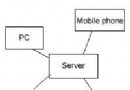
本文深入說明在中國移動 CMWAP、聯通 UNIWAP 環境下建立 GPRS HTTP 連線的具體代碼,並實作從網路下載圖片並顯示於螢幕的完整流程。
HttpConnection http = (HttpConnection) Connector.open("https://10.0.0.172:80");
http.setRequestProperty("X-Online-Host", "wap.ucweb.com"); // 目標站點
http.setRequestProperty("User-Agent", "Openwave");        // 關鍵 UA
http.setRequestProperty("Connection", "close");           // 建議關閉長連線
關鍵 Header 說明:
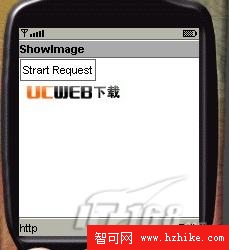
User-Agent:網關極其敏感,錯誤會導致 500 回應,必須模擬知名瀏覽器。Connection:close 請求即斷,穩定性優於 Keep-Alive。同樣採用執行緒非同步,流程為:建立連線 → 設定 Header → 取得回應碼 200 → 開啟資料輸入流 → 分塊讀取至 byte[] → Image.createImage(byte[], 0, len) → 附加到 Form 顯示。
private void startRequestHttpImage() {
    new Thread() {
        public void run() {
            HttpConnection conn = null; InputStream is = null;
            try {
                append("Start Request");
                conn = (HttpConnection) openConnection(imgUrl, 0); // CMNET
                conn.setRequestMethod(HttpConnection.GET);
                conn.setRequestProperty("User-Agent", "Openwave");
                conn.setRequestProperty("Connection", "close");

                if (conn.getResponseCode() == 200) {
                    is = conn.openDataInputStream();
                    byte[] imgData = readDataFromStream(is, 512);
                    if (imgData != null) append(Image.createImage(imgData, 0, imgData.length));
                }
            } catch (Exception e) { append(e.toString()); }
            finally { closeQuietly(is); closeQuietly(conn); }
        }
    }.start();
}
此範例可直接套用於需下載圖片、資料檔等二進位資源的場景,配合前文的代理切換邏輯即可覆蓋 CMWAP/CMNET/UNIWAP 多網絡環境。