spring-core, context, web, beans, aop, tx, expression, asm, commons-logging, dwr 等。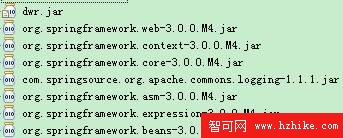
<?xml version="1.0" encoding="UTF-8"?>
<web-app version="2.5" xmlns="https://java.sun.com/xml/ns/javaee"
         xmlns:xsi="https://www.w3.org/2001/XMLSchema-instance"
         xsi:schemaLocation="https://java.sun.com/xml/ns/javaee
                             https://java.sun.com/xml/ns/javaee/web-app_2_5.xsd">

    <!-- Spring 容器啟動 -->
    <listener>
        <listener-class>org.springframework.web.context.ContextLoaderListener</listener-class>
    </listener>
    <context-param>
        <param-name>contextConfigLocation</param-name>
        <param-value>classpath*:applicationContext-*.xml</param-value>
    </context-param>

    <!-- DWR 核心 -->
    <listener>
        <listener-class>org.directwebremoting.servlet.DwrListener</listener-class>
    </listener>
    <servlet>
        <servlet-name>dwr-invoker</servlet-name>
        <servlet-class>org.directwebremoting.servlet.DwrServlet</servlet-class>
        <init-param>
            <param-name>debug</param-name>
            <param-value>true</param-value>
        </init-param>
        <!-- 關鍵:啟用 Comet (Reverse Ajax) -->
        <init-param>
            <param-name>pollAndCometEnabled</param-name>
            <param-value>true</param-value>
        </init-param>
    </servlet>
    <servlet-mapping>
        <servlet-name>dwr-invoker</servlet-name>
        <url-pattern>/dwr/*</url-pattern>
    </servlet-mapping>

</web-app>
| 元素 | 作用 |
|---|---|
| ContextLoaderListener | 啟動 Spring 根容器,載入 applicationContext-*.xml |
| DwrListener | 初始化 DWR 運行時、掃描 dwr.xml、註冊創建器 |
| DwrServlet | 處理 /dwr/* 請求:JS 腳本生成、RPC 調用、Comet 長連接 |
| pollAndCometEnabled=true | 必須開啟,否則 Reverse Ajax 無法工作 |
| debug=true | 開發期開啟,生產建議關閉 |
applicationContext-beans.xml (初始骨架)<?xml version="1.0" encoding="UTF-8"?>
<beans xmlns="https://www.springframework.org/schema/beans"
xmlns:xsi="https://www.w3.org/2001/XMLSchema-instance"
xmlns:aop="https://www.springframework.org/schema/aop"
xmlns:tx="https://www.springframework.org/schema/tx"
xmlns:util="https://www.springframework.org/schema/util"
xmlns:context="https://www.springframework.org/schema/context"
xsi:schemaLocation="
https://www.springframework.org/schema/beans https://www.springframework.org/schema/beans/spring-beans-3.0.xsd
https://www.springframework.org/schema/aop https://www.springframework.org/schema/aop/spring-aop-3.0.xsd
https://www.springframework.org/schema/tx https://www.springframework.org/schema/tx/spring-tx-3.0.xsd
https://www.springframework.org/schema/util https://www.springframework.org/schema/util/spring-util-3.0.xsd
https://www.springframework.org/schema/context https://www.springframework.org/schema/context/spring-context-3.0.xsd">
<!-- 具體 Bean 於後續篇幅註冊 -->
</beans>
dwr.xml (最小骨架)<?xml version="1.0" encoding="UTF-8"?>
<!DOCTYPE dwr PUBLIC "-//GetAhead Limited//DTD Direct Web Remoting 3.0//EN"
"https://getahead.org/dwr/dwr30.dtd">
<dwr>
<!-- 具體 allow/create/convert 於後續篇幅配置 -->
</dwr>
基礎設施就緒,下一篇進入業務邏輯實現:Message 實體、ChatMessageEvent、ChatService。