WTL (Windows Template Library) 類別大致分為五大類:
CFrameWindowImpl, CMDIFrameWindowImplCButton, CListViewCtrl 等CDC, CMenu 等CSplitterWindow, CUpdateUI, CDialogResize, CCustomDrawCString, CRect, BEGIN_MSG_MAP_EX本章深入探討框架視窗類別、介面特性類別與工具類別,展示 WTL 如何以輕量級方式實現豐富的 UI 功能。
#define STRICT
#define WIN32_LEAN_AND_MEAN
#define _WTL_USE_CSTRING
#include <atlbase.h>
#include <atlapp.h>
extern CAppModule _Module;
#include <atlwin.h>
#include <atlframe.h>
#include <atlmisc.h>
#include <atlcrack.h>關鍵點:_WTL_USE_CSTRING 必須在 atlapp.h 之前定義,確保後續標頭檔能識別 CString。
class CMyWindow : public CFrameWindowImpl<CMyWindow>
{
public:
    DECLARE_FRAME_WND_CLASS(_T("First WTL window"), IDR_MAINFRAME);
    BEGIN_MSG_MAP_EX(CMyWindow)
        CHAIN_MSG_MAP(CFrameWindowImpl<CMyWindow>)
    END_MSG_MAP()
};
DECLARE_FRAME_WND_CLASS 參數:視窗類別名稱 (可為 NULL 自動產生) 與資源 ID (載入圖示、選單、加速鍵表)。BEGIN_MSG_MAP_EX 啟用 WTL 增強訊息映射 (包含參數解碼)。CHAIN_MSG_MAP 將未處理訊息傳遞給基類 (CFrameWindowImpl 處理 WM_SIZE, WM_DESTROY 等)。int APIENTRY WinMain(HINSTANCE hInstance, HINSTANCE, LPSTR, int nCmdShow)
{
_Module.Init(NULL, hInstance);
CMyWindow wndMain;
if (NULL == wndMain.CreateEx()) return 1;
wndMain.ShowWindow(nCmdShow);
wndMain.UpdateWindow();
MSG msg;
while (GetMessage(&msg, NULL, 0, 0) > 0)
{
TranslateMessage(&msg);
DispatchMessage(&msg);
}
_Module.Term();
return msg.wParam;
}ATL 原始訊息映射需手動從 WPARAM/LPARAM 解碼參數,極易出錯。WTL 在 atlcrack.h 提供 MSG_WM_XXX 巨集自動解碼,並透過 SetMsgHandled() 取代 ATL 的 bHandled 參數。
class CMyWindow : public CFrameWindowImpl<CMyWindow>
{
public:
    BEGIN_MSG_MAP_EX(CMyWindow)
        MSG_WM_CREATE(OnCreate)
        CHAIN_MSG_MAP(CFrameWindowImpl<CMyWindow>)
    END_MSG_MAP()

    LRESULT OnCreate(LPCREATESTRUCT lpcs)
    {
        SetTimer(1, 1000); // 1 秒觸發一次
        SetMsgHandled(FALSE); // 讓基類也處理 WM_CREATE
        return 0;
    }
};
巨集 MSG_WM_CREATE 定義揭示處理函式原型:LRESULT OnCreate(LPCREATESTRUCT)。按 F12 可快速跳轉查看巨集定義,極大提升開發效率。
BEGIN_MSG_MAP_EX(CMyWindow)
    MSG_WM_CREATE(OnCreate)
    MSG_WM_DESTROY(OnDestroy)
    CHAIN_MSG_MAP(CFrameWindowImpl<CMyWindow>)
END_MSG_MAP()

void OnDestroy()
{
    KillTimer(1);
    SetMsgHandled(FALSE);
}MSG_WM_TIMER(OnTimer)
void OnTimer(UINT uTimerID, TIMERPROC)
{
if (1 != uTimerID) SetMsgHandled(FALSE);
else RedrawWindow();
}MSG_WM_ERASEBKGND(OnEraseBkgnd)
LRESULT OnEraseBkgnd(HDC hdc)
{
CDCHandle dc(hdc);
CRect rc; GetClientRect(rc);
SYSTEMTIME st; GetLocalTime(&st);
CString sTime; sTime.Format(_T("The time is %d:%02d:%02d"), st.wHour, st.wMinute, st.wSecond);
dc.SaveDC();
dc.SetBkColor(RGB(255,153,0));
dc.SetTextColor(RGB(0,0,0));
dc.ExtTextOut(0, 0, ETO_OPAQUE, rc, sTime, sTime.GetLength(), NULL);
dc.RestoreDC(-1);
return 1; // 背景已繪製
}CDCHandle 為 HDC 輕量封裝,用法類似 MFC CDC 但不會在離開作用域時銷毀裝置內容。
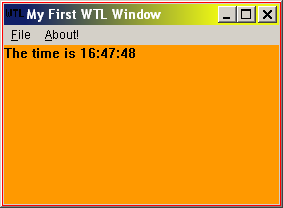
使用 ATL/WTL AppWizard 建立 SDI 專案 (專案名 WTLClock),取消工具列/重列/狀態列。精靈產生三個核心類別:
CMainFrame:主框架視窗CAboutDlg:關於對話方塊 (CDialogImpl 衍生)CWTLClockView:檢視視窗 (CWindowImpl 衍生,無 MFC 式 Document/View 架構)class CMainFrame : public CFrameWindowImpl<CMainFrame>,
public CUpdateUI<CMainFrame>,
public CMessageFilter,
public CIdleHandler
{
public:
DECLARE_FRAME_WND_CLASS(NULL, IDR_MAINFRAME)
CWTLClockView m_view;
virtual BOOL PreTranslateMessage(MSG* pMsg);
virtual BOOL OnIdle();
BEGIN_UPDATE_UI_MAP(CMainFrame)
END_UPDATE_UI_MAP()
BEGIN_MSG_MAP(CMainFrame)
// ...
CHAIN_MSG_MAP(CUpdateUI<CMainFrame>)
CHAIN_MSG_MAP(CFrameWindowImpl<CMainFrame>)
END_MSG_MAP()
};CUpdateUI (UI 狀態更新)、CMessageFilter (訊息預處理)、CIdleHandler (閒置處理)。OnCreate 建立檢視視窗並註冊至訊息迴圈:LRESULT CMainFrame::OnCreate(UINT, WPARAM, LPARAM, BOOL&)
{
m_hWndClient = m_view.Create(m_hWnd, rcDefault, NULL,
WS_CHILD | WS_VISIBLE | WS_CLIPSIBLINGS | WS_CLIPCHILDREN, WS_EX_CLIENTEDGE);
CMessageLoop* pLoop = _Module.GetMessageLoop();
pLoop->AddMessageFilter(this);
pLoop->AddIdleHandler(this);
return 0;
}m_hWndClient 為基類成員,指向客戶區視窗,框架大小改變時自動調整該視窗尺寸。
CMessageLoop::Run() 偽代碼揭示核心流程:
int Run()
{
    MSG msg;
    for(;;)
    {
        while (!PeekMessage(&msg)) DoIdleProcessing();
        if (0 == GetMessage(&msg)) break;
        if (!PreTranslateMessage(&msg))
        {
            TranslateMessage(&msg);
            DispatchMessage(&msg);
        }
    }
    return msg.wParam;
}PreTranslateMessage 由 CMessageFilter 實作,AddMessageFilter 註冊。OnIdle 由 CIdleHandler 實作,AddIdleHandler 註冊。CUpdateUI、CIdleHandler、CMessageLoop 三者協同,對應 MFC ON_UPDATE_COMMAND_UI。LRESULT OnSize(UINT, WPARAM wParam, LPARAM, BOOL& bHandled)
{
if (wParam != SIZE_MINIMIZED)
{
T* pT = static_cast<T*>(this);
pT->UpdateLayout();
}
bHandled = FALSE;
return 1;
}
void UpdateLayout(BOOL bResizeBars = TRUE)
{
RECT rect; GetClientRect(&rect);
UpdateBarsPosition(rect, bResizeBars); // 定位工具列/狀態列
if (m_hWndClient != NULL)
::SetWindowPos(m_hWndClient, NULL, rect.left, rect.top,
rect.right - rect.left, rect.bottom - rect.top,
SWP_NOZORDER | SWP_NOACTIVATE);
}關鍵在於 m_hWndClient 僅為一般 HWND,不限制類型 (不同於 MFC 必須為 CView 衍生類),極大提升彈性。
為 CWTLClockView 加入 StartClock/StopClock,主框架新增「時鐘」選單項 IDC_START/IDC_STOP:
BEGIN_UPDATE_UI_MAP(CMainFrame)
    UPDATE_ELEMENT(IDC_START, UPDUI_MENUPOPUP)
    UPDATE_ELEMENT(IDC_STOP, UPDUI_MENUPOPUP)
END_UPDATE_UI_MAP()

void CMainFrame::OnStart(UINT, int, HWND)
{
    UIEnable(IDC_START, false); UIEnable(IDC_STOP, true);
    m_view.StartClock();
}
void CMainFrame::OnStop(UINT, int, HWND)
{
    UIEnable(IDC_START, true); UIEnable(IDC_STOP, false);
    m_view.StopClock();
}
啟動時初始化選單狀態:
UIEnable(IDC_START, false); UIEnable(IDC_STOP, true);VC6 ClassView 無法解析 BEGIN_MSG_MAP_EX,可在 stdafx.h 末尾加入:
#undef BEGIN_MSG_MAP
#define BEGIN_MSG_MAP(x) BEGIN_MSG_MAP_EX(x)將介紹工具列、狀態列、重列等 Windows 95 標準介面元素,並實作 UISetCheck 等進階 UI 更新功能。