CTabCtrl 「所有頁面共用一個對話框模板」限制:每個 Tab 頁面 = 獨立對話框資源CMyTab : public CTabCtrl,兩行代碼整合
class CMyTab : public CTabCtrl {
public:
    int m_iSpeed = 10;           // 滑動速度 (像素/幀)
    BOOL m_bMove = FALSE;        // 是否正在動畫
    int m_nWndWidth;             // 子視窗寬度
    CPoint m_ptBottomRight;      // 子視窗右下角目標位置
    CPoint m_ptTopLeft;          // 子視窗左上角起始位置 (隱藏時)
    CWnd* m_pCurWnd = NULL;      // 目前顯示的子視窗
    CRect m_rcTabRect;           // Tab 標籤區域
    CPoint m_ptTabs;             // Tab 左上角座標
    int m_nItemCount = 0;        // 頁面總數

    void AddItem(CWnd* pWnd, LPCTSTR pszName); // 新增頁面

protected:
    afx_msg void OnTimer(UINT nIDEvent);       // 動畫幀驅動
    afx_msg void OnSelchange(NMHDR*, LRESULT*); // 切換頁面觸發
    afx_msg void OnSelchanging(NMHDR*, LRESULT*); // 切換前驗證
    DECLARE_MESSAGE_MAP()
};
AddItem
void CMyTab::AddItem(CWnd* pWnd, LPCTSTR pszName) {
    // 1. 插入 Tab 標籤
    InsertItem(m_nItemCount++, pszName);

    // 2. 建立子對話框 (無模式)
    pWnd->Create(/* 對話框資源 ID */, this);
    pWnd->ShowWindow(SW_HIDE);

    // 3. 記錄目標位置 (客戶區)
    CRect rcClient; GetClientRect(&rcClient);
    AdjustRect(FALSE, &rcClient); // 排除標籤區域
    m_nWndWidth = rcClient.Width();
    m_ptTopLeft = CPoint(-m_nWndWidth, rcClient.top);   // 起始:左側隱藏
    m_ptBottomRight = CPoint(0, rcClient.bottom);       // 終點:對齊左邊

    pWnd->MoveWindow(CRect(m_ptTopLeft, CSize(m_nWndWidth, rcClient.Height())));
}
OnSelchange + OnTimer
void CMyTab::OnSelchange(NMHDR* pNMHDR, LRESULT* pResult) {
    int nNewSel = GetCurSel();
    if (nNewSel < 0) return;

    CWnd* pNewWnd = GetPageWnd(nNewSel); // 取得對應子視窗指標
    if (m_pCurWnd == pNewWnd) return;

    // 隱藏舊視窗 (可加入滑出動畫)
    if (m_pCurWnd) m_pCurWnd->ShowWindow(SW_HIDE);

    // 準備新視窗滑入
    m_pCurWnd = pNewWnd;
    m_pCurWnd->ShowWindow(SW_SHOW);
    m_pCurWnd->MoveWindow(CRect(m_ptTopLeft, CSize(m_nWndWidth, m_ptBottomRight.y - m_ptTopLeft.y)));

    m_bMove = TRUE;
    SetTimer(1, 30, NULL); // 30ms ≈ 33 FPS
    *pResult = 0;
}

void CMyTab::OnTimer(UINT nIDEvent) {
    if (!m_bMove) return;

    CRect rc; m_pCurWnd->GetWindowRect(&rc); ScreenToClient(&rc);
    if (rc.left >= m_ptBottomRight.x) { // 到達目標
        m_pCurWnd->MoveWindow(CRect(m_ptBottomRight, CSize(m_nWndWidth, rc.Height())));
        m_bMove = FALSE;
        KillTimer(1);
    } else {
        // 向右移動 m_iSpeed 像素
        rc.OffsetRect(m_iSpeed, 0);
        m_pCurWnd->MoveWindow(rc);
    }
}
CMyTab.h/.cpp 加入專案CTabCtrl,ID 為 IDC_MYTABCMyTab m_tabCPage1/2/3...OnInitDialog 初始化:
CPage1* p1 = new CPage1; p1->Create(IDD_PAGE1, &m_tab);
CPage2* p2 = new CPage2; p2->Create(IDD_PAGE2, &m_tab);
// ...
m_tab.AddItem(p1, _T("頁面一"));
m_tab.AddItem(p2, _T("頁面二"));
// ...
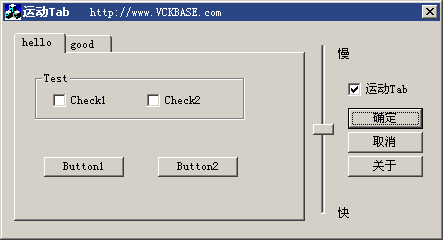
easeOutQuad 替代線性位移,提升手感WM_GESTURE 手勢滑動切換delete 所有頁面指標完整原始碼請參考本文配套下載。此控制項適合需求頻繁切換、視覺效果優先的工具類軟體 (下載管理、設定面板、儀表板等)。