在 SDI/MDI 應用程式狀態欄右側顯示即時更新的時鐘(格式 HH:MM:SS),支援彈出樣式自定義。
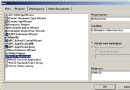
在 String Table 新增項目:
ID_INDICATOR_CLOCK00:00:00 (關鍵:決定窗格預設寬度)⚠️ 若加入現有 String Table 後時鐘不顯示,請在 resource.h 中將該 ID 值 +1。
MainFrm.cpp 中修改 indicators 陣列:
static UINT indicators[] = {
    ID_SEPARATOR,           // 左側彈性空間
    ID_INDICATOR_CLOCK,     // ⏰ 時鐘位置(順序決定顯示位置)
    ID_INDICATOR_CAPS,
    ID_INDICATOR_NUM,
    ID_INDICATOR_SCRL,
};在 CMainFrame::OnCreate 中:
int CMainFrame::OnCreate(LPCREATESTRUCT lpCreateStruct) {
    if (CFrameWnd::OnCreate(lpCreateStruct) == -1) return -1;
    SetTimer(1, 1000, NULL); // 1 秒間隔
    return 0;
}用 ClassWizard 添加 WM_TIMER 處理函數:
void CMainFrame::OnTimer(UINT nIDEvent) {
    CTime time = CTime::GetCurrentTime();
    CString s = time.Format(_T("%H:%M:%S"));
    m_wndStatusBar.SetPaneText(
        m_wndStatusBar.CommandToIndex(ID_INDICATOR_CLOCK), s);
    CFrameWnd::OnTimer(nIDEvent);
}添加 WM_CLOSE 處理:
void CMainFrame::OnClose() {
    KillTimer(1);
    CFrameWnd::OnClose();
}在 OnCreate 中額外添加:
m_wndStatusBar.SetPaneInfo(
    m_wndStatusBar.CommandToIndex(ID_INDICATOR_CLOCK),
    ID_INDICATOR_CLOCK, SBPS_POPOUT, 50); // 彈出樣式、寬度 50 像素
其他可用樣式:SBPS_NORMAL(預設)、SBPS_STRETCH(拉伸)、SBPS_DISABLED(灰顯)。
同理可添加:CPU 使用率、網速、記憶體佔用、自定義狀態文字等。只需:
indicators 陣列加入 IDOnTimer 定期更新對應窗格文字僅需 5 步、不到 20 行代碼,即可為 MFC 應用添加專業級狀態欄時鐘。技巧核心在於:String Table 預留寬度 + 定時器驅動 + SetPaneText 更新,掌握此模式可任意擴展狀態欄功能。