WTL (Windows Template Library) 輕量級但缺乏 MFC CFont 的便利封裝。本文提供 CWindowFont 類別:以視窗字體為基礎,透過旗標組合 (粗體/斜體/底線/雙倍高) 快速建立新字體並套用至控件,極大簡化 WTL 對話框/視窗字體客製化。
#pragma once
#include
#include

// LOGFONT 包裝
class CLogFont : public LOGFONT
{
public:
    CLogFont() { memset(this, 0, sizeof(LOGFONT)); }
};

// 字體建立與套用核心類
class CWindowFont : public CFont
{
public:
    enum EType {
        typeNormal       = 0x00,
        typeBold         = 0x01,
        typeItalic       = 0x02,
        typeUnderline    = 0x04,
        typeDoubleHeight = 0x08,
    };

    CWindowFont() : CFont() {}
    CWindowFont(HWND hWnd, int nType) { Create(hWnd, nType); }
    virtual ~CWindowFont() {}

    // 建立字體 (回傳 bool 成敗)
    bool Create(HWND hWnd, int nType)
    {
        ATLASSERT(hWnd && ::IsWindow(hWnd));
        HFONT hFont = (HFONT)::SendMessage(hWnd, WM_GETFONT, 0, 0);
        if (!hFont) return false;

        CLogFont lf;
        if (!::GetObject(hFont, sizeof(lf), &lf)) return false;

        if (nType & typeBold)         lf.lfWeight = FW_BOLD;
        if (nType & typeItalic)       lf.lfItalic = TRUE;
        if (nType & typeUnderline)    lf.lfUnderline = TRUE;
        if (nType & typeDoubleHeight) lf.lfHeight *= 2;

        return CreateFontIndirect(&lf) ? true : false;
    }

    // 建立並直接套用至控件
    bool Apply(HWND hWnd, int nType, UINT nCtrlID)
    {
        if (!Create(hWnd, nType)) return false;
        CWindow wndCtrl = ::GetDlgItem(hWnd, nCtrlID);
        ATLASSERT(wndCtrl.m_hWnd);
        wndCtrl.SetFont(m_hFont);
        return true;
    }
};
#include "windowfont.h"

class CMyDialog : public CDialogImpl
{
public:
    enum { IDD = IDD_MYDIALOG };

    CWindowFont m_fontBold;    // 粗體
    CWindowFont m_fontBig;     // 雙倍高
    CWindowFont m_fontBoldBig; // 粗體+雙倍高

    BOOL OnInitDialog(CWindow, LPARAM)
    {
        // 方式 1: 建立後手動套用
        if (m_fontBold.Create(m_hWnd, CWindowFont::typeBold))
            GetDlgItem(IDC_STATIC_TITLE).SetFont(m_fontBold);

        // 方式 2: 一鍵建立並套用
        m_fontBig.Apply(m_hWnd, CWindowFont::typeDoubleHeight, IDC_STATIC_SUBTITLE);

        // 方式 3: 組合旗標
        m_fontBoldBig.Create(m_hWnd, CWindowFont::typeBold | CWindowFont::typeDoubleHeight);
        GetDlgItem(IDC_STATIC_VERSION).SetFont(m_fontBoldBig);

        return TRUE;
    }
}; 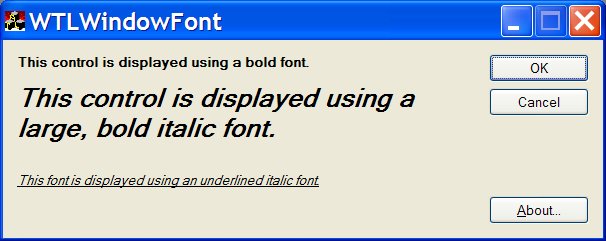
關於對話框:版本資訊使用雙倍高粗體字體;嚚導首頁:標題使用雙倍高字體增強視覺層次。
typeBold | typeItalic | typeUnderline 任意組合。CFont,析構自動 DeleteObject,無記憶體洩漏。Create 靈活控制時機,Apply 一行搞定。typeStrikeOut (刪除線)、typeAntiAlias (ClearType) 旗標。lfCharSet 覆寫 (如 CHINESEBIG5_CHARSET / GB2312_CHARSET)。CreateFromLogFont 接受完整 LOGFONT 進階客製化。CFontHandle 互轉,方便搭配 GDI+ / DirectWrite。完整 windowfont.h 可直接複製到專案 include 目錄使用,適用 WTL 7.0/7.1/8.0+。