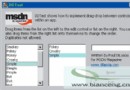
網頁/文件編輯時常需預覽系統安裝字體效果。本文示範使用 EnumFontFamiliesEx 列舉系統字體,配合 CFont 動態建立/套用字體,打造一個即時預覽的字體檢視器對話框。
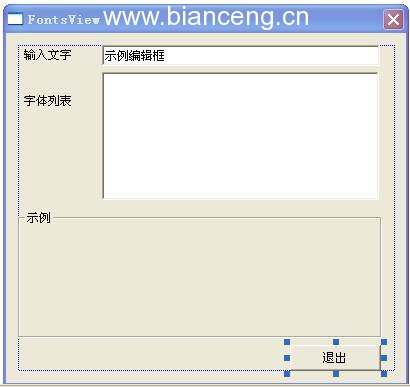
| 控制項 | ID | 類型 | 說明 |
|---|---|---|---|
| 字體清單 | IDC_LFONTS | List Box | 系統字體名稱 (變數 m_ctlFontList) |
| 輸入文字 | IDC_EENTERED | Edit | 預覽文字 (變數 m_strEntered) |
| 預覽區 | IDC_DISPLAY | Static | 顯示效果 (變數 m_ctlDisplay, 類型 CStatic) |
| 離開按鈕 | IDC_BEXIT | Button | 關閉程式 |
// FontsViewDlg.h
int CALLBACK MyEnumFontProc(ENUMLOGFONTEX* lpelf, NEWTEXTMETRICEX* lpntm,
                            DWORD nFontType, LPARAM lParam);

// FontsViewDlg.cpp
int CALLBACK MyEnumFontProc(ENUMLOGFONTEX* lpelf, NEWTEXTMETRICEX*, DWORD, LPARAM lParam)
{
    CFontsViewDlg* pDlg = (CFontsViewDlg*)lParam;
    if (pDlg)
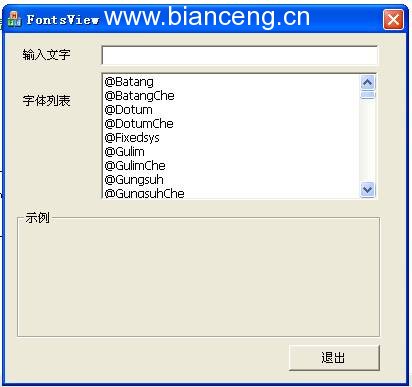
        pDlg->m_ctlFontList.AddString(lpelf->elfLogFont.lfFaceName);
    return 1; // 繼續列舉
}void CFontsViewDlg::FillFontList()
{
m_ctlFontList.ResetContent();
LOGFONT lf = {0};
lf.lfCharSet = DEFAULT_CHARSET;
lf.lfFaceName[0] = 0;
lf.lfPitchAndFamily = 0;
CClientDC dc(this);
::EnumFontFamiliesEx(dc.m_hDC, &lf,
(FONTENUMPROC)MyEnumFontProc, (LPARAM)this, 0);
// 去除重複名稱 (同字體不同字集會重複出現)
CString strCur, strPrev;
for (int i = m_ctlFontList.GetCount() - 1; i >= 0; --i)
{
m_ctlFontList.GetText(i, strCur);
if (strCur == strPrev)
m_ctlFontList.DeleteString(i);
else
strPrev = strCur;
}
}BOOL CFontsViewDlg::OnInitDialog()
{
CDialog::OnInitDialog();
// ... 圖示設定略 ...
FillFontList();
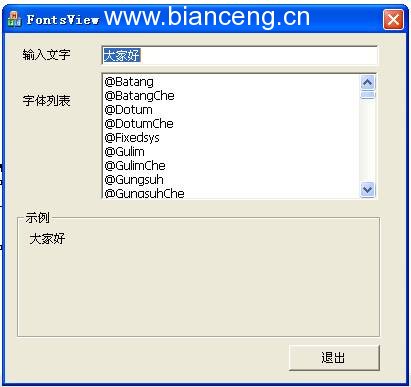
m_strEntered = _T("大家好");
m_strDisplay = m_strEntered;
UpdateData(FALSE);
return TRUE;
}void CFontsViewDlg::OnEnChangeEentered()
{
UpdateData(TRUE);
m_strDisplay = m_strEntered;
UpdateData(FALSE);
}// 成員變數
CFont m_fSetFont;
void CFontsViewDlg::SetMyFont()
{
UpdateData(TRUE); // 取得 m_strFontName (List Box 選取項)
if (m_strFontName.IsEmpty()) return;
CRect rc;
m_ctlDisplay.GetWindowRect(&rc);
ScreenToClient(&rc);
m_fSetFont.DeleteObject(); // 釋放舊字體
m_fSetFont.CreateFont(
rc.Height() - 5, 0, 0, 0, FW_NORMAL,
FALSE, FALSE, FALSE, DEFAULT_CHARSET,
OUT_DEFAULT_PRECIS, CLIP_DEFAULT_PRECIS,
DEFAULT_QUALITY, DEFAULT_PITCH | FF_DONTCARE,
m_strFontName);
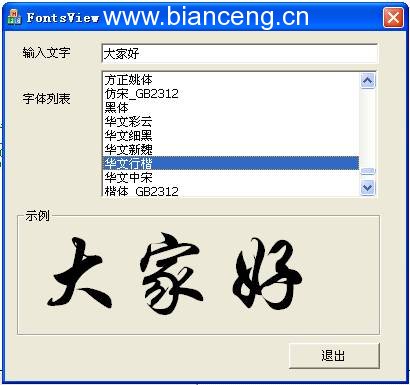
m_ctlDisplay.SetFont(&m_fSetFont);
m_ctlDisplay.Invalidate();
}
void CFontsViewDlg::OnLbnSelchangeLfonts()
{
SetMyFont();
}
CreateFont 參數 (lfWeight, lfItalic, lfUnderline, lfHeight)。EnumFontFamiliesEx 的 lfCharSet 篩選特定語系 (中文/日文/韓文/符號)。CRichEditCtrl 可顯示多行、混排效果。編譯環境:Windows XP + Visual C++ .NET (VC7.0/7.1),VC6.0 亦可編譯通過。