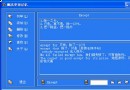
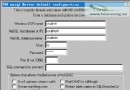
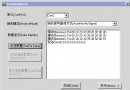
採用三層架構分離關注點:
_globalData:管理控制項陣列、INI 路徑、拖曳狀態_myControl:封裝共通屬性 (標題、矩形、類型)CMyButton、CMyEdit、CMyLabel 分別繼承 CButton、CEdit、CStatic
template<class T>
void addControl(T& parent, int nType, int nReadID = 0)
{
    int nIndex = nReadID ? nReadID : ++globalData.nCount;
    _myControl* pCtrl = globalData.myControl[nIndex];
    pCtrl->nType = nType;

    // 共用字型建立
    HFONT hFont = CreateFont(12, 0, 0, 0, 400, 0, 0, 0, ANSI_CHARSET,
        OUT_DEFAULT_PRECIS, CLIP_DEFAULT_PRECIS, DEFAULT_QUALITY,
        DEFAULT_PITCH | FF_DONTCARE, _T("新細明體"));

    CRect rc = pCtrl->rect;
    switch (nType) {
    case MYBUTTON:
        pCtrl->myButton.Create(pCtrl->strCaption, WS_VISIBLE|WS_CHILD|BS_PUSHBUTTON,
            rc, &parent, IDB_MYCONTROL + nIndex);
        SendMessage(pCtrl->myButton, WM_SETFONT, (WPARAM)hFont, TRUE);
        break;
    case MYEDIT:
        pCtrl->myEdit.Create(WS_VISIBLE|WS_CHILD, rc, &parent, IDB_MYCONTROL + nIndex);
        pCtrl->myEdit.ModifyStyleEx(0, WS_EX_CLIENTEDGE, SWP_DRAWFRAME);
        // 修正 3D 邊框尺寸差異
        pCtrl->myEdit.SetWindowPos(NULL, rc.left-2, rc.top-2,
            rc.Width()+4, rc.Height()+4, NULL);
        SendMessage(pCtrl->myEdit, WM_SETFONT, (WPARAM)hFont, TRUE);
        break;
    case MYLABEL:
        pCtrl->myLabel.Create(pCtrl->strCaption, WS_VISIBLE|WS_CHILD|SS_NOTIFY,
            rc, &parent, IDB_MYCONTROL + nIndex);
        SendMessage(pCtrl->myLabel, WM_SETFONT, (WPARAM)hFont, TRUE);
        break;
    }
}
// CMyButton.cpp
void CMyButton::OnClicked() {
    AfxMessageBox(_T("你點擊了動態按鈕!"));
}
// CMyEdit, CMyLabel 同理可加入 EN_CHANGE, STN_CLICKED 等訊息
關鍵優勢:繼承 MFC 控制項類別並使用 ClassWizard,訊息映射自動生成,無需手寫巨集,管理極簡單。
// 取得相對父視窗座標
template<class T, class P>
CRect GetRelativeRect(T& ctrl, P& parent) {
    CRect rcCtrl, rcParent;
    ctrl.GetClientRect(&rcCtrl);
    parent.GetClientRect(&rcParent);
    parent.ClientToScreen(&rcParent);
    ctrl.ClientToScreen(&rcCtrl);
    return CRect(rcCtrl.left - rcParent.left, rcCtrl.top - rcParent.top,
                 rcCtrl.right - rcParent.left, rcCtrl.bottom - rcParent.top);
}

// 儲存
void SaveConfig(CWnd& wnd) {
    GetAllControlRects(wnd); // 更新最新座標
    CFile file(globalData.strIniPath, CFile::modeCreate | CFile::modeWrite);
    file.Close(); // 清空
    WritePrivateProfileString(_T("AppInfo"), _T("Count"), strCount, iniPath);
    for (int i=1; i<=count; i++) {
        CString sec; sec.Format(_T("Ctrl%d"), i);
        WritePrivateProfileString(sec, _T("Type"), strType, iniPath);
        WritePrivateProfileString(sec, _T("Caption"), caption, iniPath);
        WritePrivateProfileString(sec, _T("Left"), strLeft, iniPath);
        // Top, Right, Bottom 同理...
    }
}

// 讀取
void LoadConfig(CWnd& wnd) {
    ClearAllControls(); // 刪除舊控制項物件
    int nCount = GetPrivateProfileInt(_T("AppInfo"), _T("Count"), 0, iniPath);
    for (int i=1; i<=nCount; i++) {
        // 讀取屬性...
        addControl(wnd, nType, i); // 指定索引重建
    }
}
BOOL CMainDlg::PreTranslateMessage(MSG* pMsg)
{
    if (pMsg->message == WM_LBUTTONDOWN && globalData.bDragMode) {
        CWnd::FromHandle(pMsg->hwnd)->SendMessage(WM_SYSCOMMAND, SC_MOVE | HTCAPTION, 0);
        Invalidate(TRUE);
        return TRUE;
    }
    return CDialog::PreTranslateMessage(pMsg);
}
利用 WM_SYSCOMMAND + SC_MOVE 系統內建視窗移動邏輯,無需手寫滑鼠追蹤迴圈,並可擴充 SC_SIZE 實現縮放。
此方案解決動態控制項三大難題:建立、事件、持久化。採用繼承類別承接訊息映射、模板函數統一建立邏輯、INI 區段化儲存,代碼結構清晰且易擴充新控制項類型。完整範例在 VC6.0 編譯通過。