Microsoft Visio 的智慧連接線功能極為好用,可手動調整且彈性高。本文分享一個自行開發的 CSmartLines 類別,實現同樣功能,可整合至 MFC Doc/View 架構專案中。
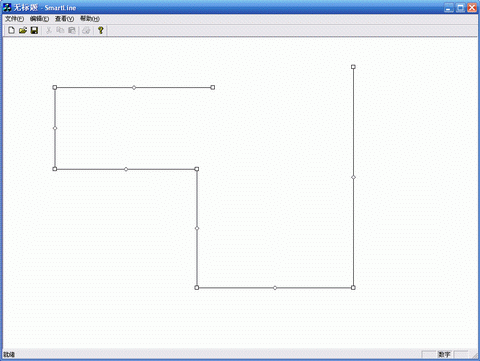
圖一:連接線效果展示
#include "SmartLines.h"SmartLines.lib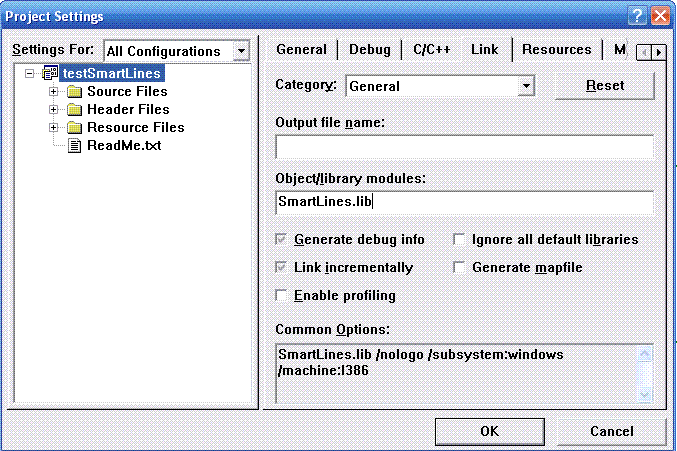
圖二:專案設定匯入庫
CSmartLines m_lines;void CTestSmartLinesView::OnLButtonDown(UINT nFlags, CPoint point)
{
m_lines.Track(this, point);
CScrollView::OnLButtonDown(nFlags, point);
}BOOL CTestSmartLinesView::OnSetCursor(CWnd* pWnd, UINT nHitTest, UINT message)
{
if (m_lines.OnSetCursor(pWnd, nHitTest))
return TRUE;
return CScrollView::OnSetCursor(pWnd, nHitTest, message);
}void CTestSmartLinesView::OnDraw(CDC* pDC)
{
CTestSmartLinesDoc* pDoc = GetDocument();
ASSERT_VALID(pDoc);
m_lines.Draw(pDC);
}適用於流程圖編輯器、組織架構圖、網路拓撲圖等需動態連接線的 MFC 應用程式。