在使用 Office 2000 套件(Word、Excel、PowerPoint、Access、Outlook)時,你或許注意到工具列或功能表上會出現其他軟體新增的自訂按鈕或選單項目。點擊它們會觸發特定功能。本文將示範如何使用 Visual C++ 6.0 搭配 ATL 3.0(Active Template Library)開發 Office 2000 內部 COM 增益集,以 Outlook 2000 為例完整呈現開發流程。Office 2000 各元件的增益集開發方式高度相似,僅在登錄機碼與匯入類型庫上略有差異。
所有 Office 2000 內部 COM 增益集必須實作 _IDTExtensibility2 分派介面,該介面定義於 MSADDN Designer 類型庫(MSADDNDR.dll/MSADDNDR.tlb),通常位於 <磁碟機>/Program Files/Common Files/Designer。此介面包含五個必須實作的方法:
實務上主要在 OnConnection 與 OnDisconnection 撰寫邏輯。
唯有正確在登錄表建立對應機碼,宿主應用程式才會載入增益集。路徑格式為:
HKEY_CURRENT_USER\Software\Microsoft\Office\<TheOfficeApp>\Addins\<ProgID>
TheOfficeApp 為應用程式名稱(如 Word、Outlook),ProgID 為增益集的唯一識別字串(如 Outlook2000Addin.Addin)。其下需建立四個主要值:
FriendlyName(字串):顯示於 COM 增益集對話方塊的名稱。Description(字串):增益集描述資訊。LoadBehavior(DWORD):0x03 為應用程式啟動時自動載入(常用);0x08 為使用者手動控制載入。CommandLineSafe(DWORD):0x01(真)或 0x00(假)。以下以建立一個可在 Outlook 2000 新增工具列按鈕與功能表項目的增益集為例。
OutlAddin。OutlookAddin,可勾選 Support ISupportErrorInfo,確定完成。COutlookAddin 類別右鍵選擇 Implement Interface。_IDTExtensibility2,確定。系統自動產生五個空的介面函式。在 FileView 的 Resource Files 中開啟 OutlookAddin.rgs,於檔案末尾加入:
// 新增 Outlook 2000 內部增益集登錄機碼
HKCU
{
    Software
    {
        Microsoft
        {
            Office
            {
                Outlook
                {
                    Addins
                    {
                        'OutlAddin.OutlookAddin'
                        {
                            val FriendlyName = s 'Outlook2000增益集'
                            val Description = s '使用ATL開發的Outlook2000增益集'
                            val LoadBehavior = d '00000003'
                            val CommandLineSafe = d '00000000'
                        }
                    }
                }
            }
        }
    }
}在 Stdafx.h 加入(路徑依實際安裝位置調整):
// 匯入 Office 2000 及 Outlook 2000 類型庫
#import "e:\Program Files\Microsoft Office\Office\mso9.dll" rename_namespace("Office"), named_guids
using namespace Office;
#import "e:\Program Files\Microsoft Office\Office\MSOUTL9.olb" rename_namespace("Outlook"), raw_interfaces_only, named_guids
using namespace Outlook;STDMETHOD(OnConnection)(IDispatch * Application,
ext_ConnectMode ConnectMode,
IDispatch * AddInInst,
SAFEARRAY * * custom)
{
CComPtr< Office::_CommandBars> spCmdBars;
// 取得 Outlook _Application 介面
CComQIPtr<Outlook::_Application> spApp(Application);
ATLASSERT(spApp);
// 取得 CommandBars 介面
CComPtr<Outlook::_Explorer> spExplorer;
spApp->ActiveExplorer(&spExplorer);
HRESULT hr = spExplorer->get_CommandBars(&spCmdBars);
if(FAILED(hr)) return hr;
ATLASSERT(spCmdBars);
// 新增工具列
CComVariant vName(L"新增Outlook2K工具列增益集");
CComPtr<Office::CommandBar> spNewCmdBar;
CComVariant vPos(1); // 位置
CComVariant vTemp(VARIANT_TRUE); // 暫存
CComVariant vEmpty(DISP_E_PARAMNOTFOUND, VT_ERROR);
spNewCmdBar = spCmdBars->Add(vName, vPos, vEmpty, vTemp);
// 取得工具列控制項集合,新增兩個按鈕
CComPtr<Office::CommandBarControls> spBarControls;
spBarControls = spNewCmdBar->GetControls();
ATLASSERT(spBarControls);
CComVariant vToolBarType(1); // msoControlButton
CComVariant vShow(VARIANT_TRUE);
CComPtr<Office::CommandBarControl> spNewBar, spNewBar2;
spNewBar = spBarControls->Add(vToolBarType, vEmpty, vEmpty, vEmpty, vShow);
spNewBar2 = spBarControls->Add(vToolBarType, vEmpty, vEmpty, vEmpty, vShow);
ATLASSERT(spNewBar); ATLASSERT(spNewBar2);
// 取得 _CommandBarButton 介面設定按鈕外觀
CComQIPtr<Office::_CommandBarButton> spCmdButton(spNewBar);
CComQIPtr<Office::_CommandBarButton> spCmdButton2(spNewBar2);
ATLASSERT(spCmdButton); ATLASSERT(spCmdButton2);
// 按鈕 1:使用自訂點陣圖 (32x32)
HBITMAP hBmp = (HBITMAP)::LoadImage(_Module.GetResourceInstance(),
MAKEINTRESOURCE(IDB_BITMAP), IMAGE_BITMAP, 0, 0, LR_LOADMAP3DCOLORS);
::OpenClipboard(NULL);
::EmptyClipboard();
::SetClipboardData(CF_BITMAP, (HANDLE)hBmp);
::CloseClipboard();
::DeleteObject(hBmp);
spCmdButton->PutStyle(Office::msoButtonIconAndCaption);
hr = spCmdButton->PasteFace();
if(FAILED(hr)) return hr;
spCmdButton->PutVisible(VARIANT_TRUE);
spCmdButton->PutCaption(OLESTR(L"按鈕1"));
spCmdButton->PutEnabled(VARIANT_TRUE);
spCmdButton->PutTooltipText(OLESTR(L"按鈕1提示訊息"));
spCmdButton->PutTag(OLESTR(L"按鈕1標誌"));
// 顯示工具列
spNewCmdBar->PutVisible(VARIANT_TRUE);
// 按鈕 2:使用 Outlook 內建圖示 (FaceId 1760)
spCmdButton2->PutStyle(Office::msoButtonIconAndCaption);
spCmdButton2->PutFaceId(1760);
spCmdButton2->PutVisible(VARIANT_TRUE);
spCmdButton2->PutCaption(OLESTR(L"按鈕2"));
spCmdButton2->PutEnabled(VARIANT_TRUE);
spCmdButton2->PutTooltipText(OLESTR(L"按鈕2提示訊息"));
spCmdButton2->PutTag(OLESTR(L"按鈕2標誌"));
spCmdButton2->PutVisible(VARIANT_TRUE);
// 保存按鈕介面指標供後續事件連接使用
m_spButton = spCmdButton;
m_spButton2 = spCmdButton2;
// ...
}_bstr_t bstrNewMenuText(OLESTR(L"新增選單項目"));
CComPtr<Office::CommandBarControls> spCmdCtrls, spCmdBarCtrls;
CComPtr<Office::CommandBarPopup> spCmdPopup;
CComPtr<Office::CommandBarControl> spCmdCtrl;
CComPtr<Office::CommandBar> spCmdBar;
// 取得主功能列
hr = spCmdBars->get_ActiveMenuBar(&spCmdBar);
if(FAILED(hr)) return hr;
spCmdCtrls = spCmdBar->GetControls();
ATLASSERT(spCmdCtrls);
// 定位第 5 項「工具」選單
CComVariant vItem(5);
spCmdCtrl = spCmdCtrls->GetItem(vItem);
ATLASSERT(spCmdCtrl);
IDispatchPtr spDisp = spCmdCtrl->GetControl();
CComQIPtr<Office::CommandBarPopup> ppCmdPopup(spDisp);
ATLASSERT(ppCmdPopup);
spCmdBarCtrls = ppCmdPopup->GetControls();
ATLASSERT(spCmdBarCtrls);
// 新增選單項目
CComVariant vMenuType(1), vMenuPos(6), vMenuEmpty(DISP_E_PARAMNOTFOUND, VT_ERROR);
CComVariant vMenuShow(VARIANT_TRUE), vMenuTemp(VARIANT_TRUE);
CComPtr<Office::CommandBarControl> spNewMenu;
spNewMenu = spCmdBarCtrls->Add(vMenuType, vMenuEmpty, vMenuEmpty, vMenuEmpty, vMenuTemp);
ATLASSERT(spNewMenu);
spNewMenu->PutCaption(bstrNewMenuText);
spNewMenu->PutEnabled(VARIANT_TRUE);
spNewMenu->PutVisible(VARIANT_TRUE);
// 為選單項目加上圖示
CComQIPtr<Office::_CommandBarButton> spCmdMenuButton(spNewMenu);
ATLASSERT(spCmdMenuButton);
spCmdMenuButton->PutStyle(Office::msoButtonIconAndCaption);
spCmdMenuButton->PasteFace(); // 同按鈕1貼上圖示
spNewMenu->PutVisible(VARIANT_TRUE);
m_spMenu = spCmdMenuButton;工具列按鈕的事件介面為 _CommandBarButtonEvents。使用 IDispEventSimpleImpl 實作事件接收(不需額外類型庫資訊)。
public IDispEventSimpleImpl<1, COutlookAddin, &__uuidof(Office::_CommandBarButtonEvents)>extern _ATL_FUNC_INFO OnClickButtonInfo;_ATL_FUNC_INFO OnClickButtonInfo = {CC_STDCALL, VT_EMPTY, 2, {VT_DISPATCH, VT_BYREF | VT_BOOL}};BEGIN_SINK_MAP(COutlookAddin)
SINK_ENTRY_INFO(1, __uuidof(Office::_CommandBarButtonEvents), 0x01, OnClickButton1, &OnClickButtonInfo)
SINK_ENTRY_INFO(2, __uuidof(Office::_CommandBarButtonEvents), 0x01, OnClickButton2, &OnClickButtonInfo)
SINK_ENTRY_INFO(3, __uuidof(Office::_CommandBarButtonEvents), 0x01, OnClickMenu, &OnClickButtonInfo)
END_SINK_MAP()void __stdcall OnClickButton1(IDispatch* /*Office::_CommandBarButton*/ Ctrl, VARIANT_BOOL* CancelDefault)
{
USES_CONVERSION;
CComQIPtr<Office::_CommandBarButton> pCommandBarButton(Ctrl);
HINSTANCE result = ShellExecute(NULL, _T("open"), _T("https://www.vckbase.com"), NULL, NULL, SW_SHOW);
}OnConnection 結尾:CommandButton1Events::DispEventAdvise((IDispatch*)m_spButton);OnDisconnection 中:CommandButton1Events::DispEventUnadvise((IDispatch*)m_spButton);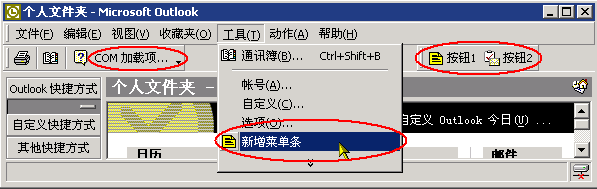
本文配套原始碼可供下載參考,內含詳細註解。