網路上托盤類實作多半繁瑣。本文推薦一個來源於經典著作、經實戰驗證的 CTrayIcon 類,**幾行代碼**即可實現:托盤圖示顯示/隱藏/動畫、右鍵選單、單擊/雙擊響應、提示文字修改。附完整類原始碼與範例專案。
將 TrayIcon.h、TrayIcon.cpp 複製到專案目錄,專案中「Add Existing Item」加入。
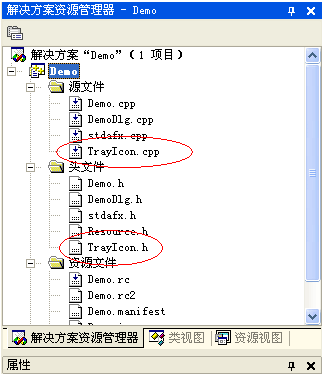
#include "TrayIcon.h"
class CDemoDlg : public CDialog {
    CTrayIcon m_TrayIcon;
    // ...
    afx_msg LRESULT OnTrayNotification(WPARAM, LPARAM);
};資源視圖 → Menu → 新增 IDR_DEMO,項目:ID_FILE_DEMO1 (顯示)、ID_FILE_EXIT (退出)。
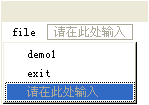
void CDemoDlg::OnFileDemo1() { ShowWindow(SW_SHOW); m_TrayIcon.RemoveIcon(); }
void CDemoDlg::OnFileExit()  { m_TrayIcon.RemoveIcon(); OnCancel(); }
#define WM_ICON_NOTIFY WM_USER + 10
BEGIN_MESSAGE_MAP(CDemoDlg, CDialog)
    // ...
    ON_MESSAGE(WM_ICON_NOTIFY, OnTrayNotification)
END_MESSAGE_MAP()

LRESULT CDemoDlg::OnTrayNotification(WPARAM w, LPARAM l) {
    return m_TrayIcon.OnTrayNotification(w, l); // 轉發給類別內部處理
}
void CDemoDlg::OnBnClickedButton1() {
    m_TrayIcon.Create(this, WM_ICON_NOTIFY, _T("滑鼠懸停提示文字"), m_hIcon, IDR_DEMO);
    ShowWindow(SW_HIDE); // 隱藏主視窗,僅駐留托盤
}SetIcon(HICON) 切換圖示,配合 WM_TIMER 實現幀動畫。SetToolTip(LPCTSTR)。RemoveIcon() (銷毀時自動調用)。
class CTrayIcon {
public:
    BOOL Create(CWnd* pWnd, UINT uMsg, LPCTSTR szTip, HICON hIcon, UINT uMenuID);
    void RemoveIcon();
    void SetIcon(HICON hIcon);
    void SetToolTip(LPCTSTR szTip);
    LRESULT OnTrayNotification(WPARAM wParam, LPARAM lParam); // 內部處理滑鼠事件、選單彈出
};
類別封裝了
Shell_NotifyIcon所有細節 (NIM_ADD/MODIFY/DELETE、NOTIFYICONDATA版本差異),開發者零學習成本。原始碼與 Demo 專案附件下載。