專案常需從遠端伺服器下載檔案(備份、同步、匯入)。PHP 內建 file_get_contents()、copy() 雖簡單,但不支援斷點續傳、大檔案記憶體超限、錯誤重試。本文提供一個完整的 HttpDownload 類,基於 Socket 實作 HTTP/1.1 協議,支援斷點續傳、進度控制、錯誤處理。
<?php
/**
 * HTTP 遠程檔案下載類
 * 支援:斷點續傳、HTTP/1.1 持久連線、Header 解析、錯誤重試
 */
class HttpDownload {
    private $url = '';
    private $scheme = 'http';
    private $host = '';
    private $port = 80;
    private $user = '';
    private $pass = '';
    private $path = '/';
    private $query = '';
    private $fp = null;
    private $error = '';
    private $headers = [];
    private $html = '';

    /** 初始化 URL 解析 */
    private function parseUrl(string $url): void {
        $parts = parse_url($url);
        if (!$parts) throw new InvalidArgumentException("URL 解析失敗: $url");

        $this->url = $url;
        $this->scheme = $parts['scheme'] ?? 'http';
        $this->host = $parts['host'] ?? '';
        $this->port = $parts['port'] ?? ($this->scheme === 'https' ? 443 : 80);
        $this->user = $parts['user'] ?? '';
        $this->pass = $parts['pass'] ?? '';
        $this->path = $parts['path'] ?? '/';
        $this->query = $parts['query'] ?? '';
    }

    /** 開啟連線並發送請求 */
    public function open(string $url, int $timeout = 30): bool {
        $this->close();
        $this->parseUrl($url);

        // 建立 Socket 連線
        $target = ($this->scheme === 'https' ? 'ssl://' : 'tcp://') . $this->host;
        $this->fp = @fsockopen($target, $this->port, $errno, $errstr, $timeout);
        if (!$this->fp) {
            $this->error = "連線失敗 ($errno): $errstr";
            return false;
        }

        // 設定超時
        stream_set_timeout($this->fp, $timeout);

        // 組裝請求路徑
        $requestPath = $this->path . ($this->query ? '?' . $this->query : '');

        // HTTP/1.1 請求頭
        $req  = "GET $requestPath HTTP/1.1\r\n";
        $req .= "Host: {$this->host}\r\n";
        $req .= "User-Agent: Mozilla/5.0 (compatible; PHP HttpDownload)\r\n";
        $req .= "Accept: */*\r\n";
        $req .= "Connection: close\r\n"; // 關鍵:避免 chunked encoding 干擾 feof

        // 斷點續傳:若已有部分檔案,加入 Range 標頭
        // $existingSize = filesize($localFile); // 外部傳入
        // if ($existingSize > 0) $req .= "Range: bytes=$existingSize-\r\n";

        // Basic Auth
        if ($this->user) {
            $auth = base64_encode("$this->user:$this->pass");
            $req .= "Authorization: Basic $auth\r\n";
        }

        $req .= "\r\n";

        // 發送請求
        fwrite($this->fp, $req);

        // 讀取回應頭
        $this->parseResponseHeaders();

        return $this->isOk();
    }

    /** 解析 HTTP 回應頭 */
    private function parseResponseHeaders(): void {
        $this->headers = [];
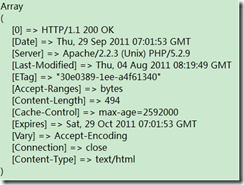
        $statusLine = fgets($this->fp, 4096);
        if (!$statusLine) return;

        // 解析狀態行
        $parts = explode(' ', trim($statusLine), 3);
        $this->headers['http_version'] = $parts[0] ?? '';
        $this->headers['http_code'] = (int)($parts[1] ?? 0);
        $this->headers['http_reason'] = $parts[2] ?? '';

        // 解析 Header 行
        while (($line = fgets($this->fp, 4096)) !== false) {
            $line = trim($line);
            if ($line === '') break; // 空行結束 Header
            if (strpos($line, ':') !== false) {
                [$key, $value] = explode(':', $line, 2);
                $this->headers[strtolower(trim($key))] = trim($value);
            }
        }
    }

    /** 判斷回應是否成功 (2xx) */
    public function isOk(): bool {
        $code = $this->headers['http_code'] ?? 0;
        if ($code >= 200 && $code < 300) return true;
        $this->error = "HTTP $code: " . ($this->headers['http_reason'] ?? '');
        return false;
    }

    /** 取得回應 Header */
    public function getHeader(string $name): string {
        return $this->headers[strtolower($name)] ?? '';
    }

    /** 另存為二進位檔案(支援續傳) */
    public function saveToFile(string $savePath, int $offset = 0): bool {
        if (!$this->isOk()) return false;
        if (!$this->fp || feof($this->fp)) {
            $this->error = '連線已關閉';
            return false;
        }

        // 開啟本地檔案(ab 模式支援續寫)
        $mode = $offset > 0 ? 'r+b' : 'wb';
        $localFp = @fopen($savePath, $mode);
        if (!$localFp) {
            $this->error = "無法開啟本地檔案: $savePath";
            return false;
        }

        if ($offset > 0) fseek($localFp, $offset, SEEK_SET);

        $bufferSize = 8192;
        $written = 0;
        while (!feof($this->fp)) {
            $chunk = fread($this->fp, $bufferSize);
            if ($chunk === '' || $chunk === false) break;
            $bytes = fwrite($localFp, $chunk);
            if ($bytes === false) {
                $this->error = '本地寫入失敗';
                fclose($localFp);
                return false;
            }
            $written += $bytes;
            // 可在這裡呼叫進度回呼
            // $this->onProgress($written, $this->getHeader('content-length'));
        }

        fclose($localFp);
        return true;
    }

    /** 取得錯誤訊息 */
    public function getError(): string {
        return $this->error;
    }

    /** 關閉連線 */
    public function close(): void {
        if ($this->fp) {
            fclose($this->fp);
            $this->fp = null;
        }
    }

    /** 解構子自動關閉 */
    public function __destruct() { $this->close(); }
}$downloader = new HttpDownload();
if ($downloader->open('https://example.com/large.zip')) {
if ($downloader->saveToFile('/tmp/large.zip')) {
echo "下載完成\n";
} else {
echo "失敗: " . $downloader->getError() . "\n";
}
} else {
echo "連線失敗: " . $downloader->getError() . "\n";
}
$downloader->close();$localFile = '/tmp/large.zip';
$url = 'https://example.com/large.zip';
$downloader = new HttpDownload();
// 1. 檢查本地已下載大小
$offset = file_exists($localFile) ? filesize($localFile) : 0;
// 2. 開啟連線並發送 Range 請求(需修改 open() 支援自定義 Header,或繼承覆寫)
// 此處示範手動發送 Range(簡化版)
$fp = fsockopen('ssl://example.com', 443);
$req = "GET /large.zip HTTP/1.1\r\n";
$req .= "Host: example.com\r\n";
if ($offset > 0) $req .= "Range: bytes=$offset-\r\n";
$req .= "Connection: close\r\n\r\n";
fwrite($fp, $req);
// ... 解析頭部,確認 206 Partial Content ...
// ... 以 append 模式寫入 ...
// 完整實作建議擴充 HttpDownload::open() 接受 $extraHeaders 參數| 技術點 | 實作細節 |
|---|---|
| HTTP/1.1 Connection: close | 避免 Chunked Transfer Encoding 干擾 feof() 判斷結束 | Range 斷點續傳 | 請求頭 Range: bytes=START-,回應 206 Partial Content + Content-Range |
| HTTPS 支援 | ssl:// 前綴 + fsockopen,需 OpenSSL 擴展 |
| 大檔案記憶體安全 | 固定 8KB 緩衝區 fread/fwrite,不載入全檔 |
| 錯誤處理 | 統一 $this->error,提供 getError()、isOk() |
| 重導向支援 | 解析 Location Header,遞迴呼叫 open()(需限制最大重導向次數) |
setProgressCallback(callable $fn),傳遞 ($downloaded, $total)。Range,合併檔案。Content-MD5 或獨立校驗檔)。setProxy($host, $port, $user, $pass),發送 CONNECT 或 Proxy-Authorization。HttpClientInterface,整合現代框架。基於 Socket 的 HttpDownload 類提供了零依賴、可控、可擴充的遠程下載能力。核心優勢在於:
生產環境建議在此基礎上加入進度回呼、校驗、多線程分段下載,或直接採用成熟庫(Guzzle + 斷點續傳插件、cURL 封裝)以減少維護成本。