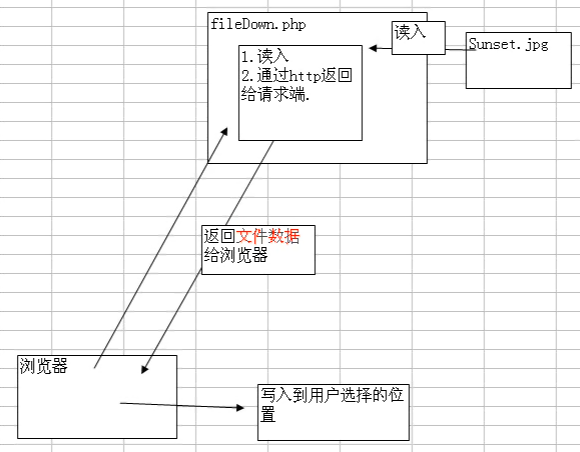
延續上一篇上傳功能,本文建立一個完整的「上傳 → 列表 → 下載」閉環系統。包含四個檔案:upload.html(前端)、upload.php(處理上傳)、list.php(檔案列表)、download.php(強制下載)。重點展示 遞迴掃描上傳目錄、表格化顯示檔案資訊、HTTP Header 實現強制下載而非瀏覽器預覽。
project/
├── upload.html      # 上傳表單
├── upload.php       # 接收上傳 → 導向 list.php
├── list.php         # 掃描 uploads/files/ 顯示表格 + 下載連結
├── download.php     # 強制下載單一檔案
└── uploads/files/   # 實際儲存目錄(需可寫)
<form action="upload.php" method="post" enctype="multipart/form-data">
    <input type="file" name="file[]" multiple><br>
    <button type="submit">上傳</button>
</form>
<?php
header("Content-Type: text/html; charset=utf-8");
const UPLOAD_DIR = __DIR__ . '/uploads/files';
$allowed = ['image/jpeg','image/png','image/gif','application/pdf'];

if (!is_dir(UPLOAD_DIR)) mkdir(UPLOAD_DIR, 0755, true);

$success = 0;
foreach ($_FILES['file']['tmp_name'] as $i => $tmp) {
    if ($_FILES['file']['error'][$i] !== UPLOAD_ERR_OK) continue;
    $finfo = new finfo(FILEINFO_MIME_TYPE);
    if (!in_array($finfo->file($tmp), $allowed)) continue;
    $ext = pathinfo($_FILES['file']['name'][$i], PATHINFO_EXTENSION);
    $name = time() . '_' . mt_rand() . '.' . $ext;
    if (move_uploaded_file($tmp, UPLOAD_DIR . '/' . $name)) $success++;
}
header("Location: list.php?msg=" . urlencode("成功上傳 {$success} 個檔案"));
exit;
<?php
header("Content-Type: text/html; charset=utf-8");
const UPLOAD_DIR = __DIR__ . '/uploads/files';

function scanDir(string $dir): array {
    $files = [];
    $iterator = new RecursiveIteratorIterator(
        new RecursiveDirectoryIterator($dir, FilesystemIterator::SKIP_DOTS),
        RecursiveIteratorIterator::SELF_FIRST
    );
    foreach ($iterator as $item) {
        if ($item->isFile()) {
            $relPath = substr($item->getPathname(), strlen($dir) + 1);
            $files[] = [
                'name'   => $item->getFilename(),
                'path'   => $relPath,           // 相對路徑供下載用
                'size'   => $item->getSize(),
                'mtime'  => $item->getMTime(),
                'isImg'  => in_array(strtolower($item->getExtension()), ['jpg','jpeg','png','gif']),
            ];
        }
    }
    return $files;
}

$files = scanDir(UPLOAD_DIR);
?>
<!DOCTYPE html>
<html>
<head>
    <meta charset="utf-8">
    <title>檔案列表</title>
    <style>
        table { border-collapse: collapse; width: 100%; }
        th, td { border: 1px solid #ddd; padding: 8px; text-align: left; }
        th { background: #f4f4f4; }
        img.thumb { max-width: 100px; max-height: 80px; cursor: pointer; }
    </style>
</head>
<body>
    <h2>檔案管理 <a href="upload.html">上傳新檔案</a></h2>
    <?php if (isset($_GET['msg'])): ?>
        <div style="color:green; padding:10px; background:#e8f5e9;"><?= htmlspecialchars($_GET['msg']) ?></div>
    <?php endif; ?>
    <table>
        <tr>
            <th>縮圖</th><th>檔名</th><th>大小</th><th>修改時間</th><th>操作</th>
        </tr>
        <?php foreach ($files as $f): ?>
        <tr>
            <td>
                <?php if ($f['isImg']): ?>
                    <img class="thumb" src="download.php?file=&thumb=1" alt="">
                <?php else: ?>
                    <span>📄</span>
                <?php endif; ?>
            </td>
            <td><?= htmlspecialchars($f['name']) ?></td>
            <td><?= number_format($f['size']/1024, 1) ?> KB</td>
            <td><?= date('Y-m-d H:i', $f['mtime']) ?></td>
            <td>
                <a href="download.php?file=" class="btn">下載</a>
                <!-- 可擴充刪除、重命名連結 -->
            </td>
        </tr>
        <?php endforeach; ?>
    </table>
</body>
</html>
<?php
// download.php
$relPath = $_GET['file'] ?? '';
$thumb = isset($_GET['thumb']); // 縮圖模式不強制下載

// 安全性:防止目錄穿越
$baseDir = realpath(__DIR__ . '/uploads/files');
$targetFile = realpath($baseDir . '/' . $relPath);

if (!$targetFile || strpos($targetFile, $baseDir) !== 0 || !is_file($targetFile)) {
    http_response_code(404);
    exit('檔案不存在');
}

$fileName = basename($targetFile);
$fileSize = filesize($targetFile);
$mime = mime_content_type($targetFile);

// 縮圖模式:直接輸出圖片(供列表頁 img src 使用)
if ($thumb && strpos($mime, 'image/') === 0) {
    header("Content-Type: {$mime}");
    header("Content-Length: {$fileSize}");
    header("Cache-Control: public, max-age=3600");
    readfile($targetFile);
    exit;
}

// 一般下載:強制瀏覽器彈出「另存新檔」
header("Content-Type: application/octet-stream");
header("Content-Disposition: attachment; filename*=UTF-8''" . rawurlencode($fileName));
header("Content-Length: {$fileSize}");
header("Content-Transfer-Encoding: binary");
header("Cache-Control: must-revalidate, post-check=0, pre-check=0");
header("Pragma: public");
header("Expires: 0");

readfile($targetFile); // 直接輸出到標準輸出,不佔用 PHP 記憶體
exit;
| Header | 作用 | 關鍵值 |
|---|---|---|
Content-Disposition: attachment | 強制下載而非預覽 | filename*=UTF-8''... 支援中文檔名(RFC 5987) |
Content-Type: application/octet-stream | 通用二進位串流,避免瀏覽器依 MIME 自動預覽 | |
Content-Length | 讓瀏覽器顯示下載進度條 | filesize() |
readfile() | 直接將檔案輸出到 PHP 標準輸出,記憶體效率高 | 優於 file_get_contents() echo |
Range Header,回傳 206 Partial Content。download.php 寫入資料庫或 Redis 計數器。ZipArchive 打包 → 串流輸出。這四個檔案構成一個最小可行的檔案管理系統。核心技術點在於:遞迴掃描目錄(SPL 迭代器)、相對路徑傳遞而非絕對路徑、強制下載 Header 組合、readfile() 串流輸出。實務專案建議將掃描、下載、刪除、重命名封裝為 FileRepository 介面與實作,支援本地、S3、OSS、FTP 等多種儲存後端切換。