PHPExcel 已於 2017 年停止維護,官方建議遷移至 PhpSpreadsheet(語法 90% 相容)。本文以 PHPExcel 為例說明核心概念,實務專案請直接使用 PhpSpreadsheet。
composer require phpoffice/phpspreadsheet
Spreadsheet:代表整個試算表檔案Worksheet:單一工作表Cell:單一儲存格Writer:匯出器(Xls, Xlsx, Csv, Html, Pdf)Reader:讀取器<?php
require 'vendor/autoload.php';
use PhpOffice\PhpSpreadsheet\Spreadsheet;
use PhpOffice\PhpSpreadsheet\Writer\Xls; // 或 Xlsx
use PhpOffice\PhpSpreadsheet\Style\Alignment;
use PhpOffice\PhpSpreadsheet\Style\Border;
use PhpOffice\PhpSpreadsheet\Style\Fill;
use PhpOffice\PhpSpreadsheet\Style\Color;
function exportExcel(array $title, array $data, string $filename = 'report') {
$spreadsheet = new Spreadsheet();
$sheet = $spreadsheet->getActiveSheet();
// 1. 寫入標題列
foreach ($title as $colIndex => $colName) {
$cell = $sheet->getCellByColumnAndRow($colIndex + 1, 1);
$cell->setValue($colName);
}
// 2. 標題樣式:粗體、置中、底色、邊框
$lastCol = $sheet->getCellByColumnAndRow(count($title), 1)->getColumn();
$styleRange = "A1:{$lastCol}1";
$sheet->getStyle($styleRange)->applyFromArray([
'font' => ['bold' => true, 'color' => ['argb' => 'FFFFFFFF']],
'alignment' => ['horizontal' => Alignment::HORIZONTAL_CENTER],
'fill' => ['fillType' => Fill::FILL_SOLID, 'startColor' => ['argb' => 'FF4472C4']],
'borders' => ['allBorders' => ['borderStyle' => Border::BORDER_THIN, 'color' => ['argb' => 'FF000000']]],
]);
// 3. 寫入資料列(支援關聯/索引陣列)
foreach ($data as $rowIndex => $row) {
$colIndex = 1;
foreach ($row as $value) {
$sheet->setCellValueByColumnAndRow($colIndex++, $rowIndex + 2, $value);
}
}
// 4. 自動欄寬
foreach (range('A', $lastCol) as $col) {
$sheet->getColumnDimension($col)->setAutoSize(true);
}
// 5. 輸出下載
header('Content-Type: application/vnd.ms-excel');
header('Content-Disposition: attachment;filename="' . $filename . '.xls"');
header('Cache-Control: max-age=0');
$writer = new Xls($spreadsheet);
$writer->save('php://output');
exit;
}
// 測試資料
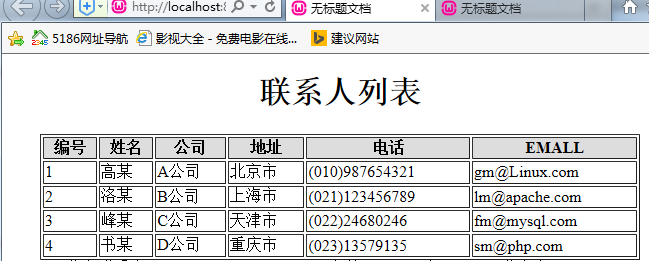
$titles = ['商品ID', '供應商', '品牌', '商品名', 'URL'];
$rows = [
[1001, '供應商A', '品牌X', '商品一', 'https://example.com/1'],
[1002, '供應商B', '品牌Y', '商品二', 'https://example.com/2'],
];
exportExcel($titles, $rows, 'product_list');
<?php
require 'vendor/autoload.php';
use PhpOffice\PhpSpreadsheet\IOFactory;

$spreadsheet = IOFactory::load('upload/product_list.xls');
$sheet = $spreadsheet->getActiveSheet();

foreach ($sheet->getRowIterator() as $row) {
    $cellIterator = $row->getCellIterator();
    $cellIterator->setIterateOnlyExistingCells(false); // 含空儲存格
    $rowData = [];
    foreach ($cellIterator as $cell) {
        $rowData[] = $cell->getCalculatedValue(); // 取得公式計算後值
    }
    print_r($rowData);
}
| 現象 | 原因 | 解決方案 |
|---|---|---|
| 匯出中文亂碼 | 舊版 PHPExcel 內部預設 ISO-8859-1 | PhpSpreadsheet 內部統一 UTF-8,直接寫入即可 |
| 讀取舊 .xls (BIFF) 中文亂碼 | .xls 無編碼標記,預設 CP1252 | Reader 設定 setReadDataOnly(true) 或指定 setInputEncoding('CP950') (繁中) / GBK (簡中) |
| CSV 匯入中文亂碼 | CSV 無編碼資訊 | 用 fgetcsv 搭配 iconv,或 PhpSpreadsheet 的 Csv Reader 指定編碼 |
<?php
// 讀取 GBK 編碼的舊 .xls
$reader = IOFactory::createReader('Xls');
$reader->setInputEncoding('GBK');
$spreadsheet = $reader->load('legacy.gbk.xls');
$spreadsheet->setCellCache(...) 減少記憶體。setCellValueExplicit($col, $row, $val, DataType::TYPE_STRING) 跳過格式推斷。PHPExcel_Shared_Date::PHPToExcel(time()),讀取用 getFormattedValue()。$cell->getCalculatedValue();匯出前可 $writer->setPreCalculateFormulas(true)。ini_set('memory_limit', '512M') 或改用 Box/Spout 串流式寫入。