PHP 提供豐富的檔案系統函數,涵蓋檔案讀寫、屬性檢查、目錄遍歷、刪除、複製與大小統計等操作。本文系統整理常用操作並提供可直接套用的類別與函數範例。
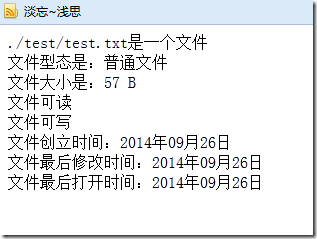
包含存在性判斷、類型識別、大小換算、權限檢查、時間屬性讀取等核心功能。
function getFilePro($fileName) {
    if (!file_exists($fileName)) {
        echo '檔案不存在<br/>';
        return;
    }

    if (is_file($fileName)) echo $fileName . ' 是一個檔案<br/>';
    if (is_dir($fileName)) echo $fileName . ' 是一個目錄<br/>';

    echo '檔案型態:' . getFileType($fileName) . '<br/>';
    echo '檔案大小:' . getFileSize(filesize($fileName)) . '<br/>';

    if (is_readable($fileName)) echo '檔案可讀<br/>';
    if (is_writable($fileName)) echo '檔案可寫<br/>';
    if (is_executable($fileName)) echo '檔案可執行<br/>';

    echo '建立時間:' . date('Y年m月j日', filectime($fileName)) . '<br/>';
    echo '最後修改:' . date('Y年m月j日', filemtime($fileName)) . '<br/>';
    echo '最後存取:' . date('Y年m月j日', fileatime($fileName)) . '<br/>';
}

function getFileType($fileName) {
    $types = [
        'file' => '一般檔案', 'dir' => '目錄', 'block' => '區塊裝置',
        'char' => '字元裝置', 'fifo' => '管道', 'link' => '符號連結',
        'unknown' => '未知'
    ];
    return $types[filetype($fileName)] ?? '未知';
}

function getFileSize($bytes) {
    $units = ['B', 'KB', 'MB', 'GB', 'TB'];
    $pow = floor(($bytes ? log($bytes) : 0) / log(1024));
    $pow = min($pow, count($units) - 1);
    return round($bytes / (1024 ** $pow), 2) . ' ' . $units[$pow];
}function findDir($dirName) {
$num = 0;
$handle = opendir($dirName);
echo '<table border="0" align="center" width="600">';
echo '<caption><h2>目錄 ' . $dirName . ' 下的檔案</h2></caption>';
echo '<tr bgcolor="#cccccc"><th>檔案名</th><th>大小</th><th>類型</th><th>修改時間</th></tr>';
while (($file = readdir($handle)) !== false) {
if ($file === '.' || $file === '..') continue;
$fullPath = $dirName . '/' . $file;
$bg = ($num++ % 2 === 0) ? '#ffffff' : '#cccccc';
echo "<tr bgcolor='$bg'>";
echo "<td>$file</td>";
echo "<td>" . filesize($fullPath) . "</td>";
echo "<td>" . filetype($fullPath) . "</td>";
echo "<td>" . date('Y/n/j', filemtime($fullPath)) . "</td>";
echo "</tr>";
}
echo "</table>";
closedir($handle);
echo "在 <b>$dirName</b> 目錄下共有 <b>$num</b> 個子檔案";
}function dirSize($dirName) {
$size = 0;
if ($handle = @opendir($dirName)) {
while (($file = readdir($handle)) !== false) {
if ($file === '.' || $file === '..') continue;
$path = $dirName . '/' . $file;
if (is_file($path)) $size += filesize($path);
elseif (is_dir($path)) $size += dirSize($path);
}
closedir($handle);
}
return $size;
}
// 使用:echo './test 目錄大小:' . round(dirSize('./test') / 1024, 2) . ' KB';function delDir($dirName) {
if (!file_exists($dirName)) return;
if ($handle = @opendir($dirName)) {
while (($file = readdir($handle)) !== false) {
if ($file === '.' || $file === '..') continue;
$path = $dirName . '/' . $file;
is_file($path) ? unlink($path) : delDir($path);
}
closedir($handle);
rmdir($dirName);
}
return "$dirName 目錄已刪除";
}function copyDir($src, $dest) {
if (is_file($dest)) return '目標路徑不可為檔案';
if (!file_exists($dest)) mkdir($dest, 0755, true);
if ($handle = @opendir($src)) {
while (($file = readdir($handle)) !== false) {
if ($file === '.' || $file === '..') continue;
$srcPath = $src . '/' . $file;
$destPath = $dest . '/' . $file;
if (is_file($srcPath)) copy($srcPath, $destPath);
elseif (is_dir($srcPath)) copyDir($srcPath, $destPath);
}
closedir($handle);
}
return "$src 已複製至 $dest";
}@ 抑制警告,並檢查回傳值處理錯誤。set_time_limit(0) 避免逾時。glob() 或 RecursiveDirectoryIterator (SPL) 可簡化部分遍歷邏輯。掌握這些核心操作,能有效處理檔案上傳、快取管理、日誌輪替、備份同步等常見系統需求。