Smarty是PHP歷史最悠久、應用最廣泛的模板引擎之一,雖然近年Laravel Blade、Twig等新興引擎崛起,但Smarty在眾多存量項目中仍佔主導地位。本教程將系統講解Smarty 3.x/4.x的安裝配置、核心語法、進階特性與實戰最佳實踐。
composer require smarty/smartyproject/
├── public/ # Web根目錄
│ └── index.php # 入口文件
├── libs/
│ └── Smarty/ # Smarty核心庫
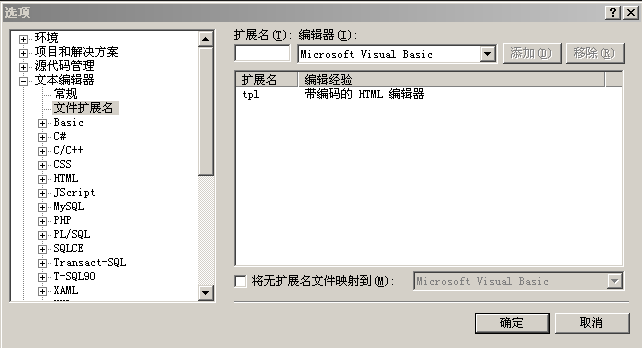
├── templates/ # 模板文件目錄(.tpl)
├── templates_c/ # 編譯緩存目錄(需寫入權限)
├── configs/ # 配置文件目錄
└── cache/ # 緩存目錄(需寫入權限)chmod 775 templates_c cache
chown www-data:www-data templates_c cache # 根據Web用戶調整創建config/smarty.php(或在入口文件中配置):
<?php
require_once __DIR__ . '/../vendor/autoload.php'; // 或手動include Smarty.class.php

$smarty = new Smarty();

// 目錄配置(使用絕對路徑)
$smarty->setTemplateDir(__DIR__ . '/../templates');
$smarty->setCompileDir(__DIR__ . '/../templates_c');
$smarty->setConfigDir(__DIR__ . '/../configs');
$smarty->setCacheDir(__DIR__ . '/../cache');

// 開發環境關閉緩存,生產環境開啟
$smarty->caching = false; // 生產環境設為 true
$smarty->cache_lifetime = 3600; // 緩存壽命(秒)

// 修改定界符避免與JS/CSS衝突
$smarty->left_delimiter  = '<{';
$smarty->right_delimiter = '}>';

// 錯誤處理
$smarty->error_reporting = E_ALL & ~E_NOTICE;

// 註冊插件目錄(可選)
$smarty->addPluginsDir(__DIR__ . '/../plugins');

return $smarty;<{* 簡單變量 *}>
<{$name}>
<{* 對象屬性 *}>
<{$user.name}>
<{* 數組元素 *}>
<{$list.0}> <{$list.name}>
<{* 修飾器管道 *}>
<{$title|upper|truncate:20}>
<{$price|number_format:2}>
<{$date|date_format:'%Y-%m-%d'}>
<{$content|escape:'html'}> <{* XSS防護 *}><{if $user.logged_in}>
歡迎回來,<{$user.name}>!
<{elseif $user.is_guest}>
請登錄
<{else}>
未知狀態
<{/if}>
<{* 邏輯運算符 *}>
<{if $age >= 18 and $has_id}>...<{/if}>
<{if $status == 'active' || $status == 'pending'}>...<{/if}><{foreach $products as $product}>
<div class="item">
<h3><{$product.name}></h3>
<span>價格:<{$product.price|number_format:2}></span>
<{if $product@first}><span class="new">新品</span><{/if}>
<{if $product@last}><hr><{/if}>
</div>
<{foreachelse}>
<p>暫無產品</p>
<{/foreach}>
<{* foreach屬性 *}>
<{$product@index}> <{* 當前索引 0-based *}>
<{$product@iteration}> <{* 當前迭代次數 1-based *}>
<{$product@first}> <{* 是否第一項 *}>
<{$product@last}> <{* 是否最後項 *}>
<{$product@total}> <{* 總項數 *}><{assign var="total" value=$price * $qty}>
<{capture name="summary"}>訂單總計:<{$total}><{/capture}>
<{$smarty.capture.summary}>
<{* 內建變量 *}>
<{$smarty.now}> <{* 當前時間戳 *}>
<{$smarty.const.PHP_VERSION}> <{* 常量 *}>
<{$smarty.get.page}> <{* $_GET['page'] *}>
<{$smarty.post.name}> <{* $_POST['name'] *}>
<{$smarty.session.user_id}> <{* $_SESSION['user_id'] *}>
<{$smarty.cookies.lang}> <{* $_COOKIE['lang'] *}>
<{$smarty.server.REQUEST_URI}> <{* $_SERVER['REQUEST_URI'] *}><{* 包含子模板 *}>
<{include file="header.tpl" title="首頁"}>
<{* 模板繼承 (Smarty 3+) *}>
<{* layout.tpl *}>
<html>
<head><title><{block name="title"}>默認標題<{/block}></title></head>
<body>
<{block name="content"}>默認內容<{/block}>
</body>
</html>
<{* child.tpl *}>
<{extends file="layout.tpl"}>
<{block name="title"}>子頁標題<{/block}>
<{block name="content"}>
子頁具體內容...
<{/block}><?php
require_once __DIR__ . '/config/smarty.php'; // 返回配置好的$smarty實例
// 分配變量
$smarty->assign('site_name', '我的商城');
$smarty->assign('user', [
'name' => '張三',
'logged_in' => true,
'is_guest' => false
]);
$smarty->assign('products', [
['name' => '筆記本電腦', 'price' => 5999.00],
['name' => '無線滑鼠', 'price' => 129.50],
['name' => '機械鍵盤', 'price' => 459.00],
]);
// 顯示模板
$smarty->display('index.tpl');
// 或獲取輸出內容
$html = $smarty->fetch('index.tpl');
echo $html;<?php
$smarty->caching = true;
$smarty->cache_lifetime = 3600; // 1小時
// 多緩存(同一模板不同數據)
$smarty->display('product.tpl', $cache_id = 'product_' . $product_id);
// 緩存組
$smarty->clearCache('product.tpl', 'product_123'); // 清除特定緩存
$smarty->clearAllCache(); // 清除所有緩存
// 模板中局部不緩存
<{nocache}>
<{$dynamic_content}>
<{/nocache}>創建plugins/modifier.truncate_chinese.php:
<?php
function smarty_modifier_truncate_chinese($string, $length = 30, $etc = '...') {
    if (mb_strlen($string, 'UTF-8') <= $length) return $string;
    return mb_substr($string, 0, $length, 'UTF-8') . $etc;
}模板中使用:<{$content|truncate_chinese:50}>
<?php
// 預過濾器:模板編譯前處理
$smarty->registerFilter('pre', function($source, $smarty) {
    return str_replace('[[', '<{', $source); // 自定義簡寫標簽
});

// 後過濾器:輸出前處理
$smarty->registerFilter('post', function($output, $smarty) {
    return str_replace('<!--REMOVE-->', '', $output); // 移除調試標記
});<{* configs/app.conf *}>
[database]
host = "localhost"
name = "myapp"
[features]
enable_cache = true
max_items = 50<{* 模板中加載 *}>
<{config_load file="app.conf" section="database"}>
主機:<{#host#}>
數據庫:<{#name#}>templates/
├── layouts/
│ ├── main.tpl # 主佈局
│ └── admin.tpl # 後台佈局
├── partials/
│ ├── header.tpl
│ ├── footer.tpl
│ └── pagination.tpl
├── pages/
│ ├── home.tpl
│ ├── product_list.tpl
│ └── product_detail.tpl
└── emails/
├── welcome.tpl
└── order_confirm.tpl<?php
// Controller層只負責協調
$data = [
'page_title' => '產品列表',
'products' => $productService->getPaginated($page, 20),
'categories' => $categoryService->getAll(),
'pagination' => $paginator->getLinks(),
];
// View Helper處理格式化
function formatPrice($price) {
return '¥' . number_format($price, 2);
}
$smarty->registerPlugin('modifier', 'format_price', 'formatPrice');caching = true,設置合理cache_lifetime{include}代替PHPinclude,利用Smarty編譯緩存{nocache}標記動態內容,避免整頁不緩存templates_c/和cache/舊文件compile_check = false(生產環境)禁用模板修改檢查|escape:'html'或|escape:'htmlall'.htaccess禁止訪問*.tpl{php}標簽(Smarty 3默認禁用),防止模板注入PHP代碼| 現象 | 可能原因 | 解決方案 |
|---|---|---|
| 模板修改不生效 | 緩存未清理 / compile_check=false | 刪除templates_c/對應文件或臨時開啟compile_check |
| 白屏/500錯誤 | 語法錯誤 / 權限不足 / 內存溢出 | 啟用錯誤顯示,檢查error_log,確保templates_c/cache可寫 |
| 變量輸出為空 | 變量名拼寫錯誤 / 未assign / 作用域問題 | 使用{debug}或{$smarty}調試,檢查控制器assign |
| 中文截取亂碼 | 修飾器不支持多字節字符 | 使用自定義mb_*修飾器或PHP預處理 |
若項目重構或新項目選型,建議考慮:
遷移策略:逐頁遷移、共存運行、利用smarty->registerPlugin兼容舊修飾器。
Smarty作為PHP模板引擎的「元老」,其穩定性和功能完備性經受住了時間考驗。掌握其核心機制、配置優化、安全實踐,能讓你在維護存量項目時遊刃有餘。同時,了解現代引擎的設計理念,為技術選型與遷移奠定基礎。願本教程成為你Smarty開發路上的得力參考手冊!