CakePHP 的「腳手架」功能能根據資料庫表結構自動生成模型、控制器、視圖,提供開箱即用的 CRUD 介面,極大加速原型開發。本文以 CakePHP 2.x/3.x 為例,詳細演示資料庫建立、配置、模型生成、腳手架啟用與自定義擴展全流程。
composer create-project --prefer-dist cakephp/app myapp-- MySQL 命令列
CREATE DATABASE `data_access` CHARACTER SET utf8mb4 COLLATE utf8mb4_unicode_ci;
USE `data_access`;
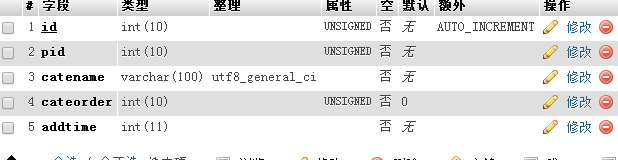
CREATE TABLE `books` (
`id` INT(11) NOT NULL AUTO_INCREMENT PRIMARY KEY,
`isbn` VARCHAR(10) NOT NULL,
`title` VARCHAR(127) NOT NULL,
`description` TEXT NOT NULL,
`author_name` VARCHAR(127) NOT NULL,
`created` DATETIME DEFAULT CURRENT_TIMESTAMP,
`modified` DATETIME DEFAULT CURRENT_TIMESTAMP ON UPDATE CURRENT_TIMESTAMP
) ENGINE=InnoDB DEFAULT CHARSET=utf8mb4;
編輯 config/app.php (3.x) 或 app/Config/database.php (2.x):
'Datasources' => [
    'default' => [
        'className' => 'Cake\Database\Connection',
        'driver' => 'Cake\Database\Driver\Mysql',
        'persistent' => false,
        'host' => 'localhost',
        'port' => 3306,
        'username' => 'your_username',
        'password' => 'your_password',
        'database' => 'data_access',
        'encoding' => 'utf8mb4',
        'timezone' => 'UTC',
        'flags' => [],
        'cacheMetadata' => true,
        'log' => false,
        'quoteIdentifiers' => false,
        'url' => env('DATABASE_URL', null),
    ],
],
CakePHP 3.x 使用 bin/cake bake,2.x 使用 Console/cake bake。
# 1. 生成模型 (Table + Entity)
bin/cake bake model Books

# 2. 生成控制器 (含 CRUD 動作)
bin/cake bake controller Books --scaffold

# 3. 生成模板 (index, view, add, edit)
bin/cake bake template Books
關鍵參數:--scaffold 讓控制器繼承 ScaffoldController,自動提供 CRUD 路由與視圖渲染。
編輯 config/routes.php:
use Cake\Routing\Route\DashedRoute;
use Cake\Routing\Router;

Router::scope('/', function ($routes) {
    $routes->fallbacks(DashedRoute::class);
    // 腳手架會自動註冊 /books/index, /books/view/1, /books/add, /books/edit/1, /books/delete/1
});
啟動內建伺服器:
bin/cake server -p 8765
瀏覽器訪問:
https://localhost:8765/books → 列表頁(分頁、排序、搜尋)https://localhost:8765/books/add → 新增表單(自動驗證、CSRF 保護)https://localhost:8765/books/edit/1 → 編輯表單(預填資料)https://localhost:8765/books/view/1 → 詳細頁POST /books/delete/1 → 刪除(含確認)
src/Model/Table/BooksTable.phpnamespace App\Model\Table;
use Cake\ORM\Table;
class BooksTable extends Table {
public function initialize(array $config): void {
$this->setTable('books');
$this->setDisplayField('title');
$this->setPrimaryKey('id');
$this->addBehavior('Timestamp'); // 自動管理 created/modified
}
}
src/Model/Entity/Book.phpnamespace App\Model\Entity;
use Cake\ORM\Entity;
class Book extends Entity {
protected $_accessible = [
'isbn' => true,
'title' => true,
'description' => true,
'author_name' => true,
];
}
src/Controller/BooksController.phpnamespace App\Controller;
use App\Controller\AppController;
class BooksController extends AppController {
public function initialize(): void {
parent::initialize();
$this->loadComponent('Paginator');
$this->loadComponent('Flash');
}
// 列表:自動分頁、排序、搜尋
public function index() {
$books = $this->paginate($this->Books);
$this->set(compact('books'));
}
// 新增:實體建立、驗證、儲存、重導
public function add() {
$book = $this->Books->newEmptyEntity();
if ($this->request->is('post')) {
$book = $this->Books->patchEntity($book, $this->request->getData());
if ($this->Books->save($book)) {
$this->Flash->success('書本已新增');
return $this->redirect(['action' => 'index']);
}
$this->Flash->error('新增失敗');
}
$this->set(compact('book'));
}
// edit, view, delete 同理...
}
// BooksController.php
public function index() {
    $query = $this->Books->find()
        ->select(['id', 'isbn', 'title', 'author_name', 'created'])
        ->where(['author_name LIKE' => '%' . $this->request->getQuery('q') . '%']);
    $this->set('books', $this->paginate($query));
}
// BooksTable.php
public function validationDefault(Validator $validator): Validator {
    $validator
        ->notEmptyString('isbn', 'ISBN 不可為空')
        ->add('isbn', 'unique', ['rule' => 'validateUnique', 'provider' => 'table', 'message' => 'ISBN 已存在'])
        ->notEmptyString('title', '標題不可為空')
        ->maxLength('title', 127)
        ->notEmptyString('author_name', '作者不可為空');
    return $validator;
}
templates/Books/ 修改)# templates/Books/index.php
<table class="table">
<thead>
<tr>
<th>Paginator->sort('isbn') ?></th>
<th>Paginator->sort('title') ?></th>
<th>Paginator->sort('author_name') ?></th>
<th class="actions">操作</th>
</tr>
</thead>
<tbody>
<tr>
<td>isbn) ?></td>
<td>Html->link(h($book->title), ['action' => 'view', $book->id]) ?></td>
<td>author_name) ?></td>
<td class="actions">
Html->link('查看', ['action' => 'view', $book->id]) ?>
Html->link('編輯', ['action' => 'edit', $book->id]) ?>
Form->postLink('刪除', ['action' => 'delete', $book->id], ['confirm' => '確定刪除?']) ?>
</td>
</tr>
</tbody>
</table>
--scaffold:手寫控制器動作,完全掌控邏輯。_accessible:僅開放必要欄位,防止大量賦值攻擊。Authorization 插件或自定義 isAuthorized()。contain() 關聯載入、select() 僅取需欄位、索引優化。bin/cake bake test 生成測試骨架,補全邊界案例。bin/cake schema_cache build、bin/cake asset_compress build、composer install --no-dev --optimize-autoloader。CakePHP 腳手架讓「從資料表到可用 CRUD」只需 5 分鐘。善用它快速驗證需求、生成原型,再按清單逐步重構為生產級代碼,是敏捷開發的最佳路徑。