圖片上傳是 Web 系統高頻功能。本文提供一個整合「上傳驗證、目錄管理、縮圖生成、文字水印、圖片水印」的完整 PHP 類別,採用 GD 庫實現,適合直接引用或二次開發。
UploadHandler
├── validate()      // 檔案類型、大小、錯誤碼驗證
├── prepareDirs()   // 以 Ymd 日期建立大圖/縮圖目錄
├── moveUpload()    // 移動暫存檔至永久儲存
├── applyWatermark() // 文字/圖片水印(支援 9 種位置)
├── createThumb()   // 等比縮放生成縮圖
└── process()       // 統一入口
<?php
class UploadHandler {
private $bigDir = 'img';
private $smallDir = 'smallimg';
private $maxSize = 102400; // 100KB
private $allowedExt = ['jpg','jpeg','png','gif'];
private $thumbW = 180;
private $thumbH = 150;
private $waterText = 'www.example.com';
private $waterImage = 'watermark.png';
private $fontFile = 'cour.ttf'; // 文字水印字體
public function process() {
if (!isset($_POST['submit'])) return $this->showForm();
// 1. 驗證
$file = $_FILES['image'];
$err = $this->validate($file);
if ($err) return $this->showError($err);
// 2. 準備目錄
$this->prepareDirs();
// 3. 產生檔名
$ext = strtolower(pathinfo($file['name'], PATHINFO_EXTENSION));
$baseName = 'img_' . date('YmdHis') . '_' . bin2hex(random_bytes(4));
$bigPath = $this->bigDir . '/' . date('Ymd') . '/' . $baseName . '.' . $ext;
$smallPath = $this->smallDir . '/' . date('Ymd') . '/' . $baseName . '_s.jpg';
// 4. 移動檔案
if (!move_uploaded_file($file['tmp_name'], $bigPath)) {
return $this->showError('檔案移動失敗');
}
// 5. 加水印(原圖)
$this->applyWatermark($bigPath);
// 6. 生成縮圖
$this->createThumb($bigPath, $smallPath);
echo "";
$this->showForm();
}
private function validate($file) {
if ($file['error'] !== UPLOAD_ERR_OK) {
return match($file['error']) {
UPLOAD_ERR_INI_SIZE => '超過 php.ini upload_max_filesize',
UPLOAD_ERR_FORM_SIZE => '超過表單 MAX_FILE_SIZE',
UPLOAD_ERR_PARTIAL => '檔案部分上傳',
UPLOAD_ERR_NO_FILE => '未選擇檔案',
default => '上傳錯誤碼: ' . $file['error'],
};
}
$ext = strtolower(pathinfo($file['name'], PATHINFO_EXTENSION));
if (!in_array($ext, $this->allowedExt)) {
return '僅允許 ' . implode(', ', $this->allowedExt) . ' 格式';
}
if ($file['size'] > $this->maxSize) {
return '檔案大小不可超過 ' . ($this->maxSize/1024) . 'KB';
}
return null;
}
private function prepareDirs() {
$dateDir = date('Ymd');
foreach ([$this->bigDir, $this->smallDir] as $dir) {
$path = $dir . '/' . $dateDir;
if (!is_dir($path)) mkdir($path, 0755, true);
}
}
// === 水印核心 ===
private function applyWatermark($imagePath) {
$info = getimagesize($imagePath);
if (!$info) return;
$mime = $info['mime'];
$src = match($mime) {
'image/jpeg' => imagecreatefromjpeg($imagePath),
'image/png' => imagecreatefrompng($imagePath),
'image/gif' => imagecreatefromgif($imagePath),
default => null
};
if (!$src) return;
// 文字水印
$color = imagecolorallocate($src, 255, 0, 0); // 紅色
$fontSize = 20;
$box = imagettfbbox($fontSize, 0, $this->fontFile, $this->waterText);
$textW = $box[2] - $box[0];
$textH = $box[1] - $box[7];
$x = $info[0] - $textW - 10; // 右下角
$y = $info[1] - $textH - 10;
imagettftext($src, $fontSize, 0, $x, $y, $color, $this->fontFile, $this->waterText);
// 圖片水印(可選)
if (file_exists($this->waterImage)) {
$waterInfo = getimagesize($this->waterImage);
$water = imagecreatefrompng($this->waterImage); // 假設 PNG 透明
imagealphablending($src, true);
imagecopy($src, $water, 10, 10, 0, 0, $waterInfo[0], $waterInfo[1]); // 左上角
}
// 覆蓋儲存
imagejpeg($src, $imagePath, 90);
imagedestroy($src);
}
// === 縮圖核心 ===
private function createThumb($srcPath, $destPath) {
$info = getimagesize($srcPath);
if (!$info) return;
$mime = $info['mime'];
$src = match($mime) {
'image/jpeg' => imagecreatefromjpeg($srcPath),
'image/png' => imagecreatefrompng($srcPath),
'image/gif' => imagecreatefromgif($srcPath),
default => null
};
if (!$src) return;
$srcW = $info[0]; $srcH = $info[1];
$ratio = min($this->thumbW / $srcW, $this->thumbH / $srcH);
$newW = (int)($srcW * $ratio);
$newH = (int)($srcH * $ratio);
$thumb = imagecreatetruecolor($newW, $newH);
// 保持透明度(PNG/GIF)
if ($mime === 'image/png' || $mime === 'image/gif') {
imagealphablending($thumb, false);
imagesavealpha($thumb, true);
$transparent = imagecolorallocatealpha($thumb, 0, 0, 0, 127);
imagefill($thumb, 0, 0, $transparent);
}
imagecopyresampled($thumb, $src, 0, 0, 0, 0, $newW, $newH, $srcW, $srcH);
imagejpeg($thumb, $destPath, 85);
imagedestroy($thumb);
imagedestroy($src);
}
private function showForm() {
echo '<form method="post" enctype="multipart/form-data">
<input type="hidden" name="MAX_FILE_SIZE" value="' . $this->maxSize . '">
<input type="file" name="image" accept="image/*">
<input type="submit" name="submit" value="上傳圖片">
</form>';
}
private function showError($msg) {
echo "<div style='color:red;text-align:center'>$msg<br><a href='javascript:history.back()'>返回</a></div>";
$this->showForm();
}
}
// 使用
$uploader = new UploadHandler();
$uploader->process();
?>| 功能 | 關鍵函式/技巧 |
|---|---|
| 等比縮放 | min($maxW/$srcW, $maxH/$srcH) 計算比例,imagecopyresampled 高品質重採樣 |
| 透明度保持 | imagealphablending(false) + imagesavealpha(true) + imagecolorallocatealpha |
| 文字水印 | imagettfbbox 計算文字邊界,imagettftext 繪製 TrueType 字體 |
| 圖片水印 | imagecopy 直接像素複製,需源水印為 PNG 透明 |
| 水印位置 | 9 宮格座標計算:左上(0,0)、中上(($W-$w)/2,0)、右上($W-$w,0)... |
| 檔名安全 | date('YmdHis') . '_' . bin2hex(random_bytes(4)) 避免衝突與中文問題 |
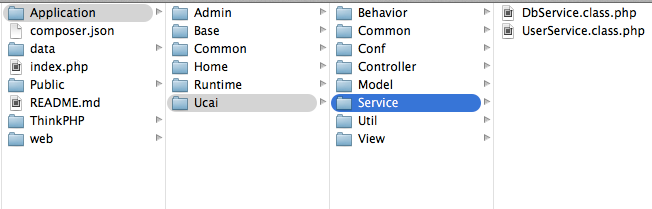
cour.ttf 需放在腳本同目錄,或指定絕對路徑。中文水印需使用支援中文的 TTF(如微軟雅黑)。Imagick 擴充套件(支援串流處理)或預先壓縮。getimagesize() 驗證真實 MIME,防止偽裝腳本上傳。此類別整合了圖片上傳全流程核心需求。實際專案建議:核心邏輯拆分為 Service(驗證、儲存、水印、縮圖各自獨立類別),配合介面依賴、異步隊列、雲端儲存(S3/OSS)適配器,構建可擴展、可測試、高效能的圖片處理管線。