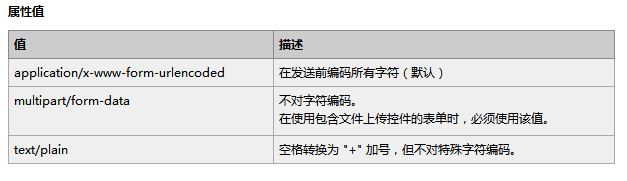
用戶選擇檔案 → 瀏覽器 POST multipart/form-data
      ↓
PHP 接收 → $_FILES 陣列 (tmp_name, name, size, type, error)
      ↓
【檢查點 1】錯誤碼檢查 (UPLOAD_ERR_OK)
【檢查點 2】is_uploaded_file() 確認真實上傳
【檢查點 3】檔案大小限制
【檢查點 4】MIME 型別驗證 (finfo, 不信任 $_FILES['type'])
【檢查點 5】副檔名白名單
【檢查點 6】內容掃描 (可選: 圖片重繪、ClamAV)
【檢查點 7】安全重命名 + 移動至非公開目錄
      ↓
回傳結果 (JSON / 頁面跳轉)FileUploader<?php
/**
* 生產級檔案上傳處理器
* 特性:多型別支援、大小分級、MIME 驗證、隨機命名、錯誤代碼標準化
*/
class FileUploader {
public const ERROR_OK = 0;
public const ERROR_UPLOAD_FAILED = 1;
public const ERROR_SIZE_EXCEED = 2;
public const ERROR_TYPE_NOT_ALLOWED = 3;
public const ERROR_EXT_NOT_ALLOWED = 4;
public const ERROR_MOVE_FAILED = 5;
public const ERROR_CONTENT_INVALID = 6;
private array $config;
public function __construct(array $config = []) {
$defaults = [
'max_size' => 5 * 1024 * 1024, // 5MB 預設
'allowed_mimes' => [ // MIME 白名單
'image' => ['image/jpeg','image/png','image/gif','image/webp'],
'document' => ['application/pdf','application/msword',
'application/vnd.openxmlformats-officedocument.wordprocessingml.document',
'application/vnd.ms-excel',
'application/vnd.openxmlformats-officedocument.spreadsheetml.sheet'],
'archive' => ['application/zip','application/x-rar-compressed','application/x-7z-compressed'],
],
'allowed_exts' => [ // 副檔名白名單 (小寫)
'image' => ['jpg','jpeg','png','gif','webp'],
'document' => ['pdf','doc','docx','xls','xlsx'],
'archive' => ['zip','rar','7z'],
],
'upload_dir' => __DIR__ . '/../storage/uploads', // 實體儲存目錄 (非 web 公開)
'url_prefix' => '/storage/uploads', // 對外 URL 前綴
'use_subdir' => true, // 按日期建立子目錄 Y/m/d
'filename_strategy' => 'random', // random | hash | original
];
$this->config = array_merge($defaults, $config);
if (!is_dir($this->config['upload_dir'])) {
mkdir($this->config['upload_dir'], 0755, true);
}
}
/**
* 執行上傳
* @param string $fieldName 表單檔案欄位名
* @param string|null $category 型別分類: image|document|archive (對應 config 白名單)
* @return array ['code'=>int, 'msg'=>string, 'data'=>[url,path,size,mime,original_name]|null]
*/
public function upload(string $fieldName, ?string $category = 'image'): array {
// 1. 檢查 $_FILES
if (!isset($_FILES[$fieldName])) {
return $this->error(self::ERROR_UPLOAD_FAILED, '未收到檔案欄位');
}
$file = $_FILES[$fieldName];
// 2. 上傳錯誤碼
if ($file['error'] !== UPLOAD_ERR_OK) {
return $this->error(self::ERROR_UPLOAD_FAILED, $this->getUploadErrorMsg($file['error']));
}
// 3. 確認真實上傳檔案
if (!is_uploaded_file($file['tmp_name'])) {
return $this->error(self::ERROR_UPLOAD_FAILED, '非合法上傳檔案');
}
// 4. 檔案大小
if ($file['size'] > $this->config['max_size']) {
return $this->error(self::ERROR_SIZE_EXCEED, '檔案大小超過限制 (' . $this->formatBytes($this->config['max_size']) . ')');
}
// 5. MIME 型別驗證 (finfo)
$finfo = finfo_open(FILEINFO_MIME_TYPE);
$mime = finfo_file($finfo, $file['tmp_name']);
finfo_close($finfo);
$allowedMimes = $this->config['allowed_mimes'][$category] ?? [];
if (!in_array($mime, $allowedMimes, true)) {
return $this->error(self::ERROR_TYPE_NOT_ALLOWED, '檔案類型不允許: ' . $mime);
}
// 6. 副檔名檢查
$originalName = $file['name'];
$ext = strtolower(pathinfo($originalName, PATHINFO_EXTENSION));
$allowedExts = $this->config['allowed_exts'][$category] ?? [];
if (!in_array($ext, $allowedExts, true)) {
return $this->error(self::ERROR_EXT_NOT_ALLOWED, '副檔名不允許: ' . $ext);
}
// 7. 內容驗證 (圖片: 嘗試重繪防偽裝)
if ($category === 'image') {
if (!$this->validateImage($file['tmp_name'])) {
return $this->error(self::ERROR_CONTENT_INVALID, '圖片內容無效或損壞');
}
}
// 8. 產生安全檔名與目標路徑
$destPath = $this->buildDestPath($ext);
$destDir = dirname($destPath);
if (!is_dir($destDir)) mkdir($destDir, 0755, true);
// 9. 移動檔案
if (!move_uploaded_file($file['tmp_name'], $destPath)) {
return $this->error(self::ERROR_MOVE_FAILED, '檔案儲存失敗');
}
// 10. 設定檔案權限
chmod($destPath, 0644);
// 11. 回傳成功資訊
$relativePath = str_replace($this->config['upload_dir'] . '/', '', $destPath);
$url = $this->config['url_prefix'] . '/' . $relativePath;
return [
'code' => self::ERROR_OK,
'msg' => '上傳成功',
'data' => [
'url' => $url,
'path' => $destPath,
'size' => $file['size'],
'mime' => $mime,
'original_name' => $originalName,
]
];
}
private function buildDestPath(string $ext): string {
$base = $this->config['upload_dir'];
if ($this->config['use_subdir']) {
$base .= '/' . date('Y/m/d');
}
$filename = $this->generateFilename($ext);
return $base . '/' . $filename;
}
private function generateFilename(string $ext): string {
switch ($this->config['filename_strategy']) {
case 'hash':
// 內容雜湊 (需讀取檔案,較慢但可去重)
return hash_file('sha256', $_FILES[$fieldName]['tmp_name']) . '.' . $ext;
case 'original':
// 保留原始檔名 (需過濾危險字元、避免重名)
$safe = preg_replace('/[^a-zA-Z0-9_\-\.]/', '_', basename($_FILES[$fieldName]['name'], '.' . $ext));
return $safe . '_' . time() . '.' . $ext;
case 'random':
default:
// 時間戳(微秒) + 隨機 8 字元
return sprintf('%s_%s.%s', date('YmdHis'), bin2hex(random_bytes(4)), $ext);
}
}
private function validateImage(string $tmpPath): bool {
// 嘗試以 GD 讀取並重新編碼,可過濾偽裝成圖片的惡意檔案
$img = @imagecreatefromstring(file_get_contents($tmpPath));
if ($img === false) return false;
// 可選:重新儲存覆蓋原暫存檔,確保純淨
// imagejpeg($img, $tmpPath, 90);
imagedestroy($img);
return true;
}
private function getUploadErrorMsg(int $code): string {
return match ($code) {
UPLOAD_ERR_INI_SIZE, UPLOAD_ERR_FORM_SIZE => '檔案超過伺服器/表單限制大小',
UPLOAD_ERR_PARTIAL => '檔案上傳不完整',
UPLOAD_ERR_NO_FILE => '未選擇檔案',
UPLOAD_ERR_NO_TMP_DIR => '伺服器缺少暫存目錄',
UPLOAD_ERR_CANT_WRITE => '伺服器寫入失敗',
UPLOAD_ERR_EXTENSION => 'PHP 擴充功能阻止上傳',
default => '未知上傳錯誤',
};
}
private function formatBytes(int $bytes): string {
$units = ['B','KB','MB','GB'];
$i = 0;
while ($bytes >= 1024 && $i < count($units)-1) {
$bytes /= 1024;
$i++;
}
return round($bytes, 2) . ' ' . $units[$i];
}
private function error(int $code, string $msg): array {
return ['code' => $code, 'msg' => $msg, 'data' => null];
}
}
?>/api/upload.php<?php
require 'FileUploader.php';
header('Content-Type: application/json; charset=utf-8');
if ($_SERVER['REQUEST_METHOD'] !== 'POST') {
http_response_code(405);
echo json_encode(['code' => -1, 'msg' => 'Method Not Allowed']);
exit;
}
// 依據業務需求調整分類與大小
$uploader = new FileUploader([
'max_size' => 10 * 1024 * 1024, // 10MB
'category_limits' => [
'avatar' => ['max_size' => 2 * 1024 * 1024, 'category' => 'image'],
'document' => ['max_size' => 20 * 1024 * 1024, 'category' => 'document'],
],
]);
// 簡單路由:?type=avatar|document
$type = $_GET['type'] ?? 'avatar';
$field = 'file';
$limits = $uploader->config['category_limits'][$type] ?? ['max_size' => $uploader->config['max_size'], 'category' => 'image'];
// 動態調整大小限制 (簡易示範,實際建議建立多個 Uploader 實例)
$uploader->config['max_size'] = $limits['max_size'];
$result = $uploader->upload($field, $limits['category']);
http_response_code($result['code'] === 0 ? 200 : 400);
echo json_encode($result);
?><input type="file" id="fileInput" accept="image/*">
<button onclick="uploadFile()">上傳</button>
<progress id="progress" value="0" max="100" style="width:100%;display:none"></progress>
<p id="result"></p>
<script>
async function uploadFile() {
const file = document.getElementById('fileInput').files[0];
if (!file) return alert('請選擇檔案');
const formData = new FormData();
formData.append('file', file);
const progressEl = document.getElementById('progress');
const resultEl = document.getElementById('result');
progressEl.style.display = 'block';
progressEl.value = 0;
resultEl.textContent = '';
try {
const response = await fetch('/api/upload.php?type=avatar', {
method: 'POST',
body: formData,
// 進度監聽需使用 XMLHttpRequest
});
const data = await response.json();
if (data.code === 0) {
resultEl.innerHTML = `成功!<a href="${data.data.url}" target="_blank">檢視</a>`;
} else {
resultEl.textContent = '失敗:' + data.msg;
}
} catch (e) {
resultEl.textContent = '網路錯誤:' + e.message;
}
progressEl.style.display = 'none';
}
// 如需上傳進度條,改用 XMLHttpRequest:
function uploadWithProgress() {
const file = document.getElementById('fileInput').files[0];
const xhr = new XMLHttpRequest();
xhr.upload.onprogress = e => {
if (e.lengthComputable) {
document.getElementById('progress').value = (e.loaded / e.total) * 100;
}
};
xhr.onload = () => {
const data = JSON.parse(xhr.responseText);
document.getElementById('result').textContent = data.code === 0 ? '成功' : data.msg;
};
xhr.open('POST', '/api/upload.php?type=avatar');
xhr.send(new FormData(document.getElementById('uploadForm')));
}
</script>| 項目 | 檢查標準 |
|---|---|
| 儲存目錄權限 | 擁有者 www-data:www-data,權限 0755,檔案 0644 |
| 儲存目錄不可執行 | Nginx: location /storage/uploads { location ~ \.php$ { deny all; } } |
| MIME 驗證 | 使用 finfo 而非 $_FILES['type'] |
| 副檔名白名單 | 嚴格對應 MIME,拒絕雙重副檔名 (shell.php.jpg) |
| 檔名隨機化 | 不使用使用者原始檔名,防止路徑遍歷、覆蓋、XSS |
| 大小限制三層 | php.ini / Nginx client_max_body_size / 應用層 |
| 病毒掃描 | 整合 ClamAV clamscan 非同步掃描,陽性隔離 |
| 圖片重繪 | GD/ImageMagick 讀取並重新編碼,移除 EXIF/殘留代碼 |
| CSRF 保護 | 表單/ API 附帶 Token 驗證 |
| 速率限制 | 同 IP/用戶每分鐘上傳次數、總大小限制 |
檔案上傳看似簡單,實則是安全攻擊面最大的功能之一。本文提供的 FileUploader 類別涵蓋:錯誤碼處理、MIME+副檔名雙重驗證、圖片內容驗證、隨機命名、日期分目錄、權限設定、標準化錯誤回傳。配合前端進度條、後端速率限制、病毒掃描、儲存目錄執行權限隔離,即可構建生產級安全上傳系統。程式碼採用單一職責設計,易於擴充雲端儲存 (S3/OSS)、斷點續傳、圖片壓縮轉檔等進階功能。