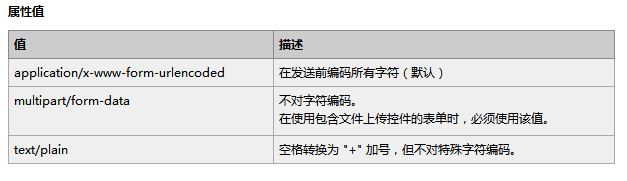
採用前後端分離模式:前端使用原生 XMLHttpRequest + FormData 實現無刷新上傳,後端 PHP 接收 $_FILES 儲存並回傳 JSON 路徑。無第三方庫依賴,輕量易維護。
<?php
// upload.php
if (isset($_FILES['myfile'])) {
    $ret = [];
    // 按日期建立目錄:images/20241219/
    $uploadDir = 'images' . DIRECTORY_SEPARATOR . date('Ymd') . DIRECTORY_SEPARATOR;
    $absDir = __DIR__ . DIRECTORY_SEPARATOR . $uploadDir;

    if (!file_exists($absDir)) {
        mkdir($absDir, 0777, true);
        chmod($absDir, 0777);
    }

    // 單檔上傳處理
    if (!is_array($_FILES['myfile']['name'])) {
        $ext = strtolower(pathinfo($_FILES['myfile']['name'], PATHINFO_EXTENSION));
        $fileName = time() . uniqid() . '.' . $ext;
        $destPath = $absDir . $fileName;

        if (move_uploaded_file($_FILES['myfile']['tmp_name'], $destPath)) {
            // 回傳相對路徑供前端預覽
            $ret['file'] = $uploadDir . $fileName;
            $ret['status'] = 'success';
        } else {
            $ret['status'] = 'error';
            $ret['msg'] = '檔案移動失敗';
        }
    }

    header('Content-Type: application/json; charset=utf-8');
    echo json_encode($ret);
    exit;
}
?><!DOCTYPE html>
<html>
<head>
<meta charset="utf-8">
<title>非同步圖片上傳 Demo</title>
<style>
.upload-wrap { max-width: 600px; margin: 2rem auto; padding: 1rem; font-family: sans-serif; }
.file-input { display: none; }
.btn { display: inline-block; padding: 0.5rem 1rem; background: #007bff; color: #fff; border: none; border-radius: 4px; cursor: pointer; margin-right: 0.5rem; }
.btn:hover { background: #0056b3; }
.txt { width: 100%; padding: 0.5rem; border: 1px solid #ddd; border-radius: 4px; box-sizing: border-box; margin-bottom: 0.5rem; }
.preview { max-width: 100%; max-height: 300px; margin-top: 1rem; display: none; border: 1px solid #eee; border-radius: 4px; }
.msg { margin-top: 0.5rem; color: #28a745; }
.err { color: #dc3545; }
</style>
</head>
<body>
<div class="upload-wrap">
<h3>圖片上傳</h3>
<input type="text" id="filePath" class="txt" readonly placeholder="選擇圖片後顯示路徑">
<button type="button" class="btn" id="btnBrowse">瀏覽...</button>
<input type="file" id="fileInput" class="file-input" accept="image/*">
<button type="button" class="btn" id="btnUpload">上傳</button>
<div id="msg" class="msg"></div>
<img id="preview" class="preview" alt="預覽">
</div>
<script>
const fileInput = document.getElementById('fileInput');
const filePath = document.getElementById('filePath');
const preview = document.getElementById('preview');
const msg = document.getElementById('msg');
// 觸發隱藏 file input
document.getElementById('btnBrowse').onclick = () => fileInput.click();
// 選檔後更新路徑並預覽
fileInput.onchange = function() {
if (this.files.length) {
filePath.value = this.files[0].name;
// 本地預覽
const reader = new FileReader();
reader.onload = e => {
preview.src = e.target.result;
preview.style.display = 'block';
};
reader.readAsDataURL(this.files[0]);
}
};
// 上傳按鈕事件
document.getElementById('btnUpload').onclick = function() {
if (!fileInput.files.length) {
msg.textContent = '請先選擇圖片';
msg.className = 'err';
return;
}
msg.textContent = '上傳中...';
msg.className = 'msg';
const formData = new FormData();
formData.append('myfile', fileInput.files[0]);
const xhr = new XMLHttpRequest();
xhr.open('POST', 'upload.php', true);
xhr.onload = function() {
if (xhr.status === 200) {
try {
const res = JSON.parse(xhr.responseText);
if (res.status === 'success') {
msg.textContent = '上傳成功!路徑:' + res.file;
msg.className = 'msg';
// 可將路徑填入隱藏欄位提交表單
} else {
msg.textContent = '失敗:' + (res.msg || '未知錯誤');
msg.className = 'err';
}
} catch (e) {
msg.textContent = '回應解析失敗';
msg.className = 'err';
}
} else {
msg.textContent = '伺服器錯誤:' + xhr.status;
msg.className = 'err';
}
};
xhr.onerror = () => {
msg.textContent = '網路請求失敗';
msg.className = 'err';
};
xhr.send(formData);
};
</script>
</body>
</html>| 技術 | 說明 |
|---|---|
| FormData | 自動組裝 multipart/form-data,支援檔案、欄位混合傳送 |
| XMLHttpRequest Level 2 | 支援二進位傳輸、進度事件、跨域(需 CORS) |
| move_uploaded_file() | 安全移動暫存檔,防止偽造路徑攻擊 |
| uniqid() + time() | 產生唯一檔名,避免衝突 |
| 日期目錄分散 | 單目錄檔案過多影響效能,按日分目錄 |
fileInput.multiple = true,後端遍歷 $_FILES['myfile']['name'] 陣列xhr.upload.onprogress 事件計算百分比canvas.toBlob() 壓縮後再上傳,節省頻寬drop、dragover 事件實現拖放區Blob.slice() 分片上傳,後端合併分片form.enctype="multipart/form-data"、PHP file_uploads=On、upload_max_filesize、post_max_sizechown -R www-data:www-data images/max_execution_time、max_input_time、Nginx client_max_body_size