Yii 是高性能、基於組件的 PHP 框架,適合大型 Web 應用開發。本文記錄從環境準備、框架安裝、應用創建到 URL 美化、Web 服務器配置的完整流程。
安裝後可通過 https://yourhost/path/to/yii/requirements/index.php 運行需求檢查工具。
# 1. 下載解壓框架到 Web 可訪問目錄
# 2. 進入 framework 目錄執行 yiic 創建應用骨架
cd /WebRoot/testdrive/framework
./yiic webapp ../../testdrive
# 確認 Yes 後自動生成目錄結構
testdrive/
├── index.php                 # Web 入口腳本
├── index-test.php            # 功能測試入口
├── assets/                   # 發布資源目錄
├── css/                      # 樣式文件
├── images/                   # 圖片資源
├── themes/                   # 主題目錄
└── protected/                # 受保護應用核心
    ├── yiic / yiic.bat / yiic.php  # 命令行工具
    ├── commands/             # 自定義控制台命令
    ├── components/           # 可復用組件
    │   ├── Controller.php    # 控制器基類
    │   └── Identity.php      # 認證組件
    ├── config/               # 配置文件
    │   ├── main.php          # Web 應用主配置
    │   ├── console.php       # 控制台配置
    │   └── test.php          # 測試配置
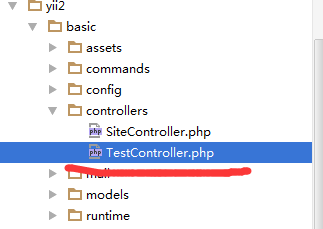
    ├── controllers/          # 控制器類
    │   └── SiteController.php
    ├── data/                 # 示例數據庫腳本
    ├── extensions/           # 第三方擴展
    ├── messages/             # 國際化翻譯
    ├── models/               # 模型類
    │   ├── LoginForm.php
    │   └── ContactForm.php
    ├── runtime/              # 運行時緩存/日誌
    ├── tests/                # 測試腳本
    └── views/                # 視圖文件
        ├── layouts/          # 佈局視圖
        └── site/             # site 控制器視圖
瀏覽器打開 https://hostname/testdrive/index.php,即可看到包含首頁、聯系、登錄三個頁面的演示應用。
LoadModule rewrite_module modules/mod_rewrite.soAllowOverride All
protected/config/main.php'components' => array(
'urlManager' => array(
'urlFormat' => 'path',
'showScriptName' => false, // 關鍵:false 不加引號
'rules' => array(
'sites' => 'site/index',
),
),
),
.htaccess (應用根目錄)RewriteEngine on
RedirectMatch 403 /\..*$
RewriteCond %{REQUEST_FILENAME} !-f
RewriteCond %{REQUEST_FILENAME} !-d
RewriteRule . index.php
server {
    set $host_path "/www/mysite";
    root $host_path/htdocs;
    set $yii_bootstrap "index.php";

    location / {
        index index.html $yii_bootstrap;
        try_files $uri $uri/ /$yii_bootstrap?$args;
    }

    location ~ ^/(protected|framework|themes/\w+/views) {
        deny all;
    }

    location ~ \.(js|css|png|jpg|gif|swf|ico|pdf|mov|fla|zip|rar)$ {
        try_files $uri =404;
    }

    location ~ \.php {
        fastcgi_split_path_info ^(.+\.php)(.*)$;
        set $fsn /$yii_bootstrap;
        if (-f $document_root$fastcgi_script_name) {
            set $fsn $fastcgi_script_name;
        }
        fastcgi_pass 127.0.0.1:9000;
        include fastcgi_params;
        fastcgi_param SCRIPT_FILENAME $document_root$fsn;
        fastcgi_param PATH_INFO $fastcgi_path_info;
    }

    location ~ /\.(htaccess|svn|git) {
        deny all;
    }
}
建議在 php.ini 設定 cgi.fix_pathinfo=0 避免不必要的 stat() 系統調用。
下篇將深入講解 DAO (數據訪問對象)、ActiveRecord、關聯查詢 等數據庫操作核心功能。